Learn how to add knowledge to your Agent and manage existing assets and sources.
Knowledge is organised in two levels: Knowledge Sources hold the raw connection to a data system, and Knowledge Assets group those sources into packages that your team can access. Both are managed from the Agent’s knowledge overview.
After opening an Agent in Administration, the knowledge overview is your central hub for managing all knowledge. It shows all Knowledge Assets with their connected sources, and provides all key actions in one place.From here you can:
Click + Add knowledge to create new assets and sources using a guided workflow
Clicking + Add knowledge opens a step-by-step wizard. You choose between two paths:
Add new asset - creates a brand-new asset, optionally with its first source
Add source to an existing asset - connects a new source to an asset that already exists
1
Choose Your Path
Select whether you want to create a new asset or add a source to an existing one. If no assets exist yet, only “Add new asset” is available.
2
Asset (new asset path only)
Enter a name and optional description for the new asset. You can also set whether the asset should be pre-selected by default when users open the Agent.
You can configure AI-based translations for the asset later in the asset settings.
3
Source - Select Your Connector
Choose the data system you want to connect. Only connectors that are available for your Agent are shown. See the connector-specific setup details below.
You can skip this step to create an empty asset without any source. The asset will appear in the knowledge overview and you can add sources to it later.
4
Configure & Sync
Select the folders, files, or scope for your source, and optionally configure a recurring sync schedule.
Click Save & Sync to save and immediately start a synchronization.
Click Save to save the source without syncing right away.
Syncs cause costs (as of August 2026: $10 per 1000 pages) and update the Agent’s knowledge base. Make sure you have selected the correct scope before starting a sync.
After saving, the new asset appears immediately in the knowledge overview.
Connect your SharePoint at the highest site level (yourcompany.sharepoint.com/site/siteName) with an SPN you will receive from your company. Your IT or internal contact person probably will be able to help you with that. This allows the Genow platform to access your SharePoint Site.
When setting up the SharePoint connector or creating sources, you will need the full site link on the highest level.
Syncing new or updated documents is possible in Administration or via scheduled syncs.
Enter a name for your source - this will also be the name of the knowledge source. Make sure the name can be easily understood by you and your team during future visits.
Service Connection: Select your service connection. If nothing is displayed, contact your IT department. The service connection refers to the SPN connected to your SharePoint site.
SharePoint Link: We will use the relevant part of your url and cut off the rest. Minimum amount of information: yourcompanyname.sharepoint.com/sites/SiteName
Go to the next screen with Continue to select the scope of the data synchronization.
When configuring the scope of your SharePoint source, you can filter by file type to control which documents are synchronized. Only the selected file types will be included in the sync - all others are ignored. This allows you to keep your knowledge base focused and avoid syncing unnecessary files.
If you add subfolders of folders already selected for a synchronization, you do not have to change the content configuration. Only if you added folders that are not part of an already selected folder do you have to change the configuration.
If you delete elements in SharePoint and then perform a synchronization, the deleted elements will also be unavailable on the Genow platform.
SharePoint pages and lists can be selected either all or none. The selection is done at the highest level.
Files over 500 MB will not be synchronized. If needed, we automatically convert files to PDFs and split them into several files. They will not be modified in your own file system.
Make sure your documents meet the requirements in the Data Maintenance article.
You can synchronize data from Google Drive either by using a service account or your personal access token. You can select from one of these options during the source creation step. This setting is managed by your IT department.
Show Sync via Personal Access Token
After creating the sync, you have the option to create a personal access token which uses your account to access your Google Drive permissions. Click on Create Credential or Refresh Credential to do this. A Google pop-up will open. Please follow the instructions and grant Genow access to read your Google Drive items.After this process has been completed you will be brought back to the Genow platform tab in your browser and you can continue to select relevant data.
Show Sync via Service Account and Sharing Email
1
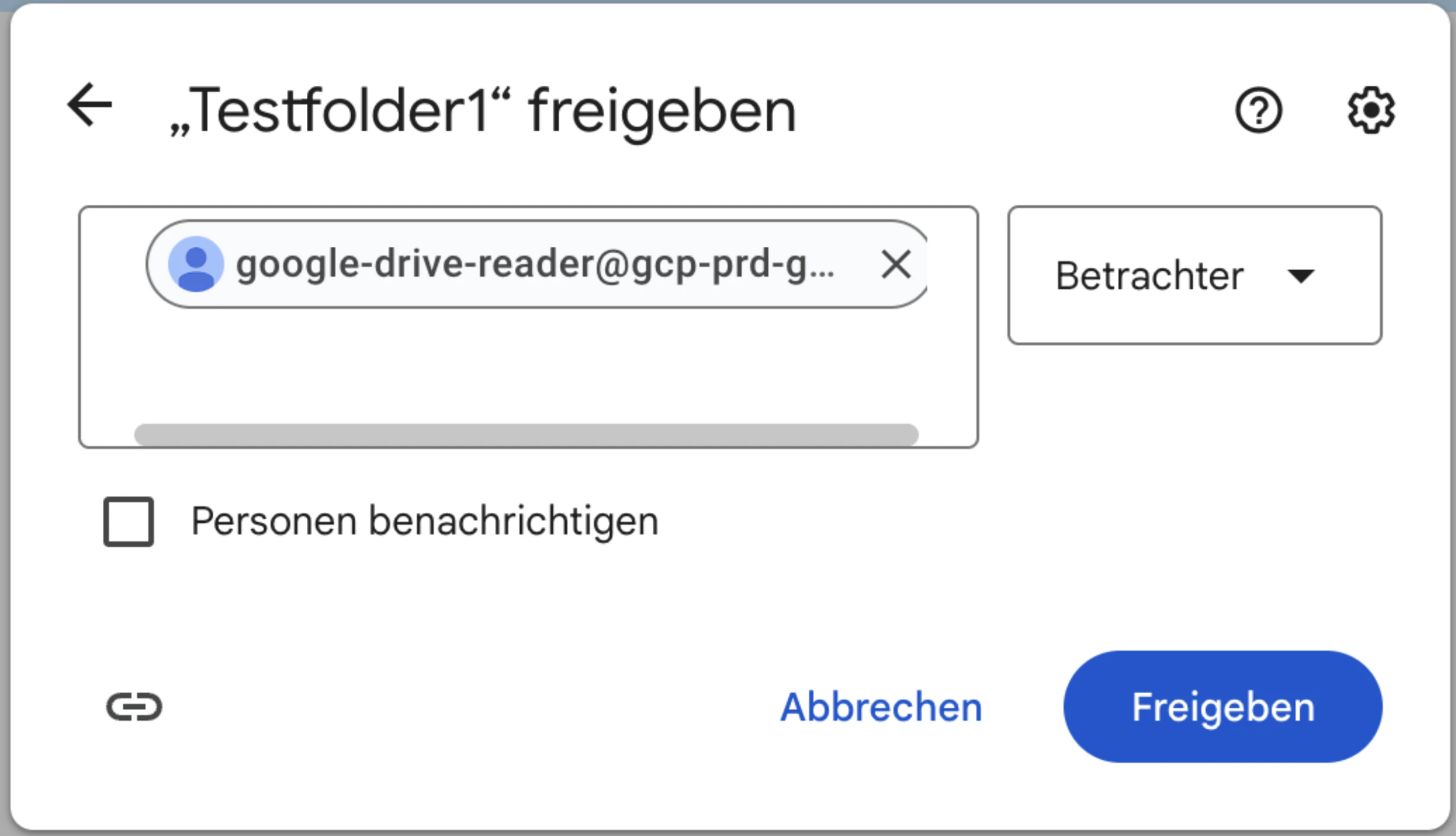
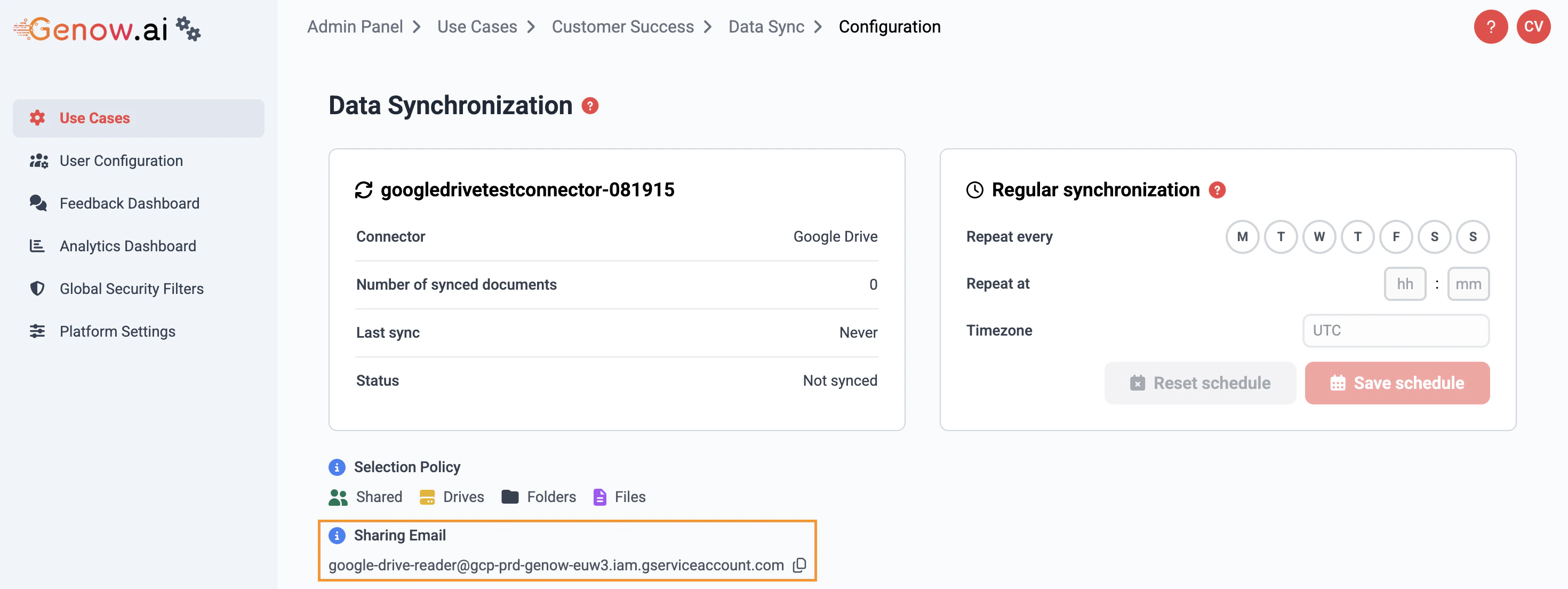
Copy the Sharing Email
After creating the sync, an e-mail address is displayed under “Sharing Email”. Copy this address to the clipboard.
2
Share the Google Drive root folder
In Google Drive, go to the root folder that contains your desired documents. Click on “Share”.Paste the e-mail address you copied from Administration. Deselect the option to notify the recipient and change the setting to “Viewer”. Hit “Share” and accept the pop-up notification.
Afterwards the files and documents can be selected in the contents screen in Administration.
Select all relevant folders or loose documents using the Files batch on each side to synchronize information.
When configuring the scope of your Google Drive source, you can filter by file type to control which documents are synchronized. Only the selected file types will be included in the sync - all others are ignored.
If you add subfolders of folders already selected for a synchronization, you do not have to change the content configuration. Only if you added folders that are not part of an already selected folder do you have to change the configuration.
If you delete elements in Google Drive and then perform a synchronization, the deleted elements will also be unavailable on the Genow platform.
Files over 500 MB will not be synchronized. If needed, we automatically convert files to PDFs and split them into several files. They will not be modified in your own file system.
Make sure your documents meet the requirements in the Data Maintenance article.
To connect to your Jira data, you need to perform two steps:
1
Setup & Preparation: Connect to Jira
Please provide us the following information. We will set up the service connection credentials for you. When creating a new Jira knowledge source you will have to select the assigned service connection.
You will need the following things to set up and connect Jira:
Server URL,
User account e-mail &
User account access token;
or a combination of
Personal Access Token (PAT) &
Server URL.
2
Select Your Scope via JQL Statement
When setting up a new Jira knowledge source, a JQL statement is needed. A JQL usually consists of three parts:
Field: The item to search against (e.g., project, status, assignee)
Operator: The comparison word (e.g., =, !=, IN, >).
Value: The specific item you’re looking for (e.g., a project name, status, or user).
In Jira, select your project, go to “All Work” (German: Alle Vorgänge), click the Filter button on the top left above your list of issues:
Apply your needed filters to end up with the selection of issues relevant for your Agent.
In the same filter pop-up window, click on JQL to receive and copy your needed JQL statement.
Example: Each task has a process number, e.g., PROJ-2223. The prefix “PROJ” is sufficient as the project name. project=“PROJ” would be the resulting JQL statement if you want every issue from the project exported to Genow.
If you delete elements in Jira and then perform a synchronization, the deleted elements will also be unavailable on the Genow platform.
Custom Jira fields of your issues are currently not exported nor available in the Genow platform.
1
Setup & Preparation: Connect to Confluence
You will need the following things to set up and connect Confluence:
Server URL
API Token
The e-mail of the user associated with the API token
2
Select Your Scope
For this step a CQL statement is needed. It mostly consists of three parts:
Field: The item you want to search for (e.g., title).
Operator: How to compare (e.g., =, ~ for “contains”).
Value: The term you’re looking for (e.g., “Meeting Notes”).
You can extract your CQL statement after setting the filters in the article overview and exporting your URL. The URL will hold your CQL statement after the last ’/’.
We support attachments and images. Labels can be used for filtering. Selecting “Use Confluence labels for filtering” in the synchronization screen will mean that labels assigned to your Confluence articles are synchronized as metadata. If you select this option for an already synchronized source, the entire source will be resynced.
Preparation:
Reach out to your ServiceNow administrator for the creation of the ServiceNow credential. During the setup of the credential, it is important to follow our guide.
Provide Genow with this credential.
Knowledge Source Setup
Select ServiceNow as a connector.
Enter a knowledge source name and choose your credential.
Click Save & Sync to start the synchronization process. This may take a while to complete.
Large knowledge syncs can run for up to 72 hours. Very large sync jobs that previously exceeded the limit and failed partway through can now complete in a single run, so all of your content makes it into the platform reliably.If a single document cannot be converted, it times out on its own and is skipped. The rest of the sync - and the platform - keeps working normally.
Skipped documents do not appear in the answers your users receive. If you are missing content after a sync, check whether the file follows our data guidelines.
Click on any asset in the knowledge overview to open the asset detail screen. Here you can:
View the asset name and ID
Toggle Selected by Default (whether users see this asset pre-checked when they open the Agent)
Click Add Source to create a new source and connect it to this asset
Click Add Knowledge Source to link an existing Agent-level source to this asset - without creating a new one
View all connected sources in the sources table
Edit, share, or delete individual sources
The Add Knowledge Source option lets you reuse sources that already exist within the Agent. A single source can be linked to one or more assets, so the same data connection can be made available in several places at once.
You can also create a Knowledge Source without assigning it to an asset right away. These sources are collected in a dedicated Unassigned Sources screen, so you can prepare and sync data before deciding where it belongs.From there you can:
Link an unassigned source to one or more assets to make it available to users.
Unlink a source from an asset again. The source itself is kept - if it is no longer linked to any asset, it returns to the Unassigned Sources screen.
A source only becomes available to users once it is linked to at least one asset. A single source can be linked to multiple assets - and can even be reused in other Agents (see below).
You can add an existing knowledge source to another Agent instead of syncing the same data twice. This keeps a single, consistent copy of the data available across multiple Agents.
The source keeps one owner - the person and Agent that originally created it stay responsible for it.
Other Agents reference the same source, so you avoid duplicate syncs and duplicate sync cost.
Because all Agents draw on the same synced source, an update made by the owner applies everywhere the source is used.
Once knowledge is set up, your IT department needs to assign the correct permissions so that users can access it.
Permission roles, which hold a specific set of permissions for a knowledge asset, are assigned to a permission group from your company’s IAM system.
If you are using custom roles, that generally hold the permission to a subset of sources of your agent, and want to create a new source (that replaces other sources or just adds onto the existing data base) you need to make sure, that you will update the custom role. Contact your IT department for this.If you are using the share functionality to provide access, make sure to share the knowledge entity correctly.
1
Export the Required Permission
We distinguish between two scenarios:1. All users (or a specific user group) should be able to access all knowledge assigned to the Agent:
Use our standard roles which cover all sources in the Agent.
The needed role permission can be exported from the Agent overview screen in Administration.
Notation: useCase.[UseCaseID].User
2. A user group should only have access to a specific set of knowledge sources:
Please reach out to Genow for help to create the specific role.
2
Contact Your IT Department
Your IT will need information about which users or user groups will need which permission. Provide them with a list of users or, if you already know a group where all your users are managed, provide the name of that group.
Provide your IT department with:
The permission role
A list of users (names, emails, permission group per user). A table format is recommended.
Was this page helpful?
{"docsConfig":{"theme":"mint","$schema":"https://mintlify.com/docs.json","name":"Genow Helpcenter","colors":{"primary":"#FF6830","light":"#F7956F","dark":"#FF6830"},"logo":{"light":"https://mintcdn.com/genowgmbh/Jfz_mJOKbGC5-LHe/logo/new_genow_logo.png?fit=max\u0026auto=format\u0026n=Jfz_mJOKbGC5-LHe\u0026q=85\u0026s=9b1ab08364b0e10aa0fe9dbcac645cab","dark":"https://mintcdn.com/genowgmbh/ng_BGLQSaaE1BDCk/logo/genow_logo_darkmode.png?fit=max\u0026auto=format\u0026n=ng_BGLQSaaE1BDCk\u0026q=85\u0026s=52011ee3f36c93942a70fc22eb321568"},"favicon":"https://mintcdn.com/genowgmbh/mleDMuDy1-wUfdfL/new_genow_favicon.png?fit=max\u0026auto=format\u0026n=mleDMuDy1-wUfdfL\u0026q=85\u0026s=3b90587db6fb4e4375bf925068972938","navbar":{"links":[{"href":"mailto:support@genow.ai","label":"Support"}],"primary":{"type":"button","label":"Website","href":"https://www.genow.ai/"}},"footer":{"socials":{"linkedin":"https://www.linkedin.com/company/genow-ai"}},"seo":{"indexing":"all"},"fonts":{"family":"Inter"},"errors":{"404":{"redirect":false,"title":"Article not found!","description":"This information could have been found using the Genow platform! ;) To find the information you need, go to the main page or use the search bar at the top of the page."}},"contextual":{"options":["copy","view","claude","perplexity","mcp","cursor","vscode","chatgpt"],"display":"toc"},"markdown":{"schema":false},"styling":{"latex":false},"navigation":{"languages":[{"language":"de","default":true,"href":"product/about-genow"},{"language":"en","href":"en/product/about-genow"}]}},"deployment":{"deploymentMetadataValue":{"subdomain":"genowgmbh","hasAudioNarration":false,"actualSubdomain":"genowgmbh","customDomains":["docs.genow.ai"],"gitSource":{"type":"github","owner":"genow-ai","repo":"genow-docs","deployBranch":"docs","contentDirectory":"","isPrivate":true,"mountPath":"","label":""},"feedback":{"thumbs":true},"entitlements":{"AI_CHAT":{"status":"ENABLED"},"WEB_MCP":{"status":"ENABLED"},"NARRATION":{"status":"ENABLED"}},"buildId":"6aedc2411ca26e5206d26462","clientVersion":"0.0.4087","searchFilterCounts":[{"language":"default","tag":"API Reference","count":200},{"language":"default","tag":"Core API","count":176},{"language":"en","tag":"Use Case Management","count":28},{"language":"de","tag":"Agentenverwaltung","count":28},{"language":"default","tag":"use-cases","count":25},{"language":"default","tag":"Search API","count":20},{"language":"en","tag":"Platform Management","count":17},{"language":"de","tag":"Plattformverwaltung","count":17},{"language":"en","tag":"Use Case Settings","count":12},{"language":"de","tag":"Agent-Einstellungen","count":12},{"language":"default","tag":"service-accounts","count":12},{"language":"default","tag":"search","count":11},{"language":"default","tag":"knowledge-assets","count":10},{"language":"en","tag":"Product","count":9},{"language":"en","tag":"Manage Your Knowledge","count":9},{"language":"de","tag":"Produkt","count":9},{"language":"de","tag":"Knowledge verwalten","count":9},{"language":"default","tag":"feedback","count":9},{"language":"default","tag":"files","count":9},{"language":"en","tag":"Setup and Manage your Genow Platform","count":8},{"language":"de","tag":"Genow-Plattform einrichten und verwalten","count":8},{"language":"default","tag":"guided-search-fields","count":8},{"language":"en","tag":"More Admin Panel Features","count":7},{"language":"de","tag":"Weitere Admin-Panel-Funktionen","count":7},{"language":"en","tag":"User Guides","count":6},{"language":"de","tag":"Anleitungen","count":6},{"language":"en","tag":"Settings \u0026 Customisations","count":4},{"language":"en","tag":"Connector Details","count":4},{"language":"de","tag":"Einstellungen \u0026 Anpassungen","count":4},{"language":"de","tag":"Connector-Details","count":4}]},"assistantConfig":{},"basePath":"","hasChatPermissions":true,"hasWebMcpPermissions":true,"toggles":[{"name":"kill-isr","enabled":true,"variant":{"name":"disabled","enabled":false,"feature_enabled":true},"impressionData":false},{"name":"agent-mintlify-slack","enabled":true,"variant":{"name":"disabled","enabled":false,"feature_enabled":true},"impressionData":false},{"name":"agent-integrations-settings","enabled":true,"variant":{"name":"disabled","enabled":false,"feature_enabled":true},"impressionData":false},{"name":"rbac-expansion","enabled":true,"variant":{"name":"disabled","enabled":false,"feature_enabled":true},"impressionData":false},{"name":"automations-pr-grouping","enabled":true,"variant":{"name":"disabled","enabled":false,"feature_enabled":true},"impressionData":false},{"name":"custom-prefix","enabled":true,"variant":{"name":"disabled","enabled":false,"feature_enabled":true},"impressionData":false},{"name":"analytics-v7","enabled":true,"variant":{"name":"disabled","enabled":false,"feature_enabled":true},"impressionData":false},{"name":"user-flows-analytics","enabled":true,"variant":{"name":"disabled","enabled":false,"feature_enabled":true},"impressionData":false},{"name":"no-publish-flow","enabled":true,"variant":{"name":"disabled","enabled":false,"feature_enabled":true},"impressionData":false},{"name":"workos-onboarding","enabled":true,"variant":{"name":"disabled","enabled":false,"feature_enabled":true},"impressionData":false},{"name":"llms-txt-v2","enabled":true,"variant":{"name":"disabled","enabled":false,"feature_enabled":true},"impressionData":false},{"name":"snapshot-serving-live","enabled":true,"variant":{"name":"disabled","enabled":false,"feature_enabled":true},"impressionData":false},{"name":"stripTemperatureMiddleware","enabled":true,"variant":{"name":"disabled","enabled":false,"feature_enabled":true},"impressionData":false},{"name":"support-platform-pylon-zendesk","enabled":true,"variant":{"name":"disabled","enabled":false,"feature_enabled":true},"impressionData":false},{"name":"snapshot-serving","enabled":true,"variant":{"name":"disabled","enabled":false,"feature_enabled":true},"impressionData":false},{"name":"instant-rollback","enabled":true,"variant":{"name":"disabled","enabled":false,"feature_enabled":true},"impressionData":false},{"name":"granular-notifications-server","enabled":true,"variant":{"name":"disabled","enabled":false,"feature_enabled":true},"impressionData":false},{"name":"granular-notifications","enabled":true,"variant":{"name":"disabled","enabled":false,"feature_enabled":true},"impressionData":false},{"name":"automations-fable","enabled":true,"variant":{"name":"disabled","enabled":false,"feature_enabled":true},"impressionData":false},{"name":"fixed-ai-action-pricing","enabled":true,"variant":{"name":"disabled","enabled":false,"feature_enabled":true},"impressionData":false},{"name":"automation-resolve-merge-conflict","enabled":true,"variant":{"name":"disabled","enabled":false,"feature_enabled":true},"impressionData":false},{"name":"scoped-publishing","enabled":true,"variant":{"name":"disabled","enabled":false,"feature_enabled":true},"impressionData":false},{"name":"mintql","enabled":true,"variant":{"name":"disabled","enabled":false,"feature_enabled":true},"impressionData":false},{"name":"page-level-analytics","enabled":true,"variant":{"name":"disabled","enabled":false,"feature_enabled":true},"impressionData":false},{"name":"editor-version-history-v2","enabled":true,"variant":{"name":"disabled","enabled":false,"feature_enabled":true},"impressionData":false},{"name":"billing-page-v2","enabled":true,"variant":{"name":"disabled","enabled":false,"feature_enabled":true},"impressionData":false},{"name":"full-page-search","enabled":true,"variant":{"name":"disabled","enabled":false,"feature_enabled":true},"impressionData":false},{"name":"workspace-projects","enabled":true,"variant":{"name":"disabled","enabled":false,"feature_enabled":true},"impressionData":false},{"name":"assistant-v5","enabled":true,"variant":{"name":"disabled","enabled":false,"feature_enabled":true},"impressionData":false},{"name":"fork-pr-previews","enabled":true,"variant":{"name":"disabled","enabled":false,"feature_enabled":true},"impressionData":false},{"name":"revalidation-jwt","enabled":true,"variant":{"name":"disabled","enabled":false,"feature_enabled":true},"impressionData":false},{"name":"workos-sso-scim","enabled":true,"variant":{"name":"disabled","enabled":false,"feature_enabled":true},"impressionData":false},{"name":"hobby-abuse-scan","enabled":true,"variant":{"name":"disabled","enabled":false,"feature_enabled":true},"impressionData":false},{"name":"dashboard-inbox","enabled":true,"variant":{"name":"disabled","enabled":false,"feature_enabled":true},"impressionData":false},{"name":"workos-signup","enabled":true,"variant":{"name":"disabled","enabled":false,"feature_enabled":true},"impressionData":false},{"name":"turbopuffer-dual-write","enabled":true,"variant":{"name":"disabled","enabled":false,"feature_enabled":true},"impressionData":false},{"name":"workos-enabled","enabled":true,"variant":{"name":"disabled","enabled":false,"feature_enabled":true},"impressionData":false},{"name":"approve-review-flow","enabled":true,"variant":{"name":"disabled","enabled":false,"feature_enabled":true},"impressionData":false},{"name":"editor-metadata","enabled":true,"variant":{"name":"disabled","enabled":false,"feature_enabled":true},"impressionData":false},{"name":"sso-setup-deadline-banner","enabled":true,"variant":{"name":"disabled","enabled":false,"feature_enabled":true},"impressionData":false},{"name":"turbopuffer-serve","enabled":true,"variant":{"name":"disabled","enabled":false,"feature_enabled":true},"impressionData":false},{"name":"live-agents","enabled":true,"variant":{"name":"disabled","enabled":false,"feature_enabled":true},"impressionData":false},{"name":"comment-mode","enabled":true,"variant":{"name":"disabled","enabled":false,"feature_enabled":true},"impressionData":false}],"googleFontsInlined":false},"customCss":[],"page":{"pagePath":"en/use-case-management/knowledge/knowledge-management","slug":"/en/use-case-management/knowledge/knowledge-management","pageMetadata":{"title":"Knowledge Management: Add and Manage Knowledge","description":"Learn how to add knowledge to your Agent and manage existing assets and sources.","href":"/en/use-case-management/knowledge/knowledge-management"},"description":{"compiledSource":"\"use strict\";\nconst {jsx: _jsx} = arguments[0];\nconst {useMDXComponents: _provideComponents} = arguments[0];\nfunction _createMdxContent(props) {\n const _components = {\n p: \"p\",\n ..._provideComponents(),\n ...props.components\n };\n return _jsx(_components.p, {\n children: \"Learn how to add knowledge to your Agent and manage existing assets and sources.\"\n });\n}\nfunction MDXContent(props = {}) {\n const {wrapper: MDXLayout} = {\n ..._provideComponents(),\n ...props.components\n };\n return MDXLayout ? _jsx(MDXLayout, {\n ...props,\n children: _jsx(_createMdxContent, {\n ...props\n })\n }) : _createMdxContent(props);\n}\nreturn {\n default: MDXContent\n};\n","frontmatter":{},"scope":{}},"pageType":"default","mdx":{"mdxSource":{"compiledSource":"\"use strict\";const{Fragment:_Fragment,jsx:_jsx,jsxs:_jsxs}=arguments[0];const{useMDXComponents:_provideComponents}=arguments[0];function _createMdxContent(props){const _components={a:`a`,blockquote:`blockquote`,em:`em`,hr:`hr`,li:`li`,ol:`ol`,p:`p`,strong:`strong`,ul:`ul`,..._provideComponents(),...props.components},{Expandable,Frame,Heading,Info,Note,OptimizedImage,Step,Steps,Tab,Tabs,Tip,Warning}=_components;if(!Expandable)_missingMdxReference(`Expandable`,true);if(!Frame)_missingMdxReference(`Frame`,true);if(!Heading)_missingMdxReference(`Heading`,true);if(!Info)_missingMdxReference(`Info`,true);if(!Note)_missingMdxReference(`Note`,true);if(!OptimizedImage)_missingMdxReference(`OptimizedImage`,true);if(!Step)_missingMdxReference(`Step`,true);if(!Steps)_missingMdxReference(`Steps`,true);if(!Tab)_missingMdxReference(`Tab`,true);if(!Tabs)_missingMdxReference(`Tabs`,true);if(!Tip)_missingMdxReference(`Tip`,true);if(!Warning)_missingMdxReference(`Warning`,true);return _jsxs(_Fragment,{children:[_jsxs(_components.blockquote,{children:[`\n`,_jsx(_components.p,{children:_jsx(_components.strong,{children:`Knowledge is organised in two levels: Knowledge Sources hold the raw connection to a data system, and Knowledge Assets group those sources into packages that your team can access. Both are managed from the Agent’s knowledge overview.`})}),`\n`]}),`\n`,_jsx(_components.hr,{}),`\n`,_jsx(Heading,{level:`2`,id:`the-knowledge-overview`,children:`The Knowledge Overview`}),`\n`,_jsx(_components.p,{children:`After opening an Agent in Administration, the knowledge overview is your central hub for managing all knowledge. It shows all Knowledge Assets with their connected sources, and provides all key actions in one place.`}),`\n`,_jsx(_components.p,{children:`From here you can:`}),`\n`,_jsxs(_components.ul,{children:[`\n`,_jsxs(_components.li,{children:[`Click `,_jsx(`kbd`,{children:`+ Add knowledge`}),` to create new assets and sources using a guided workflow`]}),`\n`,_jsx(_components.li,{children:`Open any asset to view and manage its sources`}),`\n`,_jsx(_components.li,{children:`Share, edit, or delete existing assets`}),`\n`]}),`\n`,_jsx(_components.hr,{}),`\n`,_jsx(Heading,{level:`2`,id:`adding-knowledge-the-guided-workflow`,children:`Adding Knowledge: The Guided Workflow`}),`\n`,_jsxs(_components.p,{children:[`Clicking `,_jsx(`kbd`,{children:`+ Add knowledge`}),` opens a step-by-step wizard. You choose between two paths:`]}),`\n`,_jsxs(_components.ul,{children:[`\n`,_jsxs(_components.li,{children:[_jsx(_components.strong,{children:`Add new asset`}),` - creates a brand-new asset, optionally with its first source`]}),`\n`,_jsxs(_components.li,{children:[_jsx(_components.strong,{children:`Add source to an existing asset`}),` - connects a new source to an asset that already exists`]}),`\n`]}),`\n`,_jsxs(Steps,{children:[_jsxs(Step,{title:`Choose Your Path`,children:[_jsx(_components.p,{children:`Select whether you want to create a new asset or add a source to an existing one. If no assets exist yet, only “Add new asset” is available.`}),_jsx(Frame,{children:_jsx(OptimizedImage,{src:`https://mintcdn.com/genowgmbh/7XSVUN1jk3j8hGqL/images/new_data_1-1.png?fit=max\u0026auto=format\u0026n=7XSVUN1jk3j8hGqL\u0026q=85\u0026s=904423b95499a71f77a54a781d08a7ad`,alt:`New Data 1 1`,\"data-og-width\":`2936`,width:`2936`,\"data-og-height\":`502`,height:`502`,\"data-path\":`images/new_data_1-1.png`,\"data-optimize\":`true`,\"data-opv\":`3`,srcset:`https://mintcdn.com/genowgmbh/7XSVUN1jk3j8hGqL/images/new_data_1-1.png?w=280\u0026fit=max\u0026auto=format\u0026n=7XSVUN1jk3j8hGqL\u0026q=85\u0026s=13983a2837f441b10277c235d2fb8963 280w, https://mintcdn.com/genowgmbh/7XSVUN1jk3j8hGqL/images/new_data_1-1.png?w=560\u0026fit=max\u0026auto=format\u0026n=7XSVUN1jk3j8hGqL\u0026q=85\u0026s=cb4a6f9da1a4fa2e5215e69e9f32cd30 560w, https://mintcdn.com/genowgmbh/7XSVUN1jk3j8hGqL/images/new_data_1-1.png?w=840\u0026fit=max\u0026auto=format\u0026n=7XSVUN1jk3j8hGqL\u0026q=85\u0026s=65177ba1e9439d382ab938489903b5a1 840w, https://mintcdn.com/genowgmbh/7XSVUN1jk3j8hGqL/images/new_data_1-1.png?w=1100\u0026fit=max\u0026auto=format\u0026n=7XSVUN1jk3j8hGqL\u0026q=85\u0026s=1fb3d7b828fdfe4e706f17e32ddea73b 1100w, https://mintcdn.com/genowgmbh/7XSVUN1jk3j8hGqL/images/new_data_1-1.png?w=1650\u0026fit=max\u0026auto=format\u0026n=7XSVUN1jk3j8hGqL\u0026q=85\u0026s=b1117b98a1c7196feaa532977dc24be3 1650w, https://mintcdn.com/genowgmbh/7XSVUN1jk3j8hGqL/images/new_data_1-1.png?w=2500\u0026fit=max\u0026auto=format\u0026n=7XSVUN1jk3j8hGqL\u0026q=85\u0026s=e312a8fb2c33a6c87870e81d0e9ca164 2500w`})}),_jsx(Frame,{children:_jsx(OptimizedImage,{src:`https://mintcdn.com/genowgmbh/7XSVUN1jk3j8hGqL/images/new_data_2.png?fit=max\u0026auto=format\u0026n=7XSVUN1jk3j8hGqL\u0026q=85\u0026s=a0147785d799957a6951cf0ac206d6c1`,alt:`New Data 2`,\"data-og-width\":`2112`,width:`2112`,\"data-og-height\":`676`,height:`676`,\"data-path\":`images/new_data_2.png`,\"data-optimize\":`true`,\"data-opv\":`3`,srcset:`https://mintcdn.com/genowgmbh/7XSVUN1jk3j8hGqL/images/new_data_2.png?w=280\u0026fit=max\u0026auto=format\u0026n=7XSVUN1jk3j8hGqL\u0026q=85\u0026s=e05b307dfcdb87ba457bee5f3d214bea 280w, https://mintcdn.com/genowgmbh/7XSVUN1jk3j8hGqL/images/new_data_2.png?w=560\u0026fit=max\u0026auto=format\u0026n=7XSVUN1jk3j8hGqL\u0026q=85\u0026s=508281e84a0323c9d1265851b4331f4f 560w, https://mintcdn.com/genowgmbh/7XSVUN1jk3j8hGqL/images/new_data_2.png?w=840\u0026fit=max\u0026auto=format\u0026n=7XSVUN1jk3j8hGqL\u0026q=85\u0026s=d1a65ce1415b475f539de38c96d108fe 840w, https://mintcdn.com/genowgmbh/7XSVUN1jk3j8hGqL/images/new_data_2.png?w=1100\u0026fit=max\u0026auto=format\u0026n=7XSVUN1jk3j8hGqL\u0026q=85\u0026s=77290fb2c3c51d2b3ddc3d44056d1c5e 1100w, https://mintcdn.com/genowgmbh/7XSVUN1jk3j8hGqL/images/new_data_2.png?w=1650\u0026fit=max\u0026auto=format\u0026n=7XSVUN1jk3j8hGqL\u0026q=85\u0026s=3340283d9bcada6f63498a4f6c097d7a 1650w, https://mintcdn.com/genowgmbh/7XSVUN1jk3j8hGqL/images/new_data_2.png?w=2500\u0026fit=max\u0026auto=format\u0026n=7XSVUN1jk3j8hGqL\u0026q=85\u0026s=f18909c5d53400a0eb59d8e858d57782 2500w`})})]}),_jsxs(Step,{title:`Asset (new asset path only)`,children:[_jsx(_components.p,{children:`Enter a name and optional description for the new asset. You can also set whether the asset should be pre-selected by default when users open the Agent.`}),_jsx(Info,{children:_jsx(_components.p,{children:`You can configure AI-based translations for the asset later in the asset settings.`})})]}),_jsxs(Step,{title:`Source - Select Your Connector`,children:[_jsx(_components.p,{children:`Choose the data system you want to connect. Only connectors that are available for your Agent are shown. See the connector-specific setup details below.`}),_jsx(Info,{children:_jsx(_components.p,{children:`You can skip this step to create an empty asset without any source. The asset will appear in the knowledge overview and you can add sources to it later.`})})]}),_jsxs(Step,{title:`Configure \u0026 Sync`,children:[_jsx(_components.p,{children:`Select the folders, files, or scope for your source, and optionally configure a recurring sync schedule.`}),_jsxs(_components.ul,{children:[`\n`,_jsxs(_components.li,{children:[`Click `,_jsx(`kbd`,{children:`Save \u0026 Sync`}),` to save and immediately start a synchronization.`]}),`\n`,_jsxs(_components.li,{children:[`Click `,_jsx(`kbd`,{children:`Save`}),` to save the source without syncing right away.`]}),`\n`]}),_jsx(Warning,{children:_jsx(_components.p,{children:`Syncs cause costs (as of August 2026: $10 per 1000 pages) and update the Agent’s knowledge base. Make sure you have selected the correct scope before starting a sync.`})})]})]}),`\n`,_jsx(_components.p,{children:`After saving, the new asset appears immediately in the knowledge overview.`}),`\n`,_jsx(_components.hr,{}),`\n`,_jsx(Heading,{level:`2`,id:`connector-setup-details-\u0026-start-synchronizations`,children:`Connector Setup Details \u0026 Start Synchronizations`}),`\n`,_jsx(_components.p,{children:`Select your data system below for setup instructions:`}),`\n`,_jsxs(Tabs,{children:[_jsxs(Tab,{title:`SharePoint`,id:`sharepoint`,\"data-child-heading-ids\":`[\"preparation\",\"create-a-new-sharepoint-source%3A\",\"selecting-your-scope\",\"file-type-selection\",\"faq\"]`,children:[_jsx(Heading,{level:`3`,id:`preparation`,children:`Preparation`}),_jsxs(_components.ul,{children:[`\n`,_jsxs(_components.li,{children:[_jsx(_components.strong,{children:`Connect your SharePoint at the highest site level`}),` (yourcompany.sharepoint.com/site/siteName) `,_jsx(_components.strong,{children:`with an SPN`}),` you will receive from your company. `,_jsx(_components.strong,{children:`Your IT or internal contact person probably will be able to help you with that`}),`. This allows the Genow platform to access your SharePoint Site.`]}),`\n`,_jsx(_components.li,{children:`When setting up the SharePoint connector or creating sources, you will need the full site link on the highest level.`}),`\n`,_jsx(_components.li,{children:`Syncing new or updated documents is possible in Administration or via scheduled syncs.`}),`\n`]}),_jsx(Heading,{level:`3`,id:`create-a-new-sharepoint-source`,children:`Create a New SharePoint Source:`}),_jsxs(_components.ol,{children:[`\n`,_jsxs(_components.li,{children:[`Enter a `,_jsx(_components.strong,{children:`name`}),` for your source - this will also be the name of the knowledge source. Make sure the name can be easily understood by you and your team during future visits.`]}),`\n`,_jsxs(_components.li,{children:[_jsx(_components.strong,{children:`Service Connection:`}),` Select your service connection. If nothing is displayed, contact your IT department. The service connection refers to the SPN connected to your SharePoint site.`]}),`\n`,_jsxs(_components.li,{children:[_jsx(_components.strong,{children:`SharePoint Link: We will use the relevant part of your url and cut off the rest.`}),` Minimum amount of information: `,_jsx(_components.em,{children:`yourcompanyname.sharepoint.com/sites/SiteName`})]}),`\n`]}),_jsxs(_components.p,{children:[`Go to the next screen with `,_jsx(`kbd`,{children:`Continue`}),` to select the scope of the data synchronization.`]}),_jsx(Heading,{level:`4`,id:`selecting-your-scope`,children:`Selecting Your Scope`}),_jsxs(_components.p,{children:[`Select all relevant folders or loose documents using the `,_jsx(`kbd`,{children:`Files`}),` batch on each side to synchronize information.`]}),_jsxs(Frame,{children:[_jsx(OptimizedImage,{src:`https://mintcdn.com/genowgmbh/7XSVUN1jk3j8hGqL/images/sharepoint_data_sync.png?fit=max\u0026auto=format\u0026n=7XSVUN1jk3j8hGqL\u0026q=85\u0026s=4766002cba1d6594b6e5a96cf45ab0b5`,className:`dark:mint-hidden`,\"data-og-width\":`1718`,width:`1718`,\"data-og-height\":`916`,height:`916`,\"data-path\":`images/sharepoint_data_sync.png`,\"data-optimize\":`true`,\"data-opv\":`3`,srcset:`https://mintcdn.com/genowgmbh/7XSVUN1jk3j8hGqL/images/sharepoint_data_sync.png?w=280\u0026fit=max\u0026auto=format\u0026n=7XSVUN1jk3j8hGqL\u0026q=85\u0026s=59b9ca8ae62c8c964f0728c723fbd998 280w, https://mintcdn.com/genowgmbh/7XSVUN1jk3j8hGqL/images/sharepoint_data_sync.png?w=560\u0026fit=max\u0026auto=format\u0026n=7XSVUN1jk3j8hGqL\u0026q=85\u0026s=40be513a767bb16779f5231914d1c30d 560w, https://mintcdn.com/genowgmbh/7XSVUN1jk3j8hGqL/images/sharepoint_data_sync.png?w=840\u0026fit=max\u0026auto=format\u0026n=7XSVUN1jk3j8hGqL\u0026q=85\u0026s=f6efabade5ef52b42f9ab0dad0092df5 840w, https://mintcdn.com/genowgmbh/7XSVUN1jk3j8hGqL/images/sharepoint_data_sync.png?w=1100\u0026fit=max\u0026auto=format\u0026n=7XSVUN1jk3j8hGqL\u0026q=85\u0026s=8d3f582c43d0302094dbad24c7403ae7 1100w, https://mintcdn.com/genowgmbh/7XSVUN1jk3j8hGqL/images/sharepoint_data_sync.png?w=1650\u0026fit=max\u0026auto=format\u0026n=7XSVUN1jk3j8hGqL\u0026q=85\u0026s=4a71fb97b1a9c419639214e5c6592987 1650w, https://mintcdn.com/genowgmbh/7XSVUN1jk3j8hGqL/images/sharepoint_data_sync.png?w=2500\u0026fit=max\u0026auto=format\u0026n=7XSVUN1jk3j8hGqL\u0026q=85\u0026s=6f11d7638e83ede94c48fd60f46a888d 2500w`}),_jsx(OptimizedImage,{src:`https://mintcdn.com/genowgmbh/7XSVUN1jk3j8hGqL/images/sharepoint_data_sync-1.png?fit=max\u0026auto=format\u0026n=7XSVUN1jk3j8hGqL\u0026q=85\u0026s=a604f10f95ea3944aab594a4a6eee048`,className:`mint-hidden dark:mint-block`,\"data-og-width\":`1718`,width:`1718`,\"data-og-height\":`916`,height:`916`,\"data-path\":`images/sharepoint_data_sync-1.png`,\"data-optimize\":`true`,\"data-opv\":`3`,srcset:`https://mintcdn.com/genowgmbh/7XSVUN1jk3j8hGqL/images/sharepoint_data_sync-1.png?w=280\u0026fit=max\u0026auto=format\u0026n=7XSVUN1jk3j8hGqL\u0026q=85\u0026s=0c3eab754ac96d69d47b49436aa2776e 280w, https://mintcdn.com/genowgmbh/7XSVUN1jk3j8hGqL/images/sharepoint_data_sync-1.png?w=560\u0026fit=max\u0026auto=format\u0026n=7XSVUN1jk3j8hGqL\u0026q=85\u0026s=4e1669ceab50988cc6a4b8bbdd98a357 560w, https://mintcdn.com/genowgmbh/7XSVUN1jk3j8hGqL/images/sharepoint_data_sync-1.png?w=840\u0026fit=max\u0026auto=format\u0026n=7XSVUN1jk3j8hGqL\u0026q=85\u0026s=5b65f2fc68d09a05a0cface2d8ff4695 840w, https://mintcdn.com/genowgmbh/7XSVUN1jk3j8hGqL/images/sharepoint_data_sync-1.png?w=1100\u0026fit=max\u0026auto=format\u0026n=7XSVUN1jk3j8hGqL\u0026q=85\u0026s=787126ddec56734fe6e0271a52546ebb 1100w, https://mintcdn.com/genowgmbh/7XSVUN1jk3j8hGqL/images/sharepoint_data_sync-1.png?w=1650\u0026fit=max\u0026auto=format\u0026n=7XSVUN1jk3j8hGqL\u0026q=85\u0026s=ebf0a231791699ab8dabceeaa1ecd0ff 1650w, https://mintcdn.com/genowgmbh/7XSVUN1jk3j8hGqL/images/sharepoint_data_sync-1.png?w=2500\u0026fit=max\u0026auto=format\u0026n=7XSVUN1jk3j8hGqL\u0026q=85\u0026s=3b519e155e3bcfbfb1ce66c21a718b45 2500w`})]}),_jsx(Heading,{level:`4`,id:`file-type-selection`,children:`File Type Selection`}),_jsx(_components.p,{children:`When configuring the scope of your SharePoint source, you can filter by file type to control which documents are synchronized. Only the selected file types will be included in the sync - all others are ignored. This allows you to keep your knowledge base focused and avoid syncing unnecessary files.`}),_jsx(Heading,{level:`4`,id:`faq`,children:`FAQ`}),_jsxs(_components.ul,{children:[`\n`,_jsx(_components.li,{children:`If you add subfolders of folders already selected for a synchronization, you do not have to change the content configuration. Only if you added folders that are not part of an already selected folder do you have to change the configuration.`}),`\n`,_jsx(_components.li,{children:`If you delete elements in SharePoint and then perform a synchronization, the deleted elements will also be unavailable on the Genow platform.`}),`\n`,_jsx(_components.li,{children:`SharePoint pages and lists can be selected either all or none. The selection is done at the highest level.`}),`\n`,_jsx(_components.li,{children:`Files over 500 MB will not be synchronized. If needed, we automatically convert files to PDFs and split them into several files. They will not be modified in your own file system.`}),`\n`,_jsxs(_components.li,{children:[`Make sure your documents meet the requirements in the `,_jsx(_components.a,{href:`/en/use-case-management/knowledge/data-maintenance`,children:`Data Maintenance`}),` article.`]}),`\n`]})]}),_jsxs(Tab,{title:`Google Drive`,id:`google-drive`,\"data-child-heading-ids\":`[\"file-type-selection-2\",\"faq-2\"]`,children:[_jsx(Info,{children:_jsx(_components.p,{children:`You can synchronize data from Google Drive either by using a service account or your personal access token. You can select from one of these options during the source creation step. This setting is managed by your IT department.`})}),_jsxs(Expandable,{title:`Sync via Personal Access Token`,children:[_jsxs(_components.p,{children:[`After creating the sync, you have the option to create a personal access token which uses your account to access your Google Drive permissions. Click on `,_jsx(`kbd`,{children:`Create Credential`}),` or `,_jsx(`kbd`,{children:`Refresh Credential`}),` to do this. A Google pop-up will open. Please follow the instructions and grant Genow access to read your Google Drive items.`]}),_jsx(_components.p,{children:`After this process has been completed you will be brought back to the Genow platform tab in your browser and you can continue to select relevant data.`})]}),_jsx(Expandable,{title:`Sync via Service Account and Sharing Email`,children:_jsxs(Steps,{children:[_jsxs(Step,{title:`Copy the Sharing Email`,children:[_jsx(_components.p,{children:`After creating the sync, an e-mail address is displayed under “Sharing Email”. Copy this address to the clipboard.`}),_jsx(Frame,{children:_jsx(OptimizedImage,{src:`https://mintcdn.com/genowgmbh/nCMOSE_2ZyomX0S8/images/GoogleDriveConnector_step2_SharingMail.png?fit=max\u0026auto=format\u0026n=nCMOSE_2ZyomX0S8\u0026q=85\u0026s=2ff0eb212dfde1f86dde96da0d03783f`,alt:`Google Drive Connector Step2 Sharing Mail`,\"data-og-width\":`2940`,width:`2940`,\"data-og-height\":`1104`,height:`1104`,\"data-path\":`images/GoogleDriveConnector_step2_SharingMail.png`,\"data-optimize\":`true`,\"data-opv\":`3`,srcset:`https://mintcdn.com/genowgmbh/nCMOSE_2ZyomX0S8/images/GoogleDriveConnector_step2_SharingMail.png?w=280\u0026fit=max\u0026auto=format\u0026n=nCMOSE_2ZyomX0S8\u0026q=85\u0026s=07c06687002c8e5be8c7b5b8ad2b8538 280w, https://mintcdn.com/genowgmbh/nCMOSE_2ZyomX0S8/images/GoogleDriveConnector_step2_SharingMail.png?w=560\u0026fit=max\u0026auto=format\u0026n=nCMOSE_2ZyomX0S8\u0026q=85\u0026s=3cb4a073b3d581c4da823676340c0f54 560w, https://mintcdn.com/genowgmbh/nCMOSE_2ZyomX0S8/images/GoogleDriveConnector_step2_SharingMail.png?w=840\u0026fit=max\u0026auto=format\u0026n=nCMOSE_2ZyomX0S8\u0026q=85\u0026s=9b22332b979f6cb01901f50ab4c22dbd 840w, https://mintcdn.com/genowgmbh/nCMOSE_2ZyomX0S8/images/GoogleDriveConnector_step2_SharingMail.png?w=1100\u0026fit=max\u0026auto=format\u0026n=nCMOSE_2ZyomX0S8\u0026q=85\u0026s=1bdac3f78ebd19e45049a95255593638 1100w, https://mintcdn.com/genowgmbh/nCMOSE_2ZyomX0S8/images/GoogleDriveConnector_step2_SharingMail.png?w=1650\u0026fit=max\u0026auto=format\u0026n=nCMOSE_2ZyomX0S8\u0026q=85\u0026s=592e0c3e35b58d64ebc09ac985e0ef2d 1650w, https://mintcdn.com/genowgmbh/nCMOSE_2ZyomX0S8/images/GoogleDriveConnector_step2_SharingMail.png?w=2500\u0026fit=max\u0026auto=format\u0026n=nCMOSE_2ZyomX0S8\u0026q=85\u0026s=26776fd4df10d9f370227dd4f4cebd9e 2500w`})})]}),_jsxs(Step,{title:`Share the Google Drive root folder`,children:[_jsx(_components.p,{children:`In Google Drive, go to the root folder that contains your desired documents. Click on “Share”.`}),_jsx(_components.p,{children:`Paste the e-mail address you copied from Administration. Deselect the option to notify the recipient and change the setting to “Viewer”. Hit “Share” and accept the pop-up notification.`}),_jsx(Frame,{children:_jsx(OptimizedImage,{src:`https://mintcdn.com/genowgmbh/nCMOSE_2ZyomX0S8/images/GoogleDriveConnector_ShareRootFolder2.png?fit=max\u0026auto=format\u0026n=nCMOSE_2ZyomX0S8\u0026q=85\u0026s=10f0480ab6224561f6ddd0cf6d9cf4e4`,alt:`Google Drive Connector Share Root Folder`,\"data-og-width\":`2458`,width:`2458`,\"data-og-height\":`1412`,height:`1412`,\"data-path\":`images/GoogleDriveConnector_ShareRootFolder2.png`,\"data-optimize\":`true`,\"data-opv\":`3`,srcset:`https://mintcdn.com/genowgmbh/nCMOSE_2ZyomX0S8/images/GoogleDriveConnector_ShareRootFolder2.png?w=280\u0026fit=max\u0026auto=format\u0026n=nCMOSE_2ZyomX0S8\u0026q=85\u0026s=03a38d474dc00124fc88c8c54236c24d 280w, https://mintcdn.com/genowgmbh/nCMOSE_2ZyomX0S8/images/GoogleDriveConnector_ShareRootFolder2.png?w=560\u0026fit=max\u0026auto=format\u0026n=nCMOSE_2ZyomX0S8\u0026q=85\u0026s=cd49e0c0fd636596879e3ebff92a7d43 560w, https://mintcdn.com/genowgmbh/nCMOSE_2ZyomX0S8/images/GoogleDriveConnector_ShareRootFolder2.png?w=840\u0026fit=max\u0026auto=format\u0026n=nCMOSE_2ZyomX0S8\u0026q=85\u0026s=628d45559a89340ae64b81dc7f4df4c3 840w, https://mintcdn.com/genowgmbh/nCMOSE_2ZyomX0S8/images/GoogleDriveConnector_ShareRootFolder2.png?w=1100\u0026fit=max\u0026auto=format\u0026n=nCMOSE_2ZyomX0S8\u0026q=85\u0026s=7177bd36a67dfe8559d4eae811dc4b2d 1100w, https://mintcdn.com/genowgmbh/nCMOSE_2ZyomX0S8/images/GoogleDriveConnector_ShareRootFolder2.png?w=1650\u0026fit=max\u0026auto=format\u0026n=nCMOSE_2ZyomX0S8\u0026q=85\u0026s=7d9307e54419d51939544d82d10f37f5 1650w, https://mintcdn.com/genowgmbh/nCMOSE_2ZyomX0S8/images/GoogleDriveConnector_ShareRootFolder2.png?w=2500\u0026fit=max\u0026auto=format\u0026n=nCMOSE_2ZyomX0S8\u0026q=85\u0026s=a7a520a3f238b004ebd25491aba3dcfd 2500w`})}),_jsx(_components.p,{children:`Afterwards the files and documents can be selected in the contents screen in Administration.`})]})]})}),_jsx(_components.p,{children:_jsx(_components.strong,{children:`Select all relevant folders or loose documents using the Files batch on each side to synchronize information.`})}),_jsxs(Frame,{children:[_jsx(OptimizedImage,{src:`https://mintcdn.com/genowgmbh/7XSVUN1jk3j8hGqL/images/google_drive_data_sync.png?fit=max\u0026auto=format\u0026n=7XSVUN1jk3j8hGqL\u0026q=85\u0026s=4a8f841dfca47d718dc484aa3f52eba9`,alt:`Data Synchronization Google Drive Source`,lightAlt:`Data Synchronization Google Drive Source`,darkAlt:`Data Synchronization Google Drive Source`,className:`dark:mint-hidden`,\"data-og-width\":`1560`,width:`1560`,\"data-og-height\":`1008`,height:`1008`,\"data-path\":`images/google_drive_data_sync.png`,\"data-optimize\":`true`,\"data-opv\":`3`,srcset:`https://mintcdn.com/genowgmbh/7XSVUN1jk3j8hGqL/images/google_drive_data_sync.png?w=280\u0026fit=max\u0026auto=format\u0026n=7XSVUN1jk3j8hGqL\u0026q=85\u0026s=c74494d4e538a446ac6000fb6f31d429 280w, https://mintcdn.com/genowgmbh/7XSVUN1jk3j8hGqL/images/google_drive_data_sync.png?w=560\u0026fit=max\u0026auto=format\u0026n=7XSVUN1jk3j8hGqL\u0026q=85\u0026s=7fb9f3c0f1967c3d7aa4f91bd8329a02 560w, https://mintcdn.com/genowgmbh/7XSVUN1jk3j8hGqL/images/google_drive_data_sync.png?w=840\u0026fit=max\u0026auto=format\u0026n=7XSVUN1jk3j8hGqL\u0026q=85\u0026s=c1dced7c90a9e516f9376ebc0a8887e2 840w, https://mintcdn.com/genowgmbh/7XSVUN1jk3j8hGqL/images/google_drive_data_sync.png?w=1100\u0026fit=max\u0026auto=format\u0026n=7XSVUN1jk3j8hGqL\u0026q=85\u0026s=35869d0f3c26a02b705d7f84b7bfd56f 1100w, https://mintcdn.com/genowgmbh/7XSVUN1jk3j8hGqL/images/google_drive_data_sync.png?w=1650\u0026fit=max\u0026auto=format\u0026n=7XSVUN1jk3j8hGqL\u0026q=85\u0026s=4bb0b7ed07b6c74a898d7e79402cac63 1650w, https://mintcdn.com/genowgmbh/7XSVUN1jk3j8hGqL/images/google_drive_data_sync.png?w=2500\u0026fit=max\u0026auto=format\u0026n=7XSVUN1jk3j8hGqL\u0026q=85\u0026s=32c6e7ebd8619b345954cc01ace10ced 2500w`}),_jsx(OptimizedImage,{src:`https://mintcdn.com/genowgmbh/7XSVUN1jk3j8hGqL/images/google_drive_data_sync-1.png?fit=max\u0026auto=format\u0026n=7XSVUN1jk3j8hGqL\u0026q=85\u0026s=440157ef9d83c034fc6c2adb1dd221b0`,alt:`Data Synchronization Google Drive Source`,lightAlt:`Data Synchronization Google Drive Source`,darkAlt:`Data Synchronization Google Drive Source`,className:`mint-hidden dark:mint-block`,\"data-og-width\":`1560`,width:`1560`,\"data-og-height\":`1008`,height:`1008`,\"data-path\":`images/google_drive_data_sync-1.png`,\"data-optimize\":`true`,\"data-opv\":`3`,srcset:`https://mintcdn.com/genowgmbh/7XSVUN1jk3j8hGqL/images/google_drive_data_sync-1.png?w=280\u0026fit=max\u0026auto=format\u0026n=7XSVUN1jk3j8hGqL\u0026q=85\u0026s=ca6231d480026f4f5f850f12e190cded 280w, https://mintcdn.com/genowgmbh/7XSVUN1jk3j8hGqL/images/google_drive_data_sync-1.png?w=560\u0026fit=max\u0026auto=format\u0026n=7XSVUN1jk3j8hGqL\u0026q=85\u0026s=0847ef442ecc49ba00a577d85bc9dfbe 560w, https://mintcdn.com/genowgmbh/7XSVUN1jk3j8hGqL/images/google_drive_data_sync-1.png?w=840\u0026fit=max\u0026auto=format\u0026n=7XSVUN1jk3j8hGqL\u0026q=85\u0026s=77ecd49499d790f2cd9f662329c9be2a 840w, https://mintcdn.com/genowgmbh/7XSVUN1jk3j8hGqL/images/google_drive_data_sync-1.png?w=1100\u0026fit=max\u0026auto=format\u0026n=7XSVUN1jk3j8hGqL\u0026q=85\u0026s=fa4eab9c707f433de62c2bd061c4bf19 1100w, https://mintcdn.com/genowgmbh/7XSVUN1jk3j8hGqL/images/google_drive_data_sync-1.png?w=1650\u0026fit=max\u0026auto=format\u0026n=7XSVUN1jk3j8hGqL\u0026q=85\u0026s=f7e31b77bf28db33675f64daab0e477b 1650w, https://mintcdn.com/genowgmbh/7XSVUN1jk3j8hGqL/images/google_drive_data_sync-1.png?w=2500\u0026fit=max\u0026auto=format\u0026n=7XSVUN1jk3j8hGqL\u0026q=85\u0026s=b2c5e35912cfdcf0c9497f305d100421 2500w`})]}),_jsx(Heading,{level:`4`,id:`file-type-selection-2`,children:`File Type Selection`}),_jsx(_components.p,{children:`When configuring the scope of your Google Drive source, you can filter by file type to control which documents are synchronized. Only the selected file types will be included in the sync - all others are ignored.`}),_jsx(Heading,{level:`4`,id:`faq-2`,children:`FAQ`}),_jsxs(_components.ul,{children:[`\n`,_jsx(_components.li,{children:`If you add subfolders of folders already selected for a synchronization, you do not have to change the content configuration. Only if you added folders that are not part of an already selected folder do you have to change the configuration.`}),`\n`,_jsx(_components.li,{children:`If you delete elements in Google Drive and then perform a synchronization, the deleted elements will also be unavailable on the Genow platform.`}),`\n`,_jsx(_components.li,{children:`Files over 500 MB will not be synchronized. If needed, we automatically convert files to PDFs and split them into several files. They will not be modified in your own file system.`}),`\n`,_jsxs(_components.li,{children:[`Make sure your documents meet the requirements in the `,_jsx(_components.a,{href:`/en/use-case-management/knowledge/data-maintenance`,children:`Data Maintenance`}),` article.`]}),`\n`]})]}),_jsxs(Tab,{title:`Jira`,id:`jira`,\"data-child-heading-ids\":`[\"how-to-find-the-jql-statement-in-jira\"]`,children:[_jsx(_components.p,{children:`To connect to your Jira data, you need to perform two steps:`}),_jsxs(Steps,{children:[_jsxs(Step,{title:`Setup \u0026 Preparation: Connect to Jira`,titleSize:`h3`,id:`setup-%26-preparation%3A-connect-to-jira`,children:[_jsx(Note,{children:_jsxs(_components.p,{children:[_jsx(_components.strong,{children:`Please provide us the following information.`}),` We will set up the service connection credentials for you. When creating a new Jira knowledge source you will have to select the assigned service connection.`]})}),_jsx(_components.p,{children:_jsx(_components.strong,{children:`You will need the following things to set up and connect Jira:`})}),_jsxs(_components.ul,{children:[`\n`,_jsx(_components.li,{children:`Server URL,`}),`\n`,_jsx(_components.li,{children:`User account e-mail \u0026`}),`\n`,_jsx(_components.li,{children:`User account access token;`}),`\n`]}),_jsx(_components.p,{children:_jsx(_components.strong,{children:`or a combination of`})}),_jsxs(_components.ul,{children:[`\n`,_jsx(_components.li,{children:`Personal Access Token (PAT) \u0026`}),`\n`,_jsx(_components.li,{children:`Server URL.`}),`\n`]})]}),_jsxs(Step,{title:`Select Your Scope via JQL Statement`,titleSize:`h3`,id:`select-your-scope-via-jql-statement`,children:[_jsx(_components.p,{children:`When setting up a new Jira knowledge source, a JQL statement is needed. A JQL usually consists of three parts:`}),_jsxs(_components.ol,{children:[`\n`,_jsx(_components.li,{children:`Field: The item to search against (e.g., project, status, assignee)`}),`\n`,_jsx(_components.li,{children:`Operator: The comparison word (e.g., =, !=, IN, >).`}),`\n`,_jsx(_components.li,{children:`Value: The specific item you’re looking for (e.g., a project name, status, or user).`}),`\n`]}),_jsx(Heading,{level:`4`,id:`how-to-find-the-jql-statement-in-jira`,children:`How to Find the JQL Statement in Jira`}),_jsx(_components.p,{children:`In Jira, select your project, go to “All Work” (German: Alle Vorgänge), click the Filter button on the top left above your list of issues:`}),_jsxs(_components.ol,{children:[`\n`,_jsx(_components.li,{children:`Apply your needed filters to end up with the selection of issues relevant for your Agent.`}),`\n`,_jsx(_components.li,{children:`In the same filter pop-up window, click on JQL to receive and copy your needed JQL statement.`}),`\n`]}),_jsx(Tip,{children:_jsxs(_components.p,{children:[`Example: Each task has a process number, e.g., PROJ-2223. The prefix “PROJ” is sufficient as the project name. `,_jsx(`kbd`,{children:`project=“PROJ”`}),` would be the resulting JQL statement if you want every issue from the project exported to Genow.`]})}),_jsx(Frame,{children:_jsx(OptimizedImage,{src:`https://mintcdn.com/genowgmbh/1OjrPf1PybZtB8uU/images/jira_jql.png?fit=max\u0026auto=format\u0026n=1OjrPf1PybZtB8uU\u0026q=85\u0026s=8de6136e5e67f15b12795efe8a4ce97c`,alt:``,\"data-og-width\":`1651`,width:`1651`,\"data-og-height\":`183`,height:`183`,\"data-path\":`images/jira_jql.png`,\"data-optimize\":`true`,\"data-opv\":`3`,srcset:`https://mintcdn.com/genowgmbh/1OjrPf1PybZtB8uU/images/jira_jql.png?w=280\u0026fit=max\u0026auto=format\u0026n=1OjrPf1PybZtB8uU\u0026q=85\u0026s=60daef5f4cc1a4d47390f24e9b55f4bc 280w, https://mintcdn.com/genowgmbh/1OjrPf1PybZtB8uU/images/jira_jql.png?w=560\u0026fit=max\u0026auto=format\u0026n=1OjrPf1PybZtB8uU\u0026q=85\u0026s=a5dd050e7de835e51f07ba3251ea8767 560w, https://mintcdn.com/genowgmbh/1OjrPf1PybZtB8uU/images/jira_jql.png?w=840\u0026fit=max\u0026auto=format\u0026n=1OjrPf1PybZtB8uU\u0026q=85\u0026s=9d695955187571d8249681ddd04a6ab5 840w, https://mintcdn.com/genowgmbh/1OjrPf1PybZtB8uU/images/jira_jql.png?w=1100\u0026fit=max\u0026auto=format\u0026n=1OjrPf1PybZtB8uU\u0026q=85\u0026s=85a16c99d25f30587585abeb99424e9e 1100w, https://mintcdn.com/genowgmbh/1OjrPf1PybZtB8uU/images/jira_jql.png?w=1650\u0026fit=max\u0026auto=format\u0026n=1OjrPf1PybZtB8uU\u0026q=85\u0026s=bae4da1e264d358b64fad42224375c92 1650w, https://mintcdn.com/genowgmbh/1OjrPf1PybZtB8uU/images/jira_jql.png?w=2500\u0026fit=max\u0026auto=format\u0026n=1OjrPf1PybZtB8uU\u0026q=85\u0026s=0a1d9b0d23b76dfdc8aef5a53e07b657 2500w`})}),_jsx(Info,{children:_jsx(_components.p,{children:`If you delete elements in Jira and then perform a synchronization, the deleted elements will also be unavailable on the Genow platform.`})}),_jsx(Info,{children:_jsx(_components.p,{children:`Custom Jira fields of your issues are currently not exported nor available in the Genow platform.`})})]})]})]}),_jsxs(Tab,{title:`Confluence`,id:`confluence`,children:[_jsxs(Steps,{children:[_jsxs(Step,{title:`Setup \u0026 Preparation: Connect to Confluence`,children:[_jsx(_components.p,{children:`You will need the following things to set up and connect Confluence:`}),_jsxs(_components.ul,{children:[`\n`,_jsx(_components.li,{children:`Server URL`}),`\n`,_jsx(_components.li,{children:`API Token`}),`\n`,_jsx(_components.li,{children:`The e-mail of the user associated with the API token`}),`\n`]})]}),_jsxs(Step,{title:`Select Your Scope`,children:[_jsxs(_components.p,{children:[`For this step a `,_jsx(_components.strong,{children:`CQL statement`}),` is needed. It mostly consists of three parts:`]}),_jsxs(_components.ol,{children:[`\n`,_jsx(_components.li,{children:`Field: The item you want to search for (e.g., title).`}),`\n`,_jsx(_components.li,{children:`Operator: How to compare (e.g., =, ~ for “contains”).`}),`\n`,_jsx(_components.li,{children:`Value: The term you’re looking for (e.g., “Meeting Notes”).`}),`\n`]}),_jsx(_components.p,{children:`You can extract your CQL statement after setting the filters in the article overview and exporting your URL. The URL will hold your CQL statement after the last ’/’.`})]})]}),_jsx(_components.p,{children:`We support attachments and images. Labels can be used for filtering. Selecting “Use Confluence labels for filtering” in the synchronization screen will mean that labels assigned to your Confluence articles are synchronized as metadata. If you select this option for an already synchronized source, the entire source will be resynced.`})]}),_jsxs(Tab,{title:`ServiceNow`,id:`servicenow`,children:[_jsx(_components.p,{children:_jsx(_components.strong,{children:`Preparation:`})}),_jsxs(_components.ul,{children:[`\n`,_jsx(_components.li,{children:`Reach out to your ServiceNow administrator for the creation of the ServiceNow credential. During the setup of the credential, it is important to follow our guide.`}),`\n`,_jsx(_components.li,{children:`Provide Genow with this credential.`}),`\n`]}),_jsx(_components.p,{children:_jsx(_components.strong,{children:`Knowledge Source Setup`})}),_jsxs(_components.ul,{children:[`\n`,_jsx(_components.li,{children:`Select ServiceNow as a connector.`}),`\n`,_jsx(_components.li,{children:`Enter a knowledge source name and choose your credential.`}),`\n`]})]})]}),`\n`,_jsx(_components.p,{children:_jsx(_components.strong,{children:_jsxs(`u`,{children:[`Click `,_jsx(`kbd`,{children:`Save \u0026 Sync`}),` to start the synchronization process. This may take a while to complete.`]})})}),`\n`,_jsx(_components.hr,{}),`\n`,_jsx(Heading,{level:`2`,id:`sync-runtime-and-problem-files`,children:`Sync Runtime and Problem Files`}),`\n`,_jsxs(_components.p,{children:[`Large knowledge syncs can run for up to `,_jsx(_components.strong,{children:`72 hours`}),`. Very large sync jobs that previously exceeded the limit and failed partway through can now complete in a single run, so all of your content makes it into the platform reliably.`]}),`\n`,_jsx(_components.p,{children:`If a single document cannot be converted, it times out on its own and is skipped. The rest of the sync - and the platform - keeps working normally.`}),`\n`,_jsx(Info,{children:_jsxs(_components.p,{children:[`Skipped documents do not appear in the answers your users receive. If you are missing content after a sync, check whether the file follows our `,_jsx(_components.a,{href:`/en/use-case-management/knowledge/data-maintenance`,children:`data guidelines`}),`.`]})}),`\n`,_jsx(_components.hr,{}),`\n`,_jsx(Heading,{level:`2`,id:`managing-existing-assets-and-sources`,children:`Managing Existing Assets and Sources`}),`\n`,_jsx(Heading,{level:`3`,id:`asset-details`,children:`Asset Details`}),`\n`,_jsx(_components.p,{children:`Click on any asset in the knowledge overview to open the asset detail screen. Here you can:`}),`\n`,_jsxs(_components.ul,{children:[`\n`,_jsx(_components.li,{children:`View the asset name and ID`}),`\n`,_jsxs(_components.li,{children:[`Toggle `,_jsx(_components.strong,{children:`Selected by Default`}),` (whether users see this asset pre-checked when they open the Agent)`]}),`\n`,_jsxs(_components.li,{children:[`Click `,_jsx(`kbd`,{children:`Add Source`}),` to create a new source and connect it to this asset`]}),`\n`,_jsxs(_components.li,{children:[`Click `,_jsx(`kbd`,{children:`Add Knowledge Source`}),` to link an existing Agent-level source to this asset - without creating a new one`]}),`\n`,_jsx(_components.li,{children:`View all connected sources in the sources table`}),`\n`,_jsx(_components.li,{children:`Edit, share, or delete individual sources`}),`\n`]}),`\n`,_jsx(Info,{children:_jsxs(_components.p,{children:[`The `,_jsx(`kbd`,{children:`Add Knowledge Source`}),` option lets you reuse sources that already exist within the Agent. A single source can be linked to one or more assets, so the same data connection can be made available in several places at once.`]})}),`\n`,_jsx(Heading,{level:`3`,id:`unassigned-sources`,children:`Unassigned Sources`}),`\n`,_jsxs(_components.p,{children:[`You can also create a Knowledge Source without assigning it to an asset right away. These sources are collected in a dedicated `,_jsx(_components.strong,{children:`Unassigned Sources`}),` screen, so you can prepare and sync data before deciding where it belongs.`]}),`\n`,_jsx(_components.p,{children:`From there you can:`}),`\n`,_jsxs(_components.ul,{children:[`\n`,_jsxs(_components.li,{children:[_jsx(_components.strong,{children:`Link`}),` an unassigned source to one or more assets to make it available to users.`]}),`\n`,_jsxs(_components.li,{children:[_jsx(_components.strong,{children:`Unlink`}),` a source from an asset again. The source itself is kept - if it is no longer linked to any asset, it returns to the Unassigned Sources screen.`]}),`\n`]}),`\n`,_jsx(Note,{children:_jsx(_components.p,{children:`A source only becomes available to users once it is linked to at least one asset. A single source can be linked to multiple assets - and can even be reused in other Agents (see below).`})}),`\n`,_jsx(Heading,{level:`3`,id:`reusing-sources-across-agents`,children:`Reusing Sources Across Agents`}),`\n`,_jsx(_components.p,{children:`You can add an existing knowledge source to another Agent instead of syncing the same data twice. This keeps a single, consistent copy of the data available across multiple Agents.`}),`\n`,_jsxs(_components.ul,{children:[`\n`,_jsxs(_components.li,{children:[`The source keeps `,_jsx(_components.strong,{children:`one owner`}),` - the person and Agent that originally created it stay responsible for it.`]}),`\n`,_jsx(_components.li,{children:`Other Agents reference the same source, so you avoid duplicate syncs and duplicate sync cost.`}),`\n`]}),`\n`,_jsx(Info,{children:_jsx(_components.p,{children:`Because all Agents draw on the same synced source, an update made by the owner applies everywhere the source is used.`})}),`\n`,_jsx(_components.hr,{}),`\n`,_jsx(Heading,{level:`2`,id:`permissions`,children:`Permissions`}),`\n`,_jsx(_components.p,{children:`Once knowledge is set up, your IT department needs to assign the correct permissions so that users can access it.`}),`\n`,_jsxs(_components.blockquote,{children:[`\n`,_jsxs(_components.p,{children:[_jsx(_components.strong,{children:`Permission roles`}),`, which hold a specific set of permissions for a knowledge asset, are assigned to a permission group from your company’s IAM system.`]}),`\n`]}),`\n`,_jsxs(Warning,{children:[_jsxs(_components.p,{children:[_jsx(_components.strong,{children:`If you are using custom roles`}),`, that generally hold the permission to a subset of sources of your agent, `,_jsx(_components.strong,{children:`and want to create a new source (that replaces other sources or just adds onto the existing data base) you need to make sure, that you will update the custom role`}),`. Contact your IT department for this.`]}),_jsx(_components.p,{children:`If you are using the share functionality to provide access, make sure to share the knowledge entity correctly.`})]}),`\n`,_jsxs(Steps,{children:[_jsxs(Step,{title:`Export the Required Permission`,titleSize:`h3`,id:`export-the-required-permission`,children:[_jsx(_components.p,{children:`We distinguish between two scenarios:`}),_jsx(_components.p,{children:_jsx(_components.strong,{children:`1. All users (or a specific user group) should be able to access all knowledge assigned to the Agent:`})}),_jsxs(_components.ul,{children:[`\n`,_jsxs(_components.li,{children:[`Use our `,_jsx(_components.strong,{children:`standard roles`}),` which cover all sources in the Agent.`]}),`\n`,_jsxs(_components.li,{children:[`The needed role permission `,_jsx(_components.strong,{children:`can be exported from the Agent overview screen in Administration`}),`.`]}),`\n`,_jsx(_components.li,{children:`Notation: useCase.[UseCaseID].User`}),`\n`]}),_jsx(_components.p,{children:_jsx(_components.strong,{children:`2. A user group should only have access to a specific set of knowledge sources:`})}),_jsxs(_components.ul,{children:[`\n`,_jsxs(_components.li,{children:[`Please reach out to `,_jsx(_components.strong,{children:`Genow`}),` for help to create the specific role.`]}),`\n`]})]}),_jsxs(Step,{title:`Contact Your IT Department`,titleSize:`h3`,id:`contact-your-it-department`,children:[_jsx(Note,{children:_jsx(_components.p,{children:`Your IT will need information about which users or user groups will need which permission. Provide them with a list of users or, if you already know a group where all your users are managed, provide the name of that group.`})}),_jsx(_components.p,{children:`Provide your IT department with:`}),_jsxs(_components.ul,{children:[`\n`,_jsx(_components.li,{children:`The permission role`}),`\n`,_jsx(_components.li,{children:`A list of users (names, emails, permission group per user). A table format is recommended.`}),`\n`]})]})]})]})}function MDXContent(props={}){const{wrapper:MDXLayout}={..._provideComponents(),...props.components};return MDXLayout?_jsx(MDXLayout,{...props,children:_jsx(_createMdxContent,{...props})}):_createMdxContent(props)}return{default:MDXContent};function _missingMdxReference(id,component){throw new Error(`Expected `+(component?`component`:`object`)+\" `\"+id+\"` to be defined: you likely forgot to import, pass, or provide it.\")}","frontmatter":{},"scope":{"config":{},"pageMetadata":{"title":"Knowledge Management: Add and Manage Knowledge","description":"Learn how to add knowledge to your Agent and manage existing assets and sources.","href":"/en/use-case-management/knowledge/knowledge-management"}}},"mdxSourceWithNoJs":null},"mdxExtracts":{"tableOfContents":[{"title":"The Knowledge Overview","slug":"the-knowledge-overview","depth":2,"children":[]},{"title":"Adding Knowledge: The Guided Workflow","slug":"adding-knowledge-the-guided-workflow","depth":2,"children":[]},{"title":"Connector Setup Details \u0026 Start Synchronizations","slug":"connector-setup-details-\u0026-start-synchronizations","depth":2,"children":[{"title":"Preparation","slug":"preparation","depth":3,"children":[],"tabId":"sharepoint"},{"title":"Create a New SharePoint Source:","slug":"create-a-new-sharepoint-source","depth":3,"children":[],"tabId":"sharepoint"},{"title":"Selecting Your Scope","slug":"selecting-your-scope","depth":4,"children":[],"tabId":"sharepoint"},{"title":"File Type Selection","slug":"file-type-selection","depth":4,"children":[],"tabId":"sharepoint"},{"title":"FAQ","slug":"faq","depth":4,"children":[],"tabId":"sharepoint"},{"title":"File Type Selection","slug":"file-type-selection-2","depth":4,"children":[],"tabId":"google-drive"},{"title":"FAQ","slug":"faq-2","depth":4,"children":[],"tabId":"google-drive"},{"title":"Setup \u0026 Preparation: Connect to Jira","slug":"setup-%26-preparation%3A-connect-to-jira","depth":3,"children":[],"tabId":"jira"},{"title":"Select Your Scope via JQL Statement","slug":"select-your-scope-via-jql-statement","depth":3,"children":[],"tabId":"jira"},{"title":"How to Find the JQL Statement in Jira","slug":"how-to-find-the-jql-statement-in-jira","depth":4,"children":[],"tabId":"jira"}]},{"title":"Sync Runtime and Problem Files","slug":"sync-runtime-and-problem-files","depth":2,"children":[]},{"title":"Managing Existing Assets and Sources","slug":"managing-existing-assets-and-sources","depth":2,"children":[{"title":"Asset Details","slug":"asset-details","depth":3,"children":[]},{"title":"Unassigned Sources","slug":"unassigned-sources","depth":3,"children":[]},{"title":"Reusing Sources Across Agents","slug":"reusing-sources-across-agents","depth":3,"children":[]}]},{"title":"Permissions","slug":"permissions","depth":2,"children":[{"title":"Export the Required Permission","slug":"export-the-required-permission","depth":3,"children":[]},{"title":"Contact Your IT Department","slug":"contact-your-it-department","depth":3,"children":[]}]}],"codeExamples":{}},"jsLinks":[],"dynamicCss":".mint-hidden {\n display: none\n}\n.dark\\:mint-block:is(.dark *) {\n display: block\n}\n.dark\\:mint-hidden:is(.dark *) {\n display: none\n}","subdomain":"genowgmbh","siteName":"Genow Helpcenter","title":"Knowledge Management: Add and Manage Knowledge - Genow Helpcenter","navMaps":{"firstHrefInVersion":{},"firstHrefInLanguage":{"de":{"href":"/use-case-management/knowledge/knowledge-management","matchLevel":1},"en":{"href":"/en/use-case-management/knowledge/knowledge-management","matchLevel":0}}},"lastModified":"2026-10-28T12:33:20.218Z","originalFileLocation":"en/use-case-management/knowledge/knowledge-management.mdx","locale":"en"},"headHtml":"\u003cscript data-mint-head>(function(){var d=document.documentElement,p=null;if(!p){try{p=localStorage.getItem(\"isDarkMode\")}catch(e){}if(p==='true')p='dark';else if(p==='false')p='light';if(p!=='light'\u0026\u0026p!=='dark'\u0026\u0026p!=='system')p=\"system\"}var r=p==='system'?(matchMedia(\"(prefers-color-scheme: dark)\").matches?'dark':'light'):p;d.classList.remove(r==='dark'?'light':'dark');d.classList.add(r);d.setAttribute(\"data-theme-preference\",p)})();\u003c/script>\u003cmeta data-mint-head name=\"description\" content=\"Learn how to add knowledge to your Agent and manage existing assets and sources.\">\u003cmeta data-mint-head name=\"application-name\" content=\"Genow Helpcenter\">\u003cmeta data-mint-head name=\"generator\" content=\"Mintlify\">\u003clink data-mint-head rel=\"icon\" type=\"image/png\" sizes=\"192x192\" href=\"/mintlify-assets/_mintlify/favicons/genowgmbh/tVd2yUMIN0kFWduA/_generated/favicon/android-chrome-192x192.png\" media=\"(prefers-color-scheme: light)\">\u003clink data-mint-head rel=\"apple-touch-icon\" type=\"image/png\" sizes=\"180x180\" href=\"/mintlify-assets/_mintlify/favicons/genowgmbh/tVd2yUMIN0kFWduA/_generated/favicon/apple-touch-icon.png\">\u003clink data-mint-head rel=\"icon\" type=\"image/png\" sizes=\"16x16\" href=\"/mintlify-assets/_mintlify/favicons/genowgmbh/tVd2yUMIN0kFWduA/_generated/favicon/favicon-16x16.png\" media=\"(prefers-color-scheme: light)\">\u003clink data-mint-head rel=\"icon\" type=\"image/png\" sizes=\"32x32\" href=\"/mintlify-assets/_mintlify/favicons/genowgmbh/tVd2yUMIN0kFWduA/_generated/favicon/favicon-32x32.png\" media=\"(prefers-color-scheme: light)\">\u003clink data-mint-head rel=\"shortcut icon\" type=\"image/x-icon\" href=\"/mintlify-assets/_mintlify/favicons/genowgmbh/tVd2yUMIN0kFWduA/_generated/favicon/favicon.ico\" media=\"(prefers-color-scheme: light)\">\u003clink data-mint-head rel=\"icon\" type=\"image/png\" sizes=\"192x192\" href=\"/mintlify-assets/_mintlify/favicons/genowgmbh/tVd2yUMIN0kFWduA/_generated/favicon-dark/android-chrome-192x192.png\" media=\"(prefers-color-scheme: dark)\">\u003clink data-mint-head rel=\"icon\" type=\"image/png\" sizes=\"16x16\" href=\"/mintlify-assets/_mintlify/favicons/genowgmbh/tVd2yUMIN0kFWduA/_generated/favicon-dark/favicon-16x16.png\" media=\"(prefers-color-scheme: dark)\">\u003clink data-mint-head rel=\"icon\" type=\"image/png\" sizes=\"32x32\" href=\"/mintlify-assets/_mintlify/favicons/genowgmbh/tVd2yUMIN0kFWduA/_generated/favicon-dark/favicon-32x32.png\" media=\"(prefers-color-scheme: dark)\">\u003clink data-mint-head rel=\"shortcut icon\" type=\"image/x-icon\" href=\"/mintlify-assets/_mintlify/favicons/genowgmbh/tVd2yUMIN0kFWduA/_generated/favicon-dark/favicon.ico\" media=\"(prefers-color-scheme: dark)\">\u003cmeta data-mint-head property=\"og:title\" content=\"Knowledge Management: Add and Manage Knowledge - Genow Helpcenter\">\u003cmeta data-mint-head property=\"og:description\" content=\"Learn how to add knowledge to your Agent and manage existing assets and sources.\">\u003cmeta data-mint-head property=\"og:site_name\" content=\"Genow Helpcenter\">\u003cmeta data-mint-head property=\"og:url\" content=\"https://docs.genow.ai/en/use-case-management/knowledge/knowledge-management\">\u003cmeta data-mint-head property=\"og:type\" content=\"website\">\u003cmeta data-mint-head property=\"og:image\" content=\"https://genowgmbh.mintlify.site/_mintlify/api/og/v2?division=Manage+Your+Knowledge\u0026amp;title=Knowledge+Management%3A+Add+and+Manage+Knowledge\u0026amp;description=Learn+how+to+add+knowledge+to+your+Agent+and+manage+existing+assets+and+sources.\u0026amp;theme=9a98df5993f1d528ca572c01\u0026amp;signature=f530c38ab8db0ffaf4b9d961d8f07dfbf1550e3cbc74f6afa5ba00f14f379caa\">\u003cmeta data-mint-head property=\"og:image:width\" content=\"1200\">\u003cmeta data-mint-head property=\"og:image:height\" content=\"630\">\u003cmeta data-mint-head name=\"twitter:card\" content=\"summary_large_image\">\u003cmeta data-mint-head name=\"twitter:title\" content=\"Knowledge Management: Add and Manage Knowledge - Genow Helpcenter\">\u003cmeta data-mint-head name=\"twitter:description\" content=\"Learn how to add knowledge to your Agent and manage existing assets and sources.\">\u003cmeta data-mint-head name=\"twitter:image\" content=\"https://genowgmbh.mintlify.site/_mintlify/api/og/v2?division=Manage+Your+Knowledge\u0026amp;title=Knowledge+Management%3A+Add+and+Manage+Knowledge\u0026amp;description=Learn+how+to+add+knowledge+to+your+Agent+and+manage+existing+assets+and+sources.\u0026amp;theme=9a98df5993f1d528ca572c01\u0026amp;signature=f530c38ab8db0ffaf4b9d961d8f07dfbf1550e3cbc74f6afa5ba00f14f379caa\">\u003cmeta data-mint-head name=\"twitter:image:width\" content=\"1200\">\u003cmeta data-mint-head name=\"twitter:image:height\" content=\"630\">\u003cmeta data-mint-head name=\"msapplication-config\" content=\"/mintlify-assets/_mintlify/favicons/genowgmbh/tVd2yUMIN0kFWduA/_generated/favicon/browserconfig.xml\">\u003cmeta data-mint-head name=\"apple-mobile-web-app-title\" content=\"Genow Helpcenter\">\u003cmeta data-mint-head name=\"msapplication-TileColor\" content=\"#FF6830\">\u003clink data-mint-head rel=\"canonical\" href=\"https://docs.genow.ai/en/use-case-management/knowledge/knowledge-management\">\u003clink data-mint-head rel=\"alternate\" type=\"application/xml\" href=\"/sitemap.xml\">\u003clink data-mint-head rel=\"alternate\" type=\"text/markdown\" href=\"/en/use-case-management/knowledge/knowledge-management.md\">\u003clink data-mint-head rel=\"alternate\" hreflang=\"en\" href=\"https://docs.genow.ai/en/use-case-management/knowledge/knowledge-management\">\u003clink data-mint-head rel=\"alternate\" hreflang=\"de\" href=\"https://docs.genow.ai/use-case-management/knowledge/knowledge-management\">\u003clink data-mint-head rel=\"alternate\" hreflang=\"x-default\" href=\"https://docs.genow.ai/use-case-management/knowledge/knowledge-management\">\u003cscript data-mint-head type=\"application/ld+json\">{\"@context\":\"https://schema.org\",\"@graph\":[{\"@type\":\"Organization\",\"@id\":\"https://docs.genow.ai/#organization\",\"name\":\"Genow Helpcenter\",\"url\":\"https://docs.genow.ai\",\"logo\":{\"@type\":\"ImageObject\",\"url\":\"https://mintcdn.com/genowgmbh/Jfz_mJOKbGC5-LHe/logo/new_genow_logo.png?fit=max\u0026auto=format\u0026n=Jfz_mJOKbGC5-LHe\u0026q=85\u0026s=9b1ab08364b0e10aa0fe9dbcac645cab\"}},{\"@type\":\"WebSite\",\"@id\":\"https://docs.genow.ai#website\",\"name\":\"Genow Helpcenter\",\"url\":\"https://docs.genow.ai\",\"publisher\":{\"@id\":\"https://docs.genow.ai/#organization\"}},{\"@type\":\"WebPage\",\"@id\":\"https://docs.genow.ai/en/use-case-management/knowledge/knowledge-management#webpage\",\"url\":\"https://docs.genow.ai/en/use-case-management/knowledge/knowledge-management\",\"name\":\"Knowledge Management: Add and Manage Knowledge\",\"description\":\"Learn how to add knowledge to your Agent and manage existing assets and sources.\",\"dateModified\":\"2026-10-28T12:33:20.218Z\",\"isPartOf\":{\"@id\":\"https://docs.genow.ai#website\"},\"breadcrumb\":{\"@id\":\"https://docs.genow.ai/en/use-case-management/knowledge/knowledge-management#breadcrumb\"}},{\"@type\":\"BreadcrumbList\",\"@id\":\"https://docs.genow.ai/en/use-case-management/knowledge/knowledge-management#breadcrumb\",\"itemListElement\":[{\"@type\":\"ListItem\",\"position\":1,\"name\":\"Manage Your Knowledge\",\"item\":\"https://docs.genow.ai/en/use-case-management/knowledge/introduction\"},{\"@type\":\"ListItem\",\"position\":2,\"name\":\"Knowledge Management: Add and Manage Knowledge\",\"item\":\"https://docs.genow.ai/en/use-case-management/knowledge/knowledge-management\"}]},{\"@type\":[\"Article\",\"TechArticle\"],\"@id\":\"https://docs.genow.ai/en/use-case-management/knowledge/knowledge-management#article\",\"headline\":\"Knowledge Management: Add and Manage Knowledge\",\"name\":\"Knowledge Management: Add and Manage Knowledge\",\"description\":\"Learn how to add knowledge to your Agent and manage existing assets and sources.\",\"url\":\"https://docs.genow.ai/en/use-case-management/knowledge/knowledge-management\",\"mainEntityOfPage\":{\"@id\":\"https://docs.genow.ai/en/use-case-management/knowledge/knowledge-management#webpage\"},\"dateModified\":\"2026-10-28T12:33:20.218Z\",\"publisher\":{\"@id\":\"https://docs.genow.ai/#organization\"},\"isPartOf\":{\"@id\":\"https://docs.genow.ai#website\"}}]}\u003c/script>\u003cscript data-mint-head type=\"application/ld+json\">{\"@context\":\"https://schema.org\",\"@type\":\"WebSite\",\"name\":\"Genow Helpcenter\",\"creator\":{\"@type\":\"Organization\",\"name\":\"Mintlify\",\"url\":\"https://mintlify.com\"}}\u003c/script>","siteName":"Genow Helpcenter","nav":{"global":null,"languages":[{"language":"de","default":true,"pages":[{"title":"de","href":"/use-case-management/knowledge/knowledge-management"}]},{"language":"en","tabs":[{"tab":"Product","pages":[{"title":"Product","href":"/en/product/about-genow"}]},{"tab":"Use Case Management","pages":[{"group":"Getting Started","pages":[{"title":"Getting Started as an Agent Admin","href":"/en/use-case-management/getting-started"},{"title":"Setup of Your New Agent","sidebarTitle":"Agent Setup","href":"/en/use-case-management/use-case-setup"},{"title":"Successful Agent Guide","href":"/en/use-case-management/use-case-guide"}]},{"group":"Manage Your Knowledge","pages":[{"title":"Manage your Knowledge Base","href":"/en/use-case-management/knowledge/introduction"},{"title":"Knowledge Abstraction Layers","description":"Learn about data abstraction and data stuctures in Genow.","mode":"wide","href":"/en/use-case-management/knowledge/knowledge-abstractions"},{"title":"Knowledge Management: Add and Manage Knowledge","href":"/en/use-case-management/knowledge/knowledge-management"},{"title":"Data Maintenance","description":"Find out how to prepare and manage your data to achieve high-quality results.","sidebarTitle":"Data Maintenance","href":"/en/use-case-management/knowledge/data-maintenance"},{"title":"Web Search","href":"/en/use-case-management/knowledge/websearch"},{"group":"Connector Details","expanded":false,"pages":[{"title":"SharePoint Connector","href":"/en/use-case-management/knowledge/sharepoint-connector"},{"title":"Google Drive Connector","href":"/en/use-case-management/manage-your-knowledge/google-drive-connector"},{"title":"Jira Connector","href":"/en/use-case-management/knowledge/jira-connector"},{"title":"Confluence Connector","href":"/en/use-case-management/knowledge/confluence-connector"}]}]},{"group":"Use Case Settings","pages":[{"title":"Context Engine \u0026 Features Overview","href":"/en/use-case-management/settings/introduction"},{"title":"Agent Context","href":"/en/use-case-management/settings/add-context"},{"title":"Skills","tag":"Beta","href":"/en/use-case-management/settings/skills"},{"title":"Glossary","href":"/en/use-case-management/settings/glossary"},{"title":"QR-Code Agent Access without Authentication","tag":"Beta","href":"/en/use-case-management/settings/qr-code-access"},{"group":"More Admin Panel Features","expanded":false,"pages":[{"title":"Feedback Form","href":"/en/use-case-management/settings/feedback-form"},{"title":"Fallbacks","href":"/en/use-case-management/settings/fallbacks"},{"title":"Guided Search","tag":"UPDATED","href":"/en/use-case-management/settings/guided-search"},{"title":"Quick Actions","href":"/en/use-case-management/settings/quick-actions"},{"title":"External Links","href":"/en/use-case-management/settings/external-links"},{"title":"Agent Guardrails","href":"/en/use-case-management/settings/guardrails"},{"title":"Data Protection","href":"/en/use-case-management/settings/data-protection"}]}]},{"group":"Analyse Your Use Case","pages":[{"title":"Analytics Dashboard","href":"/en/use-case-management/analyse/analytics"},{"title":"Evaluate Feedback","href":"/en/use-case-management/analyse/feedback"},{"title":"Troubleshooting","href":"/en/use-case-management/analyse/troubleshooting"}]},{"group":"Individualise Your Use Case","pages":[{"title":"Agentic Search","tag":"UPDATED","href":"/en/product/agents"},{"title":"Connectors","href":"/en/use-case-management/individualise/connectors"}]}]},{"tab":"Platform Management","pages":[{"title":"Platform Management","href":"/en/platform-management/introduction"}]},{"tab":"API Reference","pages":[{"title":"API Reference","href":"/api-reference/healthchecks/readiness-probe"}]}]}]},"basePath":"","title":"Knowledge Management: Add and Manage Knowledge - Genow Helpcenter","buildId":"dpl_FWZhTb2vab28gFGFH4ojka6qEznQ","deploymentId":"dpl_FWZhTb2vab28gFGFH4ojka6qEznQ","dynamics":["07c022d89b","a74be98ba7"],"chunks":["Frame-CXMGc493.js","DynamicMarkdown-D-2HDKEp.js","zoom-image-lightbox-CE4cYsJE.js","lightbox-handle-r17bVUz3.js"]}