Learn how to provide access permissions to Genow depending on different user roles.
After users have received the permission to access the platform, additional permissions are required to view Agents and their corresponding knowledge. Our role-based permission concept is designed so that complex permission structures can be implemented at agent level.
To manage the platform and access every Agent in both Administration and the Agent Hub, you will need the ‘Global Admin’ permission. Please take a look at the permissions scheme below. Please also make sure to assign this role to Genow.
When setting up Genow, you can choose from two different approaches for managing permissions. We recommend deciding on this at the start of the setup process. If you wish to change your chosen approach, please contact Genow. Both options generally work in parallel, but we recommend choosing one option and sticking to it.
Option 1: Share Entities Directly to Users and Groups via Administration (Recommended)
Share entities directly to individual users by entering their email address - or add multiple users at once via a CSV file. This gives you the most flexibility and the lowest overhead, without needing to maintain group structures in your IAM for every scenario.Please let us know if you would like this option to be made available to use case administrators as well.
By default, Agent Admins can create new Knowledge Sources within their Agent. If needed, this permission can be restricted so that only Global Admins can create sources. Contact Genow to enable this restriction for your platform.
If you are using Google SAML, you can also share knowledge entities with Workspace groups using their email.
You can share knowledge entities with Entra ID groups by entering the group’s Object ID in the sharing dialog. Before you can use this, a one-time setup in your Entra ID app registration is required - see the expandable guide below.If you want to use group claims/emails, your Entra ID or Workspace administrator will need to create a group for each user group in Entra ID or Workspace, assigning individual access rights. They will then need to use the group claim in Administration to share knowledge entities.
To ensure users can log in to the platform, at least one authentication group containing all end users must still exist in your IAM system.
Option 2: IAM Permission Management with Role Permissions
Permissions are managed directly in your IAM system using App Roles in Entra ID or Google Workspace groups assigned via Administration. Each permission level is defined as an individual App Role or group assignment.This approach offers the most granular control and is fully supported alongside the newer option. If you need custom roles that hold a subset of permissions of an Agent (e.g. the permission to only access a specific asset or source), you will need to reach out to Genow.
How to Share Knowledge Entities Or Create And Permissions
Create Permissions
Permissions Scheme
Creating user permissions is done in two steps:
1
Identify groups and create roles
Identify relevant admin and user groups for your use cases.
2
Share knowledge entitiy or create permissions yourselfes
Share knowledge entities via the share button (option 1) or create your permissions in either Entra ID or directly assign permissions to Google Workspace groups via the user configuration in Administration (option 2).
3
Share knowledge entity or create permissions yourself
Share knowledge entities via the share button (option 1) or create your permissions in either Entra ID or directly assign permissions to Google Workspace groups via the user configuration in Administration (option 2).
If you are setting up Genow the first time, please identify a group of platform admins first, which will be able to manage the platform itself as well as create and manage every agent on the platform. This group of people will receive the global.Admin role either via Entra ID or Administration. Follow the guide for option 2 to do this one time.
When it comes to creating and introducing a new agent, the agent admin, which will manage the agent corresponding to his domain or team, should think about whether there are different user groups with different access rights to specific agent data.
Show Group example
For an example Agent, there is general information as well as specific information intended for a dedicated sub-user group.
This results in two sources: general knowledge & specific knowledge and two authorization groups: Access to general knowledge & Access to specific knowledge.
Two assets can be created that are displayed depending on the authorization or one asset that looks the same for each user but contains different data depending on the user.
In addition to managing permissions via your IAM system (Entra ID or Google), Agents, Knowledge Assets, and Knowledge Sources can now be shared directly from within Administration - no external configuration required.
In-app sharing must be activated for your environment. Contact your Genow administrator if the Share button is not visible in Administration.
A Share button is available on every Agent, Knowledge Asset, and Knowledge Source - both in the overview table and in the detail view. Clicking it opens a sharing dialog where you can grant access to:
Option 1: Groups - by group email (Google SAML with Workspace) or by group Object ID from Entra ID.
Please note, that you have to perform a one time IT setup for those groups. Expand the “One-Time Setup: Configure Entra ID for Group Sharing” section below to learn more.
(Entra ID - requires one-time IT setup, see expandable guide below).
Option 2: Individual users - by email address - or multiple entries at once - via CSV bulk upload
If you want to share entities to groups, you first have to create them. You can find a short guide on how to do this below.
Show Create Google Workspace Groups
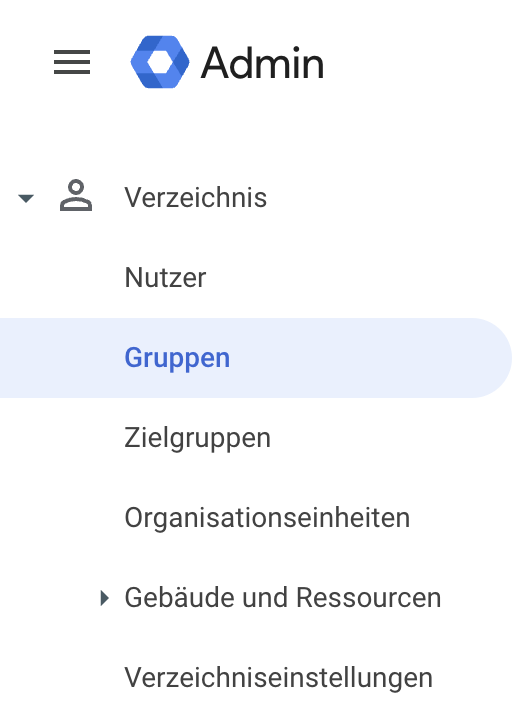
Create the necessary groups via your Google Workspace and add the users to the group. Find more information in the Google Workspace documentation.For this, navigate to “Directory” in your Google Workspace admin section.Create a new Workspace group for your new permission group.Copy the group’s email address. This will be used to assign the necessary permissions via Genow Administration.
Show One-Time Setup: Configure Entra ID for Group Sharing
This setup is done once by your IT or Entra ID administrator.Step 1: Update the App Manifest: In your Entra ID app registration, open the Manifest and set the following property:
"groupMembershipClaims": "ApplicationGroup"
We recommend the ApplicationGroup mode - it only includes groups that are explicitly assigned to the application, which is more efficient for large directories.
Do NOT enable “Emit groups as roles” - this setting is not compatible with the Genow group sharing feature.
Step 2: Add API Permissions:Depending on the mode you chose, add the following API permissions to the app registration:
Mode
Required API Permissions
ApplicationGroup (recommended)
User.ReadBasic.All + GroupMember.Read.All
SecurityGroup
User.Read.All + GroupMember.Read.All
DirectoryRole
User.Read.All
All
User.Read.All + GroupMember.Read.All
Alternatively, Directory.Read.All works for all configurations but grants broader access.Step 3: Assign Groups to the Application:Make sure the Entra ID groups you want to use for sharing are assigned to the Genow application in Entra ID (Enterprise Apps → Genow → Users and Groups).Step 4: Share in GenowOnce the setup is complete, you can share any Agent, Asset, or Source with an Entra group:
The sharing dialog shows which users and groups have direct access to each entity. You can revoke any share from this screen. Only direct shares are listed - indirect access (e.g. from a parent Agent share) is not shown at the source level.
Before creating and managing role permissions in EntraID, Genow should have been registered as an app in EntraID. Find more information here
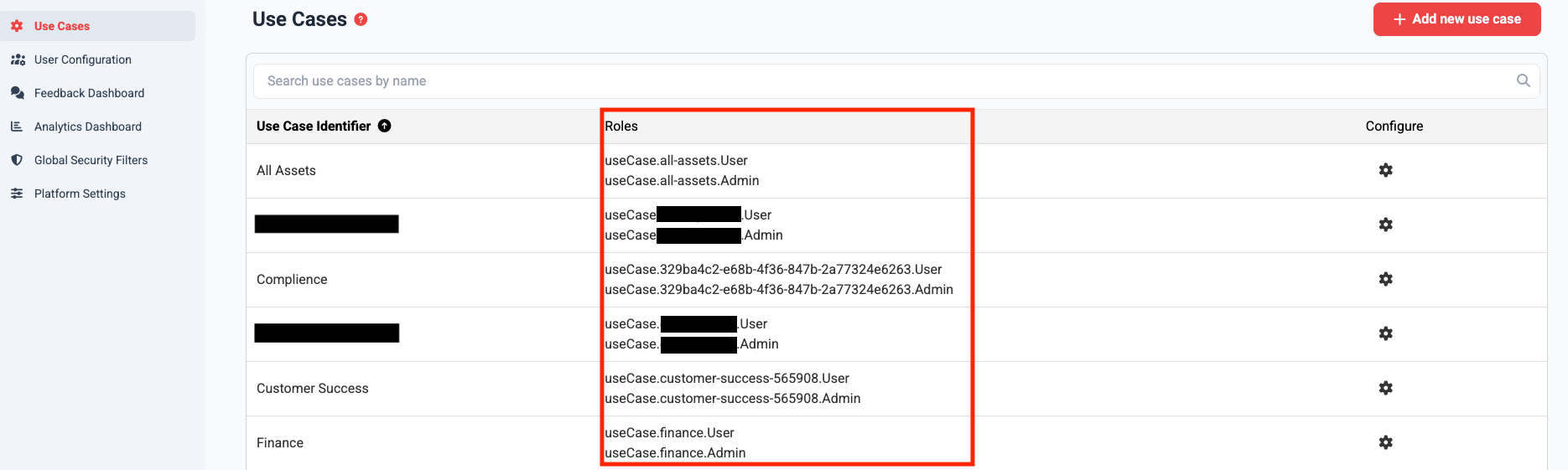
You can find the standard roles for Agents in Administration of the Genow platform.
Open Administration in the left-hand sidebar, then navigate to Agents. If you are an admin, you can also access this page directly by adding /admin/use-cases to your Genow URL.
On this page, you will find all standard role permissions for every Agent.
They have the following format: useCase.[UseCaseID].Admin and useCase.[UseCaseID].User.
Note that custom roles which grant specific access to a restricted amount of knowledge source have to be created by Genow.
2
Create App Roles
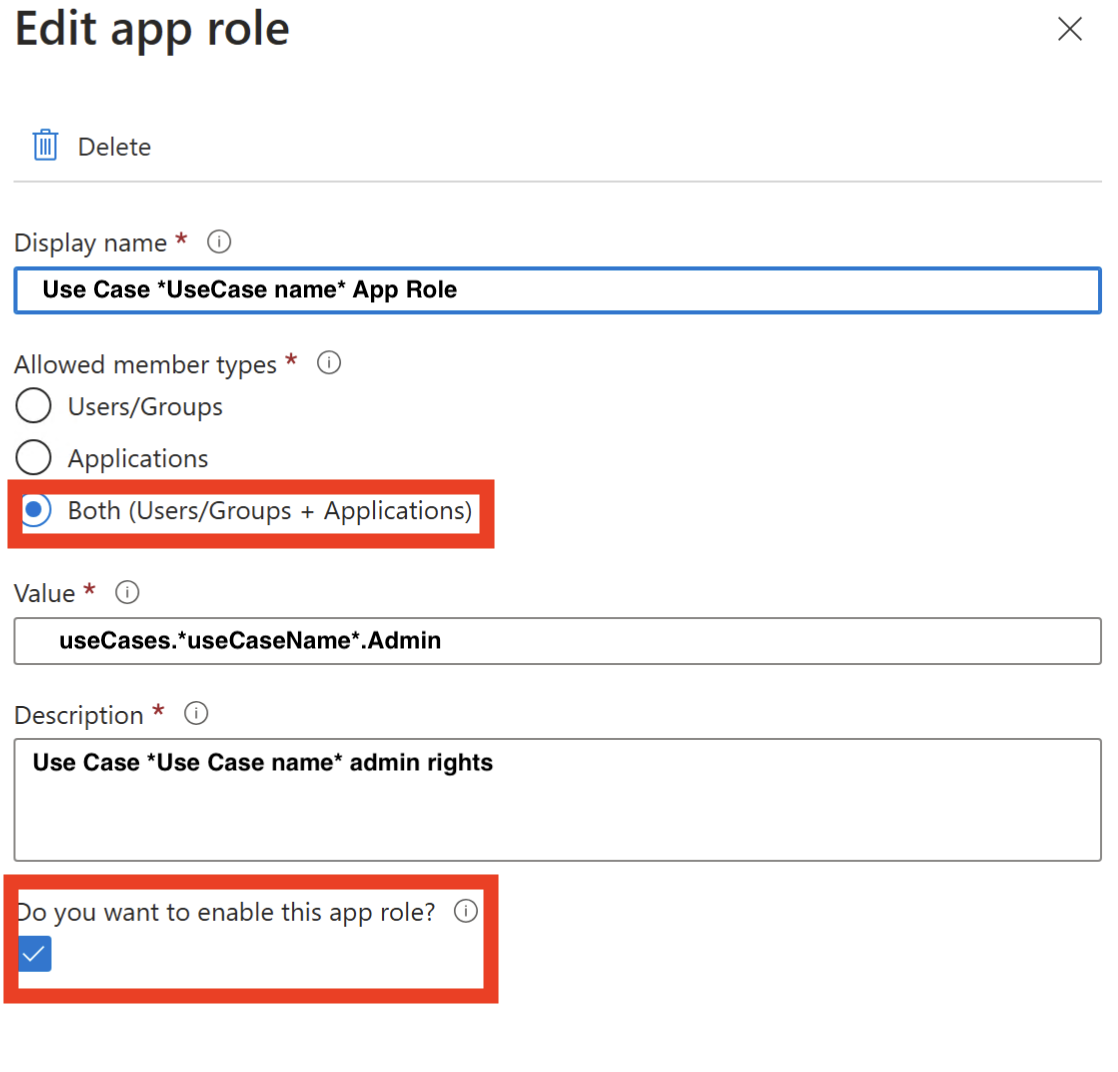
You can create app roles via the Microsoft Entra Admin Center. To do this, follow the instructions from Microsoft. In the user interface of entra you can navigate to the App Roles via the menu on the left-hand side (App registrations -> Enter application name -> App roles). There you can create app roles and assign authorizations.
When you create an app role, a value is required. This value represents a specific role permission. For example: useCase.testUseCase.User
You need a new app role for every possible role permission.
You can add a description to ensure better clarity in the management of rights.
Make sure to choose allowed member types: both
3
Assigning App Roles to Groups
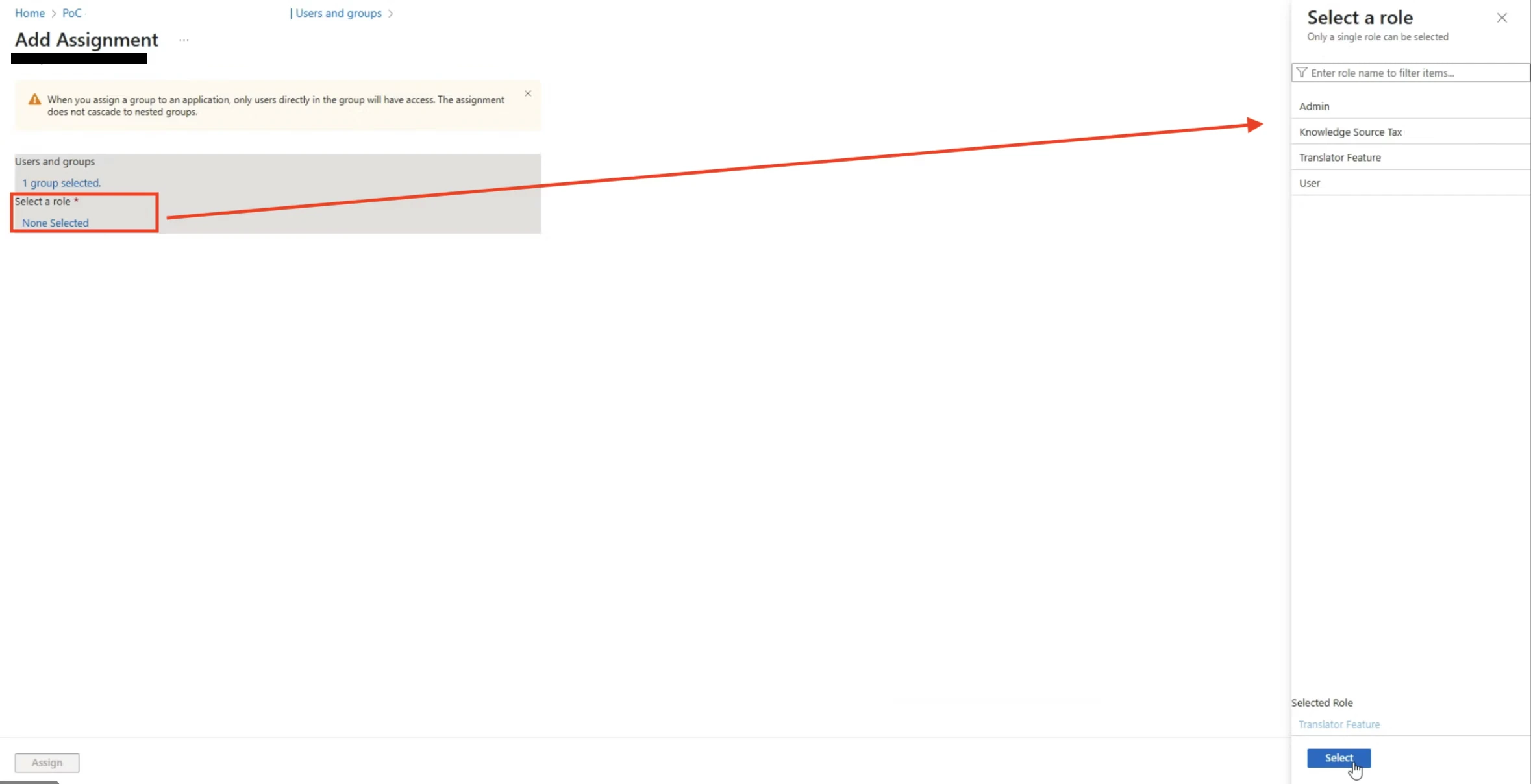
Once you have created the app roles, you need to assign them to groups.
You can assign these to the groups in order to authorize them to knowledge sources and thus also knowledge assets and Agents.
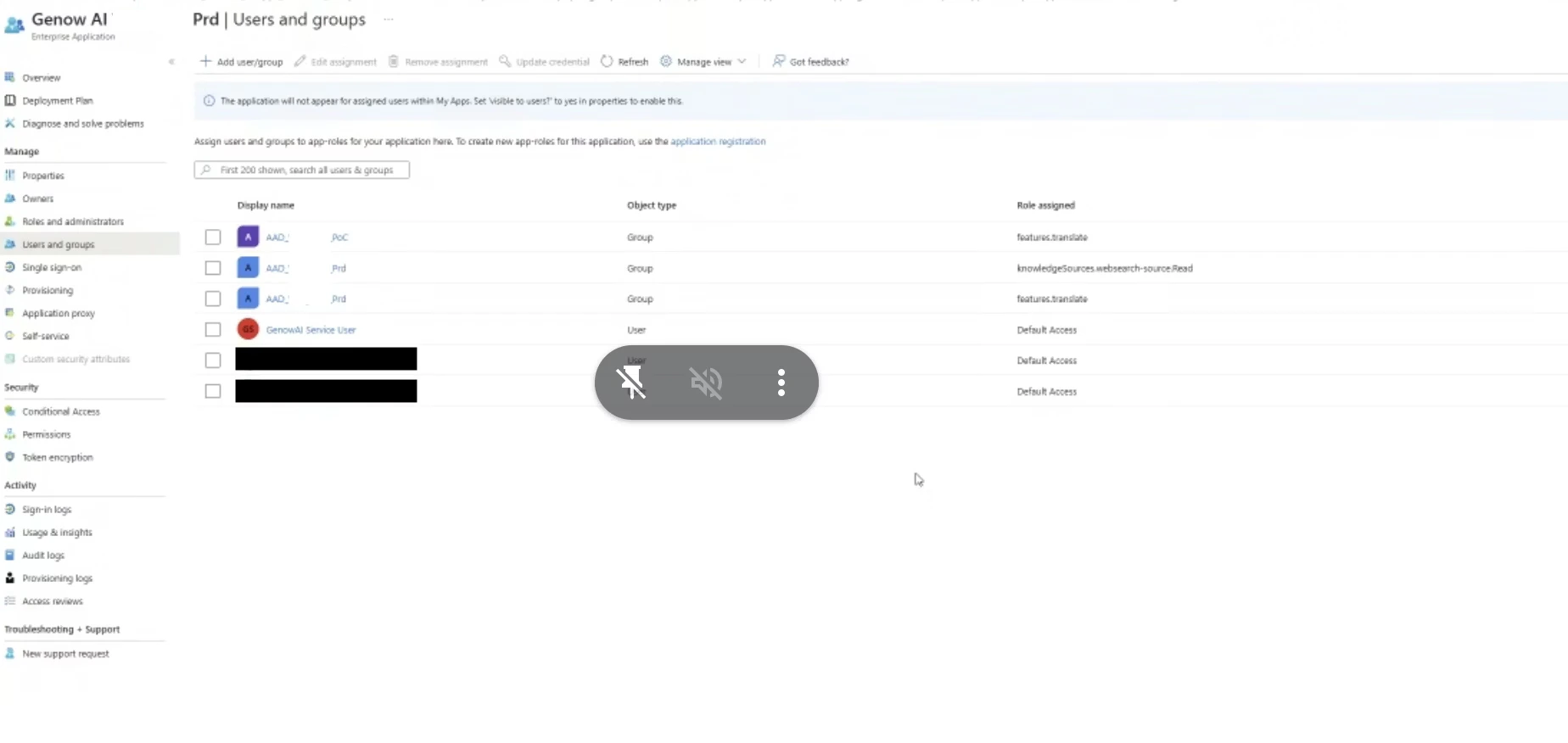
EntraID navigation: You can access this configuration by navigating to Enterprise apps -> Enter the app name -> and then select Users and Groups via the left menu bar (Screenshot below).
Then klick the plus-button “add user/group”. Each app role (/user permission) needs to be added individually.
4
Assigning App Roles to Groups
Once you have created the app roles, you need to assign them to groups.
You can assign these to the groups in order to authorize them to knowledge sources and thus also knowledge assets and Agents.
EntraID navigation: You can access this configuration by navigating to Enterprise apps -> Enter the app name -> and then select Users and Groups via the left menu bar (Screenshot below).
Then click the plus-button “add user/group”. Each app role (/user permission) needs to be added individually.
If you are using Google as your IAM provider, you can assign roles to groups using their email via Genow Administration. This can be done in just two steps:
1
Identify Relevant Roles Via Administration
You can find the standard roles for Agents in Administration of the Genow platform.
Open Administration in the left-hand sidebar, then navigate to Agents. If you are an admin, you can also access this page directly by adding /admin/use-cases to your Genow URL.
On this page, you will find all standard role permissions for every Agent.
They have the following format: useCase.[UseCaseID].Admin and useCase.[UseCaseID].User.
Note that custom roles which grant specific access to a restricted amount of knowledge source have to be created by Genow.
For this, navigate to “Directory” in your Google Workspace admin section.
Create a new Workspace group for your new permission group.
Copy the group’s email address. This will be used to assign the necessary permissions via Genow Administration (see step 2).
3
Assign Role Permissions to Groups via Administration
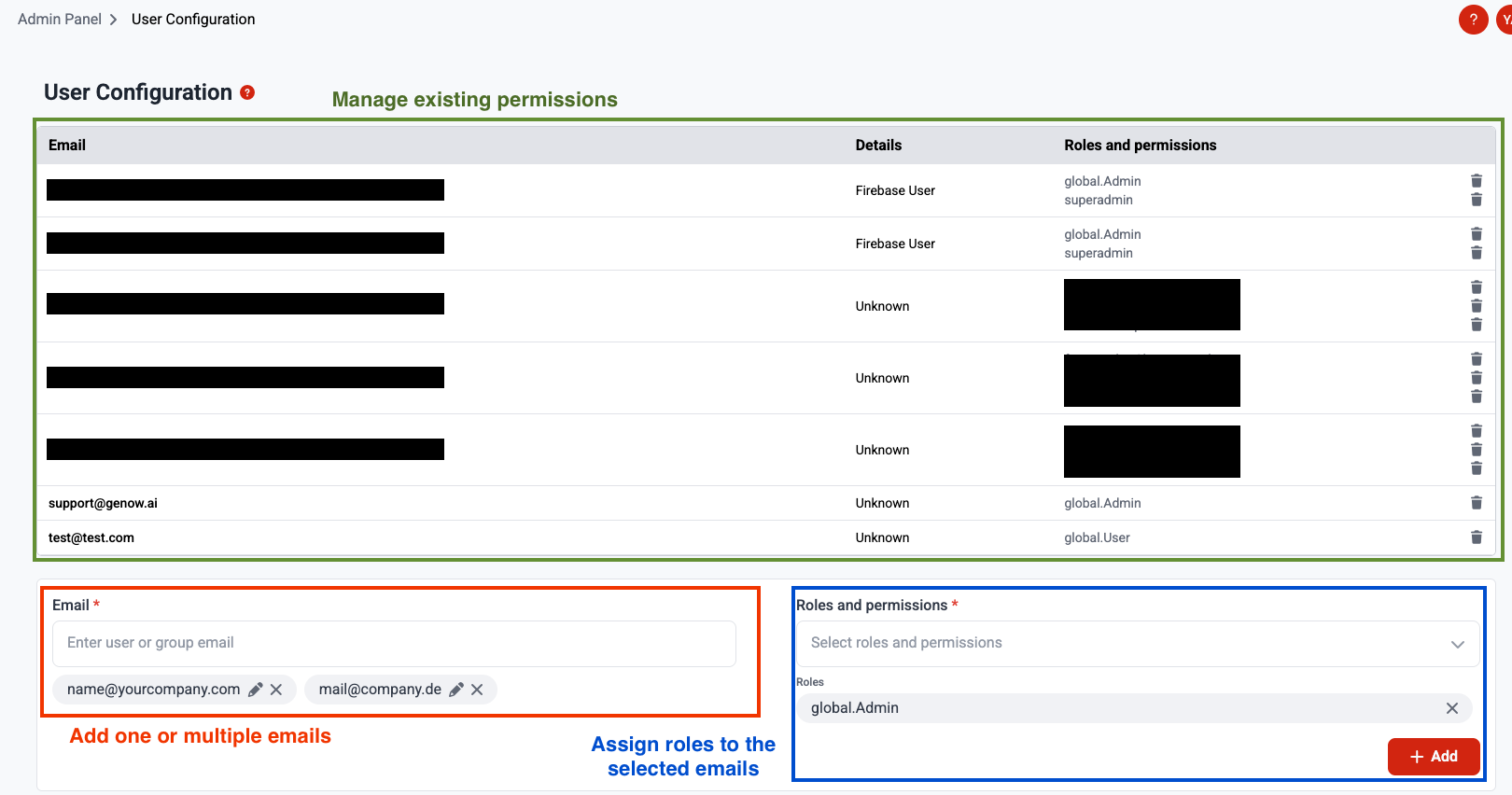
Via the User Configuration screen in Administration, which you can find via the left hand menu bar, you can then assign role permissions to the group using the group’s email.
Instead of groups, you can also assign roles to users directly. To do this, create a user in the GCP Identity Platform for your project. Then, on the same user configuration screen in Administration, assign the required permissions to the user’s email address. However, for a consistent and well-organized process, we recommend to always use workspace groups.
Basic idea:Roles are assigned to users, with each role receiving several subordinate permissions. This assignment takes place in the background and can be configured at the Agent level, for example. A user can have multiple roles.
This means, that for each permission group, you will only need one role, which groups the necessary permissions. This allows for an easy creation and management of permission.
The following roles and permission scheme is only needed if you are using option 2 for managing permissions: IAM Permission Management with Role Permissions.
Platform Organizer / Owner: - Has unrestricted access to the entire system - Responsible for configuring the organization - Works in central corporate management, IT (e.g., IT project manager)
Typical tasks: -Create use cases -Manage use cases - Configure global platform settings - Evaluate feedback on all use cases
global.Admin
Global User
Management Users: - Has User-level access to all Agents in the Agent Hub, but no admin permissions - Can query and retrieve knowledge across every Agent, but cannot make changes or access Administration - Uses the platform as a system-wide source of information - Active in executive management/management, HR, strategy, communication
Typical tasks: - Access and query knowledge across all Agents in the Agent Hub - Use the platform as a central source of information
global.User
Agent Admin
Team Lead / Domain Expert - Responsible for a specific Agent or area - able to fully manage this Agent or area - Can control content, teams, and permissions within this Agent - Active in specialist areas (e.g., sales), project or innovation management
Typical tasks: - Fill Agent with knowledge - Responsible for quality, data, and knowledge within the Agent - Make Agent-specific settings
useCase.[useCaseID].Admin
Agent User
Specialist users / Agent users - Has access to every knowledge of an Agent and can submit queries based on this knowledge - Can use features that are enabled for the Agent. - Works as a skilled worker, etc.
Typical tasks: - Retrieve knowledge and submit queries based on all sources of the Agent. - Use Agent-related documents or data.
useCase.[useCaseID].User
Feature User
Function user / feature user - Uses specific features (e.g., chat, translator) for which they are authorized
Typical tasks: - Working with a specific feature, e.g., chat
feature.[featureName].User
Use Case Creator
Team Lead / Project Owner - Can create new Agents without needing Global Admin rights - Automatically becomes the Agent Admin for every Agent they create - Has no access to other Agents unless explicitly granted
Typical tasks: - Create and set up new Agents - Manage the Agents they own
useCase.Creator
Use Case Creators need credentials to connect data. A Use Case Creator can set up new Agents, but they can only select connectors and start syncs for data sources whose credentials have been shared with them. When you assign the Use Case Creator role, also share the required credentials with that user via Platform Settings → Credentials Management (Person assignment). Learn more in the Credentials Management section.
Custom roles hold a specific, non-standard set of permissions.
They will be automatically created in Administration on Agent level
They can also be customized, i.e., created through the database, enabling individual creations.
Export the groups emails of your Google Groups and assign the needed roles via the User Configuration in Administration.
Was this page helpful?
{"docsConfig":{"theme":"mint","$schema":"https://mintlify.com/docs.json","name":"Genow Helpcenter","colors":{"primary":"#FF6830","light":"#F7956F","dark":"#FF6830"},"logo":{"light":"https://mintcdn.com/genowgmbh/Jfz_mJOKbGC5-LHe/logo/new_genow_logo.png?fit=max\u0026auto=format\u0026n=Jfz_mJOKbGC5-LHe\u0026q=85\u0026s=9b1ab08364b0e10aa0fe9dbcac645cab","dark":"https://mintcdn.com/genowgmbh/ng_BGLQSaaE1BDCk/logo/genow_logo_darkmode.png?fit=max\u0026auto=format\u0026n=ng_BGLQSaaE1BDCk\u0026q=85\u0026s=52011ee3f36c93942a70fc22eb321568"},"favicon":"https://mintcdn.com/genowgmbh/mleDMuDy1-wUfdfL/new_genow_favicon.png?fit=max\u0026auto=format\u0026n=mleDMuDy1-wUfdfL\u0026q=85\u0026s=3b90587db6fb4e4375bf925068972938","navbar":{"links":[{"href":"mailto:support@genow.ai","label":"Support"}],"primary":{"type":"button","label":"Website","href":"https://www.genow.ai/"}},"footer":{"socials":{"linkedin":"https://www.linkedin.com/company/genow-ai"}},"seo":{"indexing":"all"},"fonts":{"family":"Inter"},"errors":{"404":{"redirect":false,"title":"Article not found!","description":"This information could have been found using the Genow platform! ;) To find the information you need, go to the main page or use the search bar at the top of the page."}},"contextual":{"options":["copy","view","claude","perplexity","mcp","cursor","vscode","chatgpt"],"display":"toc"},"markdown":{"schema":false},"styling":{"latex":false},"navigation":{"languages":[{"language":"de","default":true,"href":"product/about-genow"},{"language":"en","href":"en/product/about-genow"}]}},"deployment":{"deploymentMetadataValue":{"subdomain":"genowgmbh","hasAudioNarration":false,"actualSubdomain":"genowgmbh","customDomains":["docs.genow.ai"],"gitSource":{"type":"github","owner":"genow-ai","repo":"genow-docs","deployBranch":"docs","contentDirectory":"","isPrivate":true,"mountPath":"","label":""},"feedback":{"thumbs":true},"entitlements":{"AI_CHAT":{"status":"ENABLED"},"WEB_MCP":{"status":"ENABLED"},"NARRATION":{"status":"ENABLED"}},"buildId":"6aedc2411ca26e5206d26462","clientVersion":"0.0.4087","searchFilterCounts":[{"language":"default","tag":"API Reference","count":200},{"language":"default","tag":"Core API","count":176},{"language":"en","tag":"Use Case Management","count":28},{"language":"de","tag":"Agentenverwaltung","count":28},{"language":"default","tag":"use-cases","count":25},{"language":"default","tag":"Search API","count":20},{"language":"en","tag":"Platform Management","count":17},{"language":"de","tag":"Plattformverwaltung","count":17},{"language":"en","tag":"Use Case Settings","count":12},{"language":"de","tag":"Agent-Einstellungen","count":12},{"language":"default","tag":"service-accounts","count":12},{"language":"default","tag":"search","count":11},{"language":"default","tag":"knowledge-assets","count":10},{"language":"en","tag":"Product","count":9},{"language":"en","tag":"Manage Your Knowledge","count":9},{"language":"de","tag":"Produkt","count":9},{"language":"de","tag":"Knowledge verwalten","count":9},{"language":"default","tag":"feedback","count":9},{"language":"default","tag":"files","count":9},{"language":"en","tag":"Setup and Manage your Genow Platform","count":8},{"language":"de","tag":"Genow-Plattform einrichten und verwalten","count":8},{"language":"default","tag":"guided-search-fields","count":8},{"language":"en","tag":"More Admin Panel Features","count":7},{"language":"de","tag":"Weitere Admin-Panel-Funktionen","count":7},{"language":"en","tag":"User Guides","count":6},{"language":"de","tag":"Anleitungen","count":6},{"language":"en","tag":"Settings \u0026 Customisations","count":4},{"language":"en","tag":"Connector Details","count":4},{"language":"de","tag":"Einstellungen \u0026 Anpassungen","count":4},{"language":"de","tag":"Connector-Details","count":4}]},"assistantConfig":{},"basePath":"","hasChatPermissions":true,"hasWebMcpPermissions":true,"toggles":[{"name":"kill-isr","enabled":true,"variant":{"name":"disabled","enabled":false,"feature_enabled":true},"impressionData":false},{"name":"agent-mintlify-slack","enabled":true,"variant":{"name":"disabled","enabled":false,"feature_enabled":true},"impressionData":false},{"name":"agent-integrations-settings","enabled":true,"variant":{"name":"disabled","enabled":false,"feature_enabled":true},"impressionData":false},{"name":"rbac-expansion","enabled":true,"variant":{"name":"disabled","enabled":false,"feature_enabled":true},"impressionData":false},{"name":"automations-pr-grouping","enabled":true,"variant":{"name":"disabled","enabled":false,"feature_enabled":true},"impressionData":false},{"name":"custom-prefix","enabled":true,"variant":{"name":"disabled","enabled":false,"feature_enabled":true},"impressionData":false},{"name":"analytics-v7","enabled":true,"variant":{"name":"disabled","enabled":false,"feature_enabled":true},"impressionData":false},{"name":"user-flows-analytics","enabled":true,"variant":{"name":"disabled","enabled":false,"feature_enabled":true},"impressionData":false},{"name":"no-publish-flow","enabled":true,"variant":{"name":"disabled","enabled":false,"feature_enabled":true},"impressionData":false},{"name":"workos-onboarding","enabled":true,"variant":{"name":"disabled","enabled":false,"feature_enabled":true},"impressionData":false},{"name":"llms-txt-v2","enabled":true,"variant":{"name":"disabled","enabled":false,"feature_enabled":true},"impressionData":false},{"name":"snapshot-serving-live","enabled":true,"variant":{"name":"disabled","enabled":false,"feature_enabled":true},"impressionData":false},{"name":"stripTemperatureMiddleware","enabled":true,"variant":{"name":"disabled","enabled":false,"feature_enabled":true},"impressionData":false},{"name":"support-platform-pylon-zendesk","enabled":true,"variant":{"name":"disabled","enabled":false,"feature_enabled":true},"impressionData":false},{"name":"snapshot-serving","enabled":true,"variant":{"name":"disabled","enabled":false,"feature_enabled":true},"impressionData":false},{"name":"instant-rollback","enabled":true,"variant":{"name":"disabled","enabled":false,"feature_enabled":true},"impressionData":false},{"name":"granular-notifications-server","enabled":true,"variant":{"name":"disabled","enabled":false,"feature_enabled":true},"impressionData":false},{"name":"granular-notifications","enabled":true,"variant":{"name":"disabled","enabled":false,"feature_enabled":true},"impressionData":false},{"name":"automations-fable","enabled":true,"variant":{"name":"disabled","enabled":false,"feature_enabled":true},"impressionData":false},{"name":"fixed-ai-action-pricing","enabled":true,"variant":{"name":"disabled","enabled":false,"feature_enabled":true},"impressionData":false},{"name":"automation-resolve-merge-conflict","enabled":true,"variant":{"name":"disabled","enabled":false,"feature_enabled":true},"impressionData":false},{"name":"scoped-publishing","enabled":true,"variant":{"name":"disabled","enabled":false,"feature_enabled":true},"impressionData":false},{"name":"mintql","enabled":true,"variant":{"name":"disabled","enabled":false,"feature_enabled":true},"impressionData":false},{"name":"page-level-analytics","enabled":true,"variant":{"name":"disabled","enabled":false,"feature_enabled":true},"impressionData":false},{"name":"editor-version-history-v2","enabled":true,"variant":{"name":"disabled","enabled":false,"feature_enabled":true},"impressionData":false},{"name":"billing-page-v2","enabled":true,"variant":{"name":"disabled","enabled":false,"feature_enabled":true},"impressionData":false},{"name":"full-page-search","enabled":true,"variant":{"name":"disabled","enabled":false,"feature_enabled":true},"impressionData":false},{"name":"workspace-projects","enabled":true,"variant":{"name":"disabled","enabled":false,"feature_enabled":true},"impressionData":false},{"name":"assistant-v5","enabled":true,"variant":{"name":"disabled","enabled":false,"feature_enabled":true},"impressionData":false},{"name":"fork-pr-previews","enabled":true,"variant":{"name":"disabled","enabled":false,"feature_enabled":true},"impressionData":false},{"name":"revalidation-jwt","enabled":true,"variant":{"name":"disabled","enabled":false,"feature_enabled":true},"impressionData":false},{"name":"workos-sso-scim","enabled":true,"variant":{"name":"disabled","enabled":false,"feature_enabled":true},"impressionData":false},{"name":"hobby-abuse-scan","enabled":true,"variant":{"name":"disabled","enabled":false,"feature_enabled":true},"impressionData":false},{"name":"dashboard-inbox","enabled":true,"variant":{"name":"disabled","enabled":false,"feature_enabled":true},"impressionData":false},{"name":"workos-signup","enabled":true,"variant":{"name":"disabled","enabled":false,"feature_enabled":true},"impressionData":false},{"name":"turbopuffer-dual-write","enabled":true,"variant":{"name":"disabled","enabled":false,"feature_enabled":true},"impressionData":false},{"name":"workos-enabled","enabled":true,"variant":{"name":"disabled","enabled":false,"feature_enabled":true},"impressionData":false},{"name":"approve-review-flow","enabled":true,"variant":{"name":"disabled","enabled":false,"feature_enabled":true},"impressionData":false},{"name":"editor-metadata","enabled":true,"variant":{"name":"disabled","enabled":false,"feature_enabled":true},"impressionData":false},{"name":"sso-setup-deadline-banner","enabled":true,"variant":{"name":"disabled","enabled":false,"feature_enabled":true},"impressionData":false},{"name":"turbopuffer-serve","enabled":true,"variant":{"name":"disabled","enabled":false,"feature_enabled":true},"impressionData":false},{"name":"live-agents","enabled":true,"variant":{"name":"disabled","enabled":false,"feature_enabled":true},"impressionData":false},{"name":"comment-mode","enabled":true,"variant":{"name":"disabled","enabled":false,"feature_enabled":true},"impressionData":false}],"googleFontsInlined":false},"customCss":[],"page":{"pagePath":"en/platform-management/permissions","slug":"/en/platform-management/permissions","pageMetadata":{"title":"Create and Manage Permissions","description":"Learn how to provide access permissions to Genow depending on different user roles.","href":"/en/platform-management/permissions"},"description":{"compiledSource":"\"use strict\";\nconst {jsx: _jsx} = arguments[0];\nconst {useMDXComponents: _provideComponents} = arguments[0];\nfunction _createMdxContent(props) {\n const _components = {\n p: \"p\",\n ..._provideComponents(),\n ...props.components\n };\n return _jsx(_components.p, {\n children: \"Learn how to provide access permissions to Genow depending on different user roles.\"\n });\n}\nfunction MDXContent(props = {}) {\n const {wrapper: MDXLayout} = {\n ..._provideComponents(),\n ...props.components\n };\n return MDXLayout ? _jsx(MDXLayout, {\n ...props,\n children: _jsx(_createMdxContent, {\n ...props\n })\n }) : _createMdxContent(props);\n}\nreturn {\n default: MDXContent\n};\n","frontmatter":{},"scope":{}},"pageType":"default","mdx":{"mdxSource":{"compiledSource":"\"use strict\";const{Fragment:_Fragment,jsx:_jsx,jsxs:_jsxs}=arguments[0];const{useMDXComponents:_provideComponents}=arguments[0];function _createMdxContent(props){const _components={a:`a`,blockquote:`blockquote`,code:`code`,em:`em`,hr:`hr`,li:`li`,ol:`ol`,p:`p`,pre:`pre`,span:`span`,strong:`strong`,tbody:`tbody`,td:`td`,th:`th`,thead:`thead`,tr:`tr`,ul:`ul`,..._provideComponents(),...props.components},{CodeBlock,Expandable,Frame,Heading,Info,Note,OptimizedImage,Step,Steps,Tab,Table,Tabs,Warning}=_components;if(!CodeBlock)_missingMdxReference(`CodeBlock`,true);if(!Expandable)_missingMdxReference(`Expandable`,true);if(!Frame)_missingMdxReference(`Frame`,true);if(!Heading)_missingMdxReference(`Heading`,true);if(!Info)_missingMdxReference(`Info`,true);if(!Note)_missingMdxReference(`Note`,true);if(!OptimizedImage)_missingMdxReference(`OptimizedImage`,true);if(!Step)_missingMdxReference(`Step`,true);if(!Steps)_missingMdxReference(`Steps`,true);if(!Tab)_missingMdxReference(`Tab`,true);if(!Table)_missingMdxReference(`Table`,true);if(!Tabs)_missingMdxReference(`Tabs`,true);if(!Warning)_missingMdxReference(`Warning`,true);return _jsxs(_Fragment,{children:[_jsx(_components.p,{children:`After users have received the permission to access the platform, additional permissions are required to view Agents and their corresponding knowledge. Our role-based permission concept is designed so that complex permission structures can be implemented at agent level.`}),`\n`,_jsxs(_components.blockquote,{children:[`\n`,_jsxs(_components.p,{children:[`To manage the platform and access every Agent in both Administration and the Agent Hub, you will need the ‘`,_jsx(_components.strong,{children:`Global Admin`}),`’ permission. Please take a look at the permissions scheme below. `,_jsx(_components.strong,{children:`Please also make sure to assign this role to Genow.`})]}),`\n`]}),`\n`,_jsx(_components.hr,{}),`\n`,_jsx(Heading,{level:`2`,id:`how-to-manage-permissions`,children:`How to Manage Permissions`}),`\n`,_jsxs(_components.blockquote,{children:[`\n`,_jsx(_components.p,{children:`When setting up Genow, you can choose from two different approaches for managing permissions. We recommend deciding on this at the start of the setup process. If you wish to change your chosen approach, please contact Genow. Both options generally work in parallel, but we recommend choosing one option and sticking to it.`}),`\n`]}),`\n`,_jsx(Heading,{level:`3`,id:`option-1-share-entities-directly-to-users-and-groups-via-administration-recommended`,children:`Option 1: Share Entities Directly to Users and Groups via Administration (Recommended)`}),`\n`,_jsx(_components.p,{children:`Share entities directly to individual users by entering their email address - or add multiple users at once via a CSV file. This gives you the most flexibility and the lowest overhead, without needing to maintain group structures in your IAM for every scenario.`}),`\n`,_jsx(_components.p,{children:`Please let us know if you would like this option to be made available to use case administrators as well.`}),`\n`,_jsx(Info,{children:_jsx(_components.p,{children:`By default, Agent Admins can create new Knowledge Sources within their Agent. If needed, this permission can be restricted so that only Global Admins can create sources. Contact Genow to enable this restriction for your platform.`})}),`\n`,_jsx(Info,{children:_jsx(_components.p,{children:`If you are using Google SAML, you can also share knowledge entities with Workspace groups using their email.`})}),`\n`,_jsxs(_components.p,{children:[`You can share knowledge entities with Entra ID groups by entering the group’s `,_jsx(_components.strong,{children:`Object ID`}),` in the sharing dialog. Before you can use this, a one-time setup in your Entra ID app registration is required - see the expandable guide below.`]}),`\n`,_jsx(_components.p,{children:`If you want to use group claims/emails, your Entra ID or Workspace administrator will need to create a group for each user group in Entra ID or Workspace, assigning individual access rights. They will then need to use the group claim in Administration to share knowledge entities.`}),`\n`,_jsx(Note,{children:_jsx(_components.p,{children:`To ensure users can log in to the platform, at least one authentication group containing all end users must still exist in your IAM system.`})}),`\n`,_jsx(_components.hr,{}),`\n`,_jsx(Heading,{level:`3`,id:`option-2-iam-permission-management-with-role-permissions`,children:`Option 2: IAM Permission Management with Role Permissions`}),`\n`,_jsxs(_components.p,{children:[`Permissions are managed directly in your IAM system using `,_jsx(_components.strong,{children:`App Roles in Entra ID`}),` or `,_jsx(_components.strong,{children:`Google Workspace groups assigned via Administration`}),`. Each permission level is defined as an individual App Role or group assignment.`]}),`\n`,_jsx(_components.p,{children:`This approach offers the most granular control and is fully supported alongside the newer option. If you need custom roles that hold a subset of permissions of an Agent (e.g. the permission to only access a specific asset or source), you will need to reach out to Genow.`}),`\n`,_jsx(_components.hr,{}),`\n`,_jsx(Heading,{level:`2`,id:`how-to-share-knowledge-entities-or-create-and-permissions`,children:`How to Share Knowledge Entities Or Create And Permissions`}),`\n`,_jsxs(Tabs,{children:[_jsxs(Tab,{title:`Create Permissions`,id:`create-permissions`,\"data-child-tab-ids\":`[\"share-access-via-agent-settings-option-1\",\"via-entraid-option-2\",\"google-%26-administration-option-2\"]`,\"data-child-heading-ids\":`[\"1-identify-and-create-groups\",\"2-create-and-assign-permissions\",\"how-it-works\",\"sharing-levels\",\"who-can-share-what\",\"managing-existing-shares\"]`,children:[_jsx(_components.p,{children:_jsx(_components.strong,{children:`Creating user permissions is done in two steps:`})}),_jsxs(Steps,{children:[_jsx(Step,{title:`Identify groups and create roles`,stepNumber:1,titleSize:`p`,children:_jsx(_components.p,{children:`Identify relevant admin and user groups for your use cases.`})}),_jsx(Step,{title:`Share knowledge entitiy or create permissions yourselfes`,children:_jsx(_components.p,{children:`Share knowledge entities via the share button (option 1) or create your permissions in either Entra ID or directly assign permissions to Google Workspace groups via the user configuration in Administration (option 2).`})}),_jsx(Step,{title:`Share knowledge entity or create permissions yourself`,children:_jsx(_components.p,{children:`Share knowledge entities via the share button (option 1) or create your permissions in either Entra ID or directly assign permissions to Google Workspace groups via the user configuration in Administration (option 2).`})})]}),_jsx(_components.hr,{}),_jsx(Heading,{level:`2`,id:`1-identify-and-create-groups`,children:`(1) Identify and create Groups`}),_jsxs(_components.blockquote,{children:[`\n`,_jsxs(_components.p,{children:[_jsx(_components.strong,{children:`If you are setting up Genow the first time`}),`, please identify a group of platform admins first, which will be able to manage the platform itself as well as create and manage every agent on the platform. This group of people will receive the global.Admin role either via Entra ID or Administration. Follow the guide for option 2 to do this one time.`]}),`\n`]}),_jsxs(_components.p,{children:[_jsx(_components.strong,{children:`When it comes to creating and introducing a new agent`}),`, the agent admin, which will manage the agent corresponding to his domain or team, should think about whether there are different user groups with different access rights to specific agent data.`]}),_jsx(Expandable,{title:`Group example`,children:_jsxs(_components.ul,{children:[`\n`,_jsx(_components.li,{children:`For an example Agent, there is general information as well as specific information intended for a dedicated sub-user group.`}),`\n`,_jsx(_components.li,{children:`This results in two sources: general knowledge \u0026 specific knowledge and two authorization groups: Access to general knowledge \u0026 Access to specific knowledge.`}),`\n`,_jsx(_components.li,{children:`Two assets can be created that are displayed depending on the authorization or one asset that looks the same for each user but contains different data depending on the user.`}),`\n`]})}),_jsx(_components.hr,{}),_jsx(Heading,{level:`2`,id:`2-create-and-assign-permissions`,children:`(2) Create and Assign Permissions`}),_jsxs(Tabs,{children:[_jsxs(Tab,{title:`Share Access via Agent Settings (Option 1)`,id:`share-access-via-agent-settings-option-1`,\"data-child-heading-ids\":`[\"how-it-works\",\"sharing-levels\",\"who-can-share-what\",\"managing-existing-shares\"]`,children:[_jsx(_components.p,{children:`In addition to managing permissions via your IAM system (Entra ID or Google), Agents, Knowledge Assets, and Knowledge Sources can now be shared directly from within Administration - no external configuration required.`}),_jsx(Note,{children:_jsxs(_components.p,{children:[`In-app sharing must be activated for your environment. Contact your Genow administrator if the `,_jsx(`kbd`,{children:`Share`}),` button is not visible in Administration.`]})}),_jsx(Heading,{level:`3`,id:`how-it-works`,children:`How It Works`}),_jsxs(_components.p,{children:[`A `,_jsx(`kbd`,{children:`Share`}),` button is available on every Agent, Knowledge Asset, and Knowledge Source - both in the overview table and in the detail view. Clicking it opens a sharing dialog where you can grant access to:`]}),_jsxs(_components.ul,{children:[`\n`,_jsxs(_components.li,{children:[_jsx(_components.strong,{children:`Option 1: Groups`}),` - by group email (Google SAML with Workspace) or by group Object ID from Entra ID.`,_jsx(`br`,{}),`\n`,_jsx(Info,{children:_jsx(_components.p,{children:`Please note, that you have to perform a one time IT setup for those groups. Expand the “One-Time Setup: Configure Entra ID for Group Sharing” section below to learn more.`})}),`\n`,`(Entra ID - requires one-time IT setup, see expandable guide below).`]}),`\n`,_jsxs(_components.li,{children:[_jsx(_components.strong,{children:`Option 2: Individual users`}),` - by email address - or `,_jsx(_components.strong,{children:`multiple entries at once`}),` - via CSV bulk upload`]}),`\n`]}),_jsx(_components.p,{children:_jsx(_components.strong,{children:`If you want to share entities to groups, you first have to create them. You can find a short guide on how to do this below.`})}),_jsxs(Expandable,{title:`Create Google Workspace Groups`,children:[_jsx(_components.p,{children:`Create the necessary groups via your Google Workspace and add the users to the group. Find more information in the Google Workspace documentation.`}),_jsx(_components.p,{children:`For this, navigate to “Directory” in your Google Workspace admin section.`}),_jsx(_components.p,{children:`Create a new Workspace group for your new permission group.`}),_jsx(_components.p,{children:`Copy the group’s email address. This will be used to assign the necessary permissions via Genow Administration.`})]}),_jsxs(Expandable,{title:`One-Time Setup: Configure Entra ID for Group Sharing`,children:[_jsx(_components.p,{children:`This setup is done once by your IT or Entra ID administrator.`}),_jsxs(_components.p,{children:[_jsx(_components.strong,{children:`Step 1: Update the App Manifest:`}),` In your Entra ID app registration, open the `,_jsx(_components.strong,{children:`Manifest`}),` and set the following property:`]}),_jsx(CodeBlock,{filename:``,numberOfLines:`1`,language:`json`,children:_jsx(_components.pre,{className:`shiki shiki-themes github-light-default dark-plus`,style:{backgroundColor:`#ffffff`,\"--shiki-dark-bg\":`#0B0C0E`,color:`#1f2328`,\"--shiki-dark\":`#D4D4D4`},language:`json`,children:_jsxs(_components.code,{language:`json`,numberOfLines:`1`,children:[_jsxs(_components.span,{className:`line`,children:[_jsx(_components.span,{style:{color:`#0A3069`,\"--shiki-dark\":`#CE9178`},children:`\"groupMembershipClaims\"`}),_jsx(_components.span,{style:{color:`#1F2328`,\"--shiki-dark\":`#D4D4D4`},children:`: `}),_jsx(_components.span,{style:{color:`#0A3069`,\"--shiki-dark\":`#CE9178`},children:`\"ApplicationGroup\"`})]}),`\n`]})})}),_jsxs(_components.p,{children:[`We recommend the `,_jsx(_components.code,{children:`ApplicationGroup`}),` mode - it only includes groups that are explicitly assigned to the application, which is more efficient for large directories.`]}),_jsx(Warning,{children:_jsx(_components.p,{children:`Do NOT enable “Emit groups as roles” - this setting is not compatible with the Genow group sharing feature.`})}),_jsx(_components.p,{children:_jsx(_components.strong,{children:`Step 2: Add API Permissions:`})}),_jsx(_components.p,{children:`Depending on the mode you chose, add the following API permissions to the app registration:`}),_jsxs(Table,{children:[_jsx(_components.thead,{children:_jsxs(_components.tr,{children:[_jsx(_components.th,{style:{textAlign:`left`},children:`Mode`}),_jsx(_components.th,{style:{textAlign:`left`},children:`Required API Permissions`})]})}),_jsxs(_components.tbody,{children:[_jsxs(_components.tr,{children:[_jsx(_components.td,{style:{textAlign:`left`},children:`ApplicationGroup (recommended)`}),_jsxs(_components.td,{style:{textAlign:`left`},children:[_jsx(_components.code,{children:`User.ReadBasic.All`}),` + `,_jsx(_components.code,{children:`GroupMember.Read.All`})]})]}),_jsxs(_components.tr,{children:[_jsx(_components.td,{style:{textAlign:`left`},children:`SecurityGroup`}),_jsxs(_components.td,{style:{textAlign:`left`},children:[_jsx(_components.code,{children:`User.Read.All`}),` + `,_jsx(_components.code,{children:`GroupMember.Read.All`})]})]}),_jsxs(_components.tr,{children:[_jsx(_components.td,{style:{textAlign:`left`},children:`DirectoryRole`}),_jsx(_components.td,{style:{textAlign:`left`},children:_jsx(_components.code,{children:`User.Read.All`})})]}),_jsxs(_components.tr,{children:[_jsx(_components.td,{style:{textAlign:`left`},children:`All`}),_jsxs(_components.td,{style:{textAlign:`left`},children:[_jsx(_components.code,{children:`User.Read.All`}),` + `,_jsx(_components.code,{children:`GroupMember.Read.All`})]})]})]})]}),_jsxs(_components.p,{children:[`Alternatively, `,_jsx(_components.code,{children:`Directory.Read.All`}),` works for all configurations but grants broader access.`]}),_jsx(_components.p,{children:_jsx(_components.strong,{children:`Step 3: Assign Groups to the Application:`})}),_jsx(_components.p,{children:`Make sure the Entra ID groups you want to use for sharing are assigned to the Genow application in Entra ID (Enterprise Apps → Genow → Users and Groups).`}),_jsx(_components.p,{children:_jsx(_components.strong,{children:`Step 4: Share in Genow`})}),_jsx(_components.p,{children:`Once the setup is complete, you can share any Agent, Asset, or Source with an Entra group:`}),_jsxs(_components.ol,{children:[`\n`,_jsx(_components.li,{children:`Navigate to the entity you want to share.`}),`\n`,_jsxs(_components.li,{children:[`Click the `,_jsx(`kbd`,{children:`Share`}),` button.`]}),`\n`,_jsxs(_components.li,{children:[`Click `,_jsx(`kbd`,{children:`Invite new user`}),`.`]}),`\n`,_jsxs(_components.li,{children:[`Enter the `,_jsx(_components.strong,{children:`Object ID`}),` of the Entra group.`]}),`\n`,_jsx(_components.li,{children:`Select the access level (User or Admin).`}),`\n`,_jsxs(_components.li,{children:[`Click `,_jsx(`kbd`,{children:`Save`}),`.`]}),`\n`]})]}),_jsx(Heading,{level:`3`,id:`sharing-levels`,children:`Sharing Levels`}),_jsx(_components.p,{children:`The scope of access depends on which entity you share:`}),_jsxs(Table,{children:[_jsx(_components.thead,{children:_jsxs(_components.tr,{children:[_jsx(_components.th,{style:{textAlign:`left`},children:`Entity shared`}),_jsx(_components.th,{style:{textAlign:`left`},children:`Access granted`})]})}),_jsxs(_components.tbody,{children:[_jsxs(_components.tr,{children:[_jsx(_components.td,{style:{textAlign:`left`},children:_jsx(_components.strong,{children:`Agent`})}),_jsx(_components.td,{style:{textAlign:`left`},children:`User access to all knowledge within the Agent.`})]}),_jsxs(_components.tr,{children:[_jsx(_components.td,{style:{textAlign:`left`},children:_jsx(_components.strong,{children:`Knowledge Asset`})}),_jsx(_components.td,{style:{textAlign:`left`},children:`User access to all sources within that asset.`})]}),_jsxs(_components.tr,{children:[_jsx(_components.td,{style:{textAlign:`left`},children:_jsx(_components.strong,{children:`Knowledge Source`})}),_jsx(_components.td,{style:{textAlign:`left`},children:`User access to that specific source only.`})]})]})]}),_jsx(Heading,{level:`3`,id:`who-can-share-what`,children:`Who Can Share What`}),_jsxs(Table,{children:[_jsx(_components.thead,{children:_jsxs(_components.tr,{children:[_jsx(_components.th,{style:{textAlign:`left`},children:`Role`}),_jsx(_components.th,{style:{textAlign:`left`},children:`Can share`})]})}),_jsxs(_components.tbody,{children:[_jsxs(_components.tr,{children:[_jsx(_components.td,{style:{textAlign:`left`},children:_jsx(_components.strong,{children:`Agent Admin`})}),_jsx(_components.td,{style:{textAlign:`left`},children:`User rights on Agents, Assets, and Sources they manage`})]}),_jsxs(_components.tr,{children:[_jsx(_components.td,{style:{textAlign:`left`},children:_jsx(_components.strong,{children:`Global Admin`})}),_jsx(_components.td,{style:{textAlign:`left`},children:`User rights on any entity; additionally, Admin rights at Agent level`})]})]})]}),_jsx(Heading,{level:`3`,id:`managing-existing-shares`,children:`Managing Existing Shares`}),_jsx(_components.p,{children:`The sharing dialog shows which users and groups have direct access to each entity. You can revoke any share from this screen. Only direct shares are listed - indirect access (e.g. from a parent Agent share) is not shown at the source level.`})]}),_jsxs(Tab,{title:`Via EntraID (Option 2)`,icon:`microsoft`,iconType:`solid`,id:`via-entraid-option-2`,children:[_jsx(Note,{children:_jsxs(_components.p,{children:[`Before creating and managing role permissions in EntraID, Genow should have been registered as an app in EntraID. `,_jsx(_components.a,{href:`/en/platform-management/setup/authentication`,children:`Find more information here`})]})}),_jsx(_components.p,{children:_jsx(_components.strong,{children:`If this have not been done before, first create the needed groups (see step 1).`})}),_jsxs(_components.p,{children:[`Two further steps are then required. `,_jsx(_components.a,{href:`https://learn.microsoft.com/en-us/entra/identity-platform/howto-add-app-roles-in-apps#assign-users-and-groups-to-roles`,children:`Please also refer to the Microsoft documentation for these two steps:`})]}),_jsxs(Steps,{children:[_jsxs(Step,{title:`Identify Relevant Roles Via Administration`,titleSize:`h3`,id:`identify-relevant-roles-via-administration`,children:[_jsx(_components.p,{children:`You can find the standard roles for Agents in Administration of the Genow platform.`}),_jsxs(_components.ul,{children:[`\n`,_jsxs(_components.li,{children:[`Open `,_jsx(_components.strong,{children:`Administration`}),` in the left-hand sidebar, then navigate to `,_jsx(`kbd`,{children:`Agents`}),`. If you are an admin, you can also access this page directly by adding /admin/use-cases to your Genow URL.`]}),`\n`,_jsx(_components.li,{children:`On this page, you will find all standard role permissions for every Agent.`}),`\n`,_jsxs(_components.li,{children:[`They have the following format: `,_jsx(_components.code,{children:`useCase.[UseCaseID].Admin`}),` and `,_jsx(_components.code,{children:`useCase.[UseCaseID].User`}),`.`]}),`\n`]}),_jsx(Note,{children:_jsx(_components.p,{children:`Note that custom roles which grant specific access to a restricted amount of knowledge source have to be created by Genow.`})}),_jsx(Frame,{children:_jsx(OptimizedImage,{src:`https://mintcdn.com/genowgmbh/7LDT0o7joK-C92_W/images/use_case_ids.png?fit=max\u0026auto=format\u0026n=7LDT0o7joK-C92_W\u0026q=85\u0026s=b33f8f9447c1f6ece25ad2d2de51f6c1`,style:{width:`100%`},\"data-og-width\":`1870`,width:`1870`,\"data-og-height\":`561`,height:`561`,\"data-path\":`images/use_case_ids.png`,\"data-optimize\":`true`,\"data-opv\":`3`,srcset:`https://mintcdn.com/genowgmbh/7LDT0o7joK-C92_W/images/use_case_ids.png?w=280\u0026fit=max\u0026auto=format\u0026n=7LDT0o7joK-C92_W\u0026q=85\u0026s=6f60cd52840a405cfc11114705c7f0e1 280w, https://mintcdn.com/genowgmbh/7LDT0o7joK-C92_W/images/use_case_ids.png?w=560\u0026fit=max\u0026auto=format\u0026n=7LDT0o7joK-C92_W\u0026q=85\u0026s=c5141c21ac91e7acf3696e4a3678ea85 560w, https://mintcdn.com/genowgmbh/7LDT0o7joK-C92_W/images/use_case_ids.png?w=840\u0026fit=max\u0026auto=format\u0026n=7LDT0o7joK-C92_W\u0026q=85\u0026s=81245299fa0fdd63eb05467fed042d1a 840w, https://mintcdn.com/genowgmbh/7LDT0o7joK-C92_W/images/use_case_ids.png?w=1100\u0026fit=max\u0026auto=format\u0026n=7LDT0o7joK-C92_W\u0026q=85\u0026s=eaa05168b94cad76554c4382049b5620 1100w, https://mintcdn.com/genowgmbh/7LDT0o7joK-C92_W/images/use_case_ids.png?w=1650\u0026fit=max\u0026auto=format\u0026n=7LDT0o7joK-C92_W\u0026q=85\u0026s=830b0f961776385cfb605f3bb749193a 1650w, https://mintcdn.com/genowgmbh/7LDT0o7joK-C92_W/images/use_case_ids.png?w=2500\u0026fit=max\u0026auto=format\u0026n=7LDT0o7joK-C92_W\u0026q=85\u0026s=e9b66994046eb195ad296d3514fb2dc6 2500w`})})]}),_jsxs(Step,{title:`Create App Roles`,titleSize:`h3`,id:`create-app-roles`,children:[_jsx(_components.p,{children:`You can create app roles via the Microsoft Entra Admin Center. To do this, follow the instructions from Microsoft. In the user interface of entra you can navigate to the App Roles via the menu on the left-hand side (App registrations -> Enter application name -> App roles). There you can create app roles and assign authorizations.`}),_jsxs(_components.ul,{children:[`\n`,_jsxs(_components.li,{children:[`When you create an app role, a value is required. `,_jsx(_components.strong,{children:`This value represents a specific role permission`}),`. For example: `,_jsx(_components.em,{children:`useCase.testUseCase.User`})]}),`\n`,_jsxs(_components.li,{children:[`You need a `,_jsx(_components.strong,{children:`new app role for every possible role permission`}),`.`]}),`\n`,_jsx(_components.li,{children:`You can add a description to ensure better clarity in the management of rights.`}),`\n`]}),_jsx(Frame,{children:_jsx(OptimizedImage,{src:`https://mintcdn.com/genowgmbh/2VsWBAVcIy_zHaXU/images/app_roles.png?fit=max\u0026auto=format\u0026n=2VsWBAVcIy_zHaXU\u0026q=85\u0026s=72266d8c3d7ead0b4c12af6c041bf22d`,style:{width:`100%`},\"data-og-width\":`1353`,width:`1353`,\"data-og-height\":`548`,height:`548`,\"data-path\":`images/app_roles.png`,\"data-optimize\":`true`,\"data-opv\":`3`,srcset:`https://mintcdn.com/genowgmbh/2VsWBAVcIy_zHaXU/images/app_roles.png?w=280\u0026fit=max\u0026auto=format\u0026n=2VsWBAVcIy_zHaXU\u0026q=85\u0026s=f3783048843c56895683790f4eff8b34 280w, https://mintcdn.com/genowgmbh/2VsWBAVcIy_zHaXU/images/app_roles.png?w=560\u0026fit=max\u0026auto=format\u0026n=2VsWBAVcIy_zHaXU\u0026q=85\u0026s=c079889d0444dfe90d581236f522fcb1 560w, https://mintcdn.com/genowgmbh/2VsWBAVcIy_zHaXU/images/app_roles.png?w=840\u0026fit=max\u0026auto=format\u0026n=2VsWBAVcIy_zHaXU\u0026q=85\u0026s=201f502cb630ca18d66ade5d441b16dc 840w, https://mintcdn.com/genowgmbh/2VsWBAVcIy_zHaXU/images/app_roles.png?w=1100\u0026fit=max\u0026auto=format\u0026n=2VsWBAVcIy_zHaXU\u0026q=85\u0026s=ccf0c56ed880acd12e97f9de334b86cd 1100w, https://mintcdn.com/genowgmbh/2VsWBAVcIy_zHaXU/images/app_roles.png?w=1650\u0026fit=max\u0026auto=format\u0026n=2VsWBAVcIy_zHaXU\u0026q=85\u0026s=01423b2f8cc329b6d8aaa29c29bc8d59 1650w, https://mintcdn.com/genowgmbh/2VsWBAVcIy_zHaXU/images/app_roles.png?w=2500\u0026fit=max\u0026auto=format\u0026n=2VsWBAVcIy_zHaXU\u0026q=85\u0026s=3c8e0c088c871f7b6df90f9ab55ea3c5 2500w`})}),_jsx(_components.p,{children:`Make sure to choose allowed member types: both`}),_jsx(Frame,{children:_jsx(OptimizedImage,{src:`https://mintcdn.com/genowgmbh/2VsWBAVcIy_zHaXU/images/edit_app_role.png?fit=max\u0026auto=format\u0026n=2VsWBAVcIy_zHaXU\u0026q=85\u0026s=4b60df4c97840917dc25e8e44ac22dc7`,style:{width:`63%`},\"data-og-width\":`1118`,width:`1118`,\"data-og-height\":`1072`,height:`1072`,\"data-path\":`images/edit_app_role.png`,\"data-optimize\":`true`,\"data-opv\":`3`,srcset:`https://mintcdn.com/genowgmbh/2VsWBAVcIy_zHaXU/images/edit_app_role.png?w=280\u0026fit=max\u0026auto=format\u0026n=2VsWBAVcIy_zHaXU\u0026q=85\u0026s=d3175556ace357ae2d4c3d5c97909db2 280w, https://mintcdn.com/genowgmbh/2VsWBAVcIy_zHaXU/images/edit_app_role.png?w=560\u0026fit=max\u0026auto=format\u0026n=2VsWBAVcIy_zHaXU\u0026q=85\u0026s=03914785aae5501b6cf0afb566d78d37 560w, https://mintcdn.com/genowgmbh/2VsWBAVcIy_zHaXU/images/edit_app_role.png?w=840\u0026fit=max\u0026auto=format\u0026n=2VsWBAVcIy_zHaXU\u0026q=85\u0026s=e35c2d7d9089265451db79e6279df179 840w, https://mintcdn.com/genowgmbh/2VsWBAVcIy_zHaXU/images/edit_app_role.png?w=1100\u0026fit=max\u0026auto=format\u0026n=2VsWBAVcIy_zHaXU\u0026q=85\u0026s=b1e40a3b88dc39e23a0d85ddfe9a3e2c 1100w, https://mintcdn.com/genowgmbh/2VsWBAVcIy_zHaXU/images/edit_app_role.png?w=1650\u0026fit=max\u0026auto=format\u0026n=2VsWBAVcIy_zHaXU\u0026q=85\u0026s=3bd95d7f71df37a44a98032705aae9f2 1650w, https://mintcdn.com/genowgmbh/2VsWBAVcIy_zHaXU/images/edit_app_role.png?w=2500\u0026fit=max\u0026auto=format\u0026n=2VsWBAVcIy_zHaXU\u0026q=85\u0026s=3208abfa652cdb8db4f7552bb044f384 2500w`})})]}),_jsxs(Step,{title:`Assigning App Roles to Groups`,titleSize:`h3`,id:`assigning-app-roles-to-groups`,children:[_jsxs(_components.ul,{children:[`\n`,_jsx(_components.li,{children:`Once you have created the app roles, you need to assign them to groups.`}),`\n`,_jsx(_components.li,{children:`You can assign these to the groups in order to authorize them to knowledge sources and thus also knowledge assets and Agents.`}),`\n`,_jsxs(_components.li,{children:[`EntraID navigation: You can access this configuration by navigating to Enterprise apps -> Enter the app name -> and then select `,_jsx(_components.code,{children:`Users and Groups`}),` via the left menu bar (Screenshot below).`]}),`\n`,_jsx(_components.li,{children:`Then klick the plus-button “add user/group”. Each app role (/user permission) needs to be added individually.`}),`\n`]}),_jsx(Frame,{children:_jsx(OptimizedImage,{src:`https://mintcdn.com/genowgmbh/h1KtXUUQqN_GCXrx/images/users_and_groups_new.jpg?fit=max\u0026auto=format\u0026n=h1KtXUUQqN_GCXrx\u0026q=85\u0026s=641065550275d09179645ad46a38bb73`,alt:`Users And Groups New`,\"data-og-width\":`1848`,width:`1848`,\"data-og-height\":`876`,height:`876`,\"data-path\":`images/users_and_groups_new.jpg`,\"data-optimize\":`true`,\"data-opv\":`3`,srcset:`https://mintcdn.com/genowgmbh/h1KtXUUQqN_GCXrx/images/users_and_groups_new.jpg?w=280\u0026fit=max\u0026auto=format\u0026n=h1KtXUUQqN_GCXrx\u0026q=85\u0026s=29a7a6e112d2df2d2634b7d93ba781c6 280w, https://mintcdn.com/genowgmbh/h1KtXUUQqN_GCXrx/images/users_and_groups_new.jpg?w=560\u0026fit=max\u0026auto=format\u0026n=h1KtXUUQqN_GCXrx\u0026q=85\u0026s=170fd9c3e25bed323426d4a12a4abd08 560w, https://mintcdn.com/genowgmbh/h1KtXUUQqN_GCXrx/images/users_and_groups_new.jpg?w=840\u0026fit=max\u0026auto=format\u0026n=h1KtXUUQqN_GCXrx\u0026q=85\u0026s=e121f6e0fc13b45e56e29c0d79c55568 840w, https://mintcdn.com/genowgmbh/h1KtXUUQqN_GCXrx/images/users_and_groups_new.jpg?w=1100\u0026fit=max\u0026auto=format\u0026n=h1KtXUUQqN_GCXrx\u0026q=85\u0026s=4ec98d23b42fee00f2e6f9ac61d997a8 1100w, https://mintcdn.com/genowgmbh/h1KtXUUQqN_GCXrx/images/users_and_groups_new.jpg?w=1650\u0026fit=max\u0026auto=format\u0026n=h1KtXUUQqN_GCXrx\u0026q=85\u0026s=6e3017382356dd60a0aa6baf6872f84b 1650w, https://mintcdn.com/genowgmbh/h1KtXUUQqN_GCXrx/images/users_and_groups_new.jpg?w=2500\u0026fit=max\u0026auto=format\u0026n=h1KtXUUQqN_GCXrx\u0026q=85\u0026s=f51ea56d674d9403293b27f179226cf0 2500w`})}),_jsx(Frame,{children:_jsx(OptimizedImage,{src:`https://mintcdn.com/genowgmbh/h1KtXUUQqN_GCXrx/images/add_assignment_new.jpg?fit=max\u0026auto=format\u0026n=h1KtXUUQqN_GCXrx\u0026q=85\u0026s=0d36e0a848a2391190a6e25b53ce565f`,alt:`Add Assignment New`,\"data-og-width\":`2358`,width:`2358`,\"data-og-height\":`1208`,height:`1208`,\"data-path\":`images/add_assignment_new.jpg`,\"data-optimize\":`true`,\"data-opv\":`3`,srcset:`https://mintcdn.com/genowgmbh/h1KtXUUQqN_GCXrx/images/add_assignment_new.jpg?w=280\u0026fit=max\u0026auto=format\u0026n=h1KtXUUQqN_GCXrx\u0026q=85\u0026s=eb9fc14dc6a7665538fd04237a424278 280w, https://mintcdn.com/genowgmbh/h1KtXUUQqN_GCXrx/images/add_assignment_new.jpg?w=560\u0026fit=max\u0026auto=format\u0026n=h1KtXUUQqN_GCXrx\u0026q=85\u0026s=56082736ca7c5e772f552617ff705ff5 560w, https://mintcdn.com/genowgmbh/h1KtXUUQqN_GCXrx/images/add_assignment_new.jpg?w=840\u0026fit=max\u0026auto=format\u0026n=h1KtXUUQqN_GCXrx\u0026q=85\u0026s=b12d5f75e1eb6743eaf3694ed64884ce 840w, https://mintcdn.com/genowgmbh/h1KtXUUQqN_GCXrx/images/add_assignment_new.jpg?w=1100\u0026fit=max\u0026auto=format\u0026n=h1KtXUUQqN_GCXrx\u0026q=85\u0026s=8765e43e0bbc1dbf351ecf51da03c936 1100w, https://mintcdn.com/genowgmbh/h1KtXUUQqN_GCXrx/images/add_assignment_new.jpg?w=1650\u0026fit=max\u0026auto=format\u0026n=h1KtXUUQqN_GCXrx\u0026q=85\u0026s=59136432b81999eb9c7068b1038ce1f9 1650w, https://mintcdn.com/genowgmbh/h1KtXUUQqN_GCXrx/images/add_assignment_new.jpg?w=2500\u0026fit=max\u0026auto=format\u0026n=h1KtXUUQqN_GCXrx\u0026q=85\u0026s=aebe5cd5fc2a98b15c2b0600d5926528 2500w`})})]}),_jsxs(Step,{title:`Assigning App Roles to Groups`,titleSize:`h3`,id:`assigning-app-roles-to-groups-2`,children:[_jsxs(_components.ul,{children:[`\n`,_jsx(_components.li,{children:`Once you have created the app roles, you need to assign them to groups.`}),`\n`,_jsx(_components.li,{children:`You can assign these to the groups in order to authorize them to knowledge sources and thus also knowledge assets and Agents.`}),`\n`,_jsxs(_components.li,{children:[`EntraID navigation: You can access this configuration by navigating to Enterprise apps -> Enter the app name -> and then select `,_jsx(_components.code,{children:`Users and Groups`}),` via the left menu bar (Screenshot below).`]}),`\n`,_jsx(_components.li,{children:`Then click the plus-button “add user/group”. Each app role (/user permission) needs to be added individually.`}),`\n`]}),_jsx(Frame,{children:_jsx(OptimizedImage,{src:`https://mintcdn.com/genowgmbh/h1KtXUUQqN_GCXrx/images/users_and_groups_new.jpg?fit=max\u0026auto=format\u0026n=h1KtXUUQqN_GCXrx\u0026q=85\u0026s=641065550275d09179645ad46a38bb73`,alt:`Users And Groups New`,\"data-og-width\":`1848`,width:`1848`,\"data-og-height\":`876`,height:`876`,\"data-path\":`images/users_and_groups_new.jpg`,\"data-optimize\":`true`,\"data-opv\":`3`,srcset:`https://mintcdn.com/genowgmbh/h1KtXUUQqN_GCXrx/images/users_and_groups_new.jpg?w=280\u0026fit=max\u0026auto=format\u0026n=h1KtXUUQqN_GCXrx\u0026q=85\u0026s=29a7a6e112d2df2d2634b7d93ba781c6 280w, https://mintcdn.com/genowgmbh/h1KtXUUQqN_GCXrx/images/users_and_groups_new.jpg?w=560\u0026fit=max\u0026auto=format\u0026n=h1KtXUUQqN_GCXrx\u0026q=85\u0026s=170fd9c3e25bed323426d4a12a4abd08 560w, https://mintcdn.com/genowgmbh/h1KtXUUQqN_GCXrx/images/users_and_groups_new.jpg?w=840\u0026fit=max\u0026auto=format\u0026n=h1KtXUUQqN_GCXrx\u0026q=85\u0026s=e121f6e0fc13b45e56e29c0d79c55568 840w, https://mintcdn.com/genowgmbh/h1KtXUUQqN_GCXrx/images/users_and_groups_new.jpg?w=1100\u0026fit=max\u0026auto=format\u0026n=h1KtXUUQqN_GCXrx\u0026q=85\u0026s=4ec98d23b42fee00f2e6f9ac61d997a8 1100w, https://mintcdn.com/genowgmbh/h1KtXUUQqN_GCXrx/images/users_and_groups_new.jpg?w=1650\u0026fit=max\u0026auto=format\u0026n=h1KtXUUQqN_GCXrx\u0026q=85\u0026s=6e3017382356dd60a0aa6baf6872f84b 1650w, https://mintcdn.com/genowgmbh/h1KtXUUQqN_GCXrx/images/users_and_groups_new.jpg?w=2500\u0026fit=max\u0026auto=format\u0026n=h1KtXUUQqN_GCXrx\u0026q=85\u0026s=f51ea56d674d9403293b27f179226cf0 2500w`})}),_jsx(Frame,{children:_jsx(OptimizedImage,{src:`https://mintcdn.com/genowgmbh/h1KtXUUQqN_GCXrx/images/add_assignment_new.jpg?fit=max\u0026auto=format\u0026n=h1KtXUUQqN_GCXrx\u0026q=85\u0026s=0d36e0a848a2391190a6e25b53ce565f`,alt:`Add Assignment New`,\"data-og-width\":`2358`,width:`2358`,\"data-og-height\":`1208`,height:`1208`,\"data-path\":`images/add_assignment_new.jpg`,\"data-optimize\":`true`,\"data-opv\":`3`,srcset:`https://mintcdn.com/genowgmbh/h1KtXUUQqN_GCXrx/images/add_assignment_new.jpg?w=280\u0026fit=max\u0026auto=format\u0026n=h1KtXUUQqN_GCXrx\u0026q=85\u0026s=eb9fc14dc6a7665538fd04237a424278 280w, https://mintcdn.com/genowgmbh/h1KtXUUQqN_GCXrx/images/add_assignment_new.jpg?w=560\u0026fit=max\u0026auto=format\u0026n=h1KtXUUQqN_GCXrx\u0026q=85\u0026s=56082736ca7c5e772f552617ff705ff5 560w, https://mintcdn.com/genowgmbh/h1KtXUUQqN_GCXrx/images/add_assignment_new.jpg?w=840\u0026fit=max\u0026auto=format\u0026n=h1KtXUUQqN_GCXrx\u0026q=85\u0026s=b12d5f75e1eb6743eaf3694ed64884ce 840w, https://mintcdn.com/genowgmbh/h1KtXUUQqN_GCXrx/images/add_assignment_new.jpg?w=1100\u0026fit=max\u0026auto=format\u0026n=h1KtXUUQqN_GCXrx\u0026q=85\u0026s=8765e43e0bbc1dbf351ecf51da03c936 1100w, https://mintcdn.com/genowgmbh/h1KtXUUQqN_GCXrx/images/add_assignment_new.jpg?w=1650\u0026fit=max\u0026auto=format\u0026n=h1KtXUUQqN_GCXrx\u0026q=85\u0026s=59136432b81999eb9c7068b1038ce1f9 1650w, https://mintcdn.com/genowgmbh/h1KtXUUQqN_GCXrx/images/add_assignment_new.jpg?w=2500\u0026fit=max\u0026auto=format\u0026n=h1KtXUUQqN_GCXrx\u0026q=85\u0026s=aebe5cd5fc2a98b15c2b0600d5926528 2500w`})})]})]})]}),_jsxs(Tab,{title:`Google \u0026 Administration (Option 2)`,icon:`google`,iconType:`solid`,id:`google-%26-administration-option-2`,children:[_jsx(_components.p,{children:`If you are using Google as your IAM provider, you can assign roles to groups using their email via Genow Administration. This can be done in just two steps:`}),_jsxs(Steps,{children:[_jsxs(Step,{title:`Identify Relevant Roles Via Administration`,titleSize:`h3`,id:`identify-relevant-roles-via-administration-2`,children:[_jsx(_components.p,{children:`You can find the standard roles for Agents in Administration of the Genow platform.`}),_jsxs(_components.ul,{children:[`\n`,_jsxs(_components.li,{children:[`Open `,_jsx(_components.strong,{children:`Administration`}),` in the left-hand sidebar, then navigate to `,_jsx(`kbd`,{children:`Agents`}),`. If you are an admin, you can also access this page directly by adding /admin/use-cases to your Genow URL.`]}),`\n`,_jsx(_components.li,{children:`On this page, you will find all standard role permissions for every Agent.`}),`\n`,_jsxs(_components.li,{children:[`They have the following format: `,_jsx(_components.code,{children:`useCase.[UseCaseID].Admin`}),` and `,_jsx(_components.code,{children:`useCase.[UseCaseID].User`}),`.`]}),`\n`]}),_jsx(Note,{children:_jsx(_components.p,{children:`Note that custom roles which grant specific access to a restricted amount of knowledge source have to be created by Genow.`})}),_jsx(Frame,{children:_jsx(OptimizedImage,{src:`https://mintcdn.com/genowgmbh/7LDT0o7joK-C92_W/images/use_case_ids.png?fit=max\u0026auto=format\u0026n=7LDT0o7joK-C92_W\u0026q=85\u0026s=b33f8f9447c1f6ece25ad2d2de51f6c1`,style:{width:`100%`},\"data-og-width\":`1870`,width:`1870`,\"data-og-height\":`561`,height:`561`,\"data-path\":`images/use_case_ids.png`,\"data-optimize\":`true`,\"data-opv\":`3`,srcset:`https://mintcdn.com/genowgmbh/7LDT0o7joK-C92_W/images/use_case_ids.png?w=280\u0026fit=max\u0026auto=format\u0026n=7LDT0o7joK-C92_W\u0026q=85\u0026s=6f60cd52840a405cfc11114705c7f0e1 280w, https://mintcdn.com/genowgmbh/7LDT0o7joK-C92_W/images/use_case_ids.png?w=560\u0026fit=max\u0026auto=format\u0026n=7LDT0o7joK-C92_W\u0026q=85\u0026s=c5141c21ac91e7acf3696e4a3678ea85 560w, https://mintcdn.com/genowgmbh/7LDT0o7joK-C92_W/images/use_case_ids.png?w=840\u0026fit=max\u0026auto=format\u0026n=7LDT0o7joK-C92_W\u0026q=85\u0026s=81245299fa0fdd63eb05467fed042d1a 840w, https://mintcdn.com/genowgmbh/7LDT0o7joK-C92_W/images/use_case_ids.png?w=1100\u0026fit=max\u0026auto=format\u0026n=7LDT0o7joK-C92_W\u0026q=85\u0026s=eaa05168b94cad76554c4382049b5620 1100w, https://mintcdn.com/genowgmbh/7LDT0o7joK-C92_W/images/use_case_ids.png?w=1650\u0026fit=max\u0026auto=format\u0026n=7LDT0o7joK-C92_W\u0026q=85\u0026s=830b0f961776385cfb605f3bb749193a 1650w, https://mintcdn.com/genowgmbh/7LDT0o7joK-C92_W/images/use_case_ids.png?w=2500\u0026fit=max\u0026auto=format\u0026n=7LDT0o7joK-C92_W\u0026q=85\u0026s=e9b66994046eb195ad296d3514fb2dc6 2500w`})})]}),_jsxs(Step,{title:`Create Google Workspace Groups and Add Users`,titleSize:`h3`,id:`create-google-workspace-groups-and-add-users`,children:[_jsxs(_components.p,{children:[`Create the necessary groups via your Google Workspace and add the users to the group. `,_jsx(_components.a,{href:`https://support.google.com/a/answer/9400082?hl=en`,children:`Find more information in the Google Workspace documentation. `})]}),_jsxs(_components.ul,{children:[`\n`,_jsx(_components.li,{children:`For this, navigate to “Directory” in your Google Workspace admin section.`}),`\n`,_jsx(_components.li,{children:`Create a new Workspace group for your new permission group.`}),`\n`,_jsx(_components.li,{children:`Copy the group’s email address. This will be used to assign the necessary permissions via Genow Administration (see step 2).`}),`\n`]}),_jsx(Frame,{children:_jsx(OptimizedImage,{src:`https://mintcdn.com/genowgmbh/3XRIGRAp1z5snMw9/images/workspace_groups.png?fit=max\u0026auto=format\u0026n=3XRIGRAp1z5snMw9\u0026q=85\u0026s=3a45e00281caea645c5b971cf4166e02`,style:{width:`60%`},\"data-og-width\":`524`,width:`524`,\"data-og-height\":`708`,height:`708`,\"data-path\":`images/workspace_groups.png`,\"data-optimize\":`true`,\"data-opv\":`3`,srcset:`https://mintcdn.com/genowgmbh/3XRIGRAp1z5snMw9/images/workspace_groups.png?w=280\u0026fit=max\u0026auto=format\u0026n=3XRIGRAp1z5snMw9\u0026q=85\u0026s=c0317f05f7e0fe5f1da872c4a900a2e2 280w, https://mintcdn.com/genowgmbh/3XRIGRAp1z5snMw9/images/workspace_groups.png?w=560\u0026fit=max\u0026auto=format\u0026n=3XRIGRAp1z5snMw9\u0026q=85\u0026s=bc10ecdbf990bd1a4b5f9edbba132334 560w, https://mintcdn.com/genowgmbh/3XRIGRAp1z5snMw9/images/workspace_groups.png?w=840\u0026fit=max\u0026auto=format\u0026n=3XRIGRAp1z5snMw9\u0026q=85\u0026s=306b3c73be9ac9faf8d70b32fb08021d 840w, https://mintcdn.com/genowgmbh/3XRIGRAp1z5snMw9/images/workspace_groups.png?w=1100\u0026fit=max\u0026auto=format\u0026n=3XRIGRAp1z5snMw9\u0026q=85\u0026s=df571162d473d82845a797a2b4293d79 1100w, https://mintcdn.com/genowgmbh/3XRIGRAp1z5snMw9/images/workspace_groups.png?w=1650\u0026fit=max\u0026auto=format\u0026n=3XRIGRAp1z5snMw9\u0026q=85\u0026s=6e7d145f7f4fd186b50aadade67534f2 1650w, https://mintcdn.com/genowgmbh/3XRIGRAp1z5snMw9/images/workspace_groups.png?w=2500\u0026fit=max\u0026auto=format\u0026n=3XRIGRAp1z5snMw9\u0026q=85\u0026s=8df9495bc927576a467b5dc2348c7626 2500w`})})]}),_jsxs(Step,{title:`Assign Role Permissions to Groups via Administration`,titleSize:`h3`,id:`assign-role-permissions-to-groups-via-administration`,children:[_jsxs(_components.p,{children:[`Via the `,_jsx(`kbd`,{children:`User Configuration`}),` screen in `,_jsx(_components.strong,{children:`Administration`}),`, which you can find via the left hand menu bar, you can then assign role permissions to the group using the `,_jsx(_components.strong,{children:`group’s email`}),`.`]}),_jsx(Info,{children:_jsxs(_components.p,{children:[`Instead of groups, you can also `,_jsx(_components.strong,{children:`assign roles to users directly`}),`. To do this, create a user in the GCP Identity Platform for your project. Then, on the same user configuration screen in Administration, assign the required permissions to the user’s email address. However, `,_jsx(_components.strong,{children:`for a consistent and well-organized process, we recommend to always use workspace groups.`})]})}),_jsx(Frame,{children:_jsx(OptimizedImage,{src:`https://mintcdn.com/genowgmbh/7LDT0o7joK-C92_W/images/user_configuration.png?fit=max\u0026auto=format\u0026n=7LDT0o7joK-C92_W\u0026q=85\u0026s=6cccf7192464383f12e505fb13d4dbd1`,style:{width:`100%`},\"data-og-width\":`1620`,width:`1620`,\"data-og-height\":`852`,height:`852`,\"data-path\":`images/user_configuration.png`,\"data-optimize\":`true`,\"data-opv\":`3`,srcset:`https://mintcdn.com/genowgmbh/7LDT0o7joK-C92_W/images/user_configuration.png?w=280\u0026fit=max\u0026auto=format\u0026n=7LDT0o7joK-C92_W\u0026q=85\u0026s=d88c1f08a9adaec083624b23273672dd 280w, https://mintcdn.com/genowgmbh/7LDT0o7joK-C92_W/images/user_configuration.png?w=560\u0026fit=max\u0026auto=format\u0026n=7LDT0o7joK-C92_W\u0026q=85\u0026s=fab543bdc647cdcb51b46b74ddcc8d7b 560w, https://mintcdn.com/genowgmbh/7LDT0o7joK-C92_W/images/user_configuration.png?w=840\u0026fit=max\u0026auto=format\u0026n=7LDT0o7joK-C92_W\u0026q=85\u0026s=68b264569b01ff4195c0c3e6af49aa79 840w, https://mintcdn.com/genowgmbh/7LDT0o7joK-C92_W/images/user_configuration.png?w=1100\u0026fit=max\u0026auto=format\u0026n=7LDT0o7joK-C92_W\u0026q=85\u0026s=4e75ee0b040f1662f6d18ef07e9bb34a 1100w, https://mintcdn.com/genowgmbh/7LDT0o7joK-C92_W/images/user_configuration.png?w=1650\u0026fit=max\u0026auto=format\u0026n=7LDT0o7joK-C92_W\u0026q=85\u0026s=adde8a80f9604b917a4972b2cd1582dd 1650w, https://mintcdn.com/genowgmbh/7LDT0o7joK-C92_W/images/user_configuration.png?w=2500\u0026fit=max\u0026auto=format\u0026n=7LDT0o7joK-C92_W\u0026q=85\u0026s=d6baea31d37ff5508b8b864680973043 2500w`})})]})]})]})]})]}),_jsxs(Tab,{title:`Permissions Scheme`,id:`permissions-scheme`,\"data-child-heading-ids\":`[\"role-based-permissions\",\"standard-roles\",\"custom-roles\"]`,children:[_jsx(Heading,{level:`3`,id:`role-based-permissions`,children:`Role-Based Permissions`}),_jsxs(_components.p,{children:[_jsx(_components.strong,{children:`Basic idea:`}),` `,_jsx(_components.strong,{children:`Roles`}),` are assigned to users, with each role receiving several subordinate permissions. This assignment takes place in the background and can be configured at the Agent level, for example. A user can have multiple roles.`]}),_jsxs(_components.blockquote,{children:[`\n`,_jsxs(_components.p,{children:[`This means, that `,_jsx(_components.strong,{children:`for each permission group, you will only need one role`}),`, which groups the necessary permissions. This allows for an easy creation and management of permission.`]}),`\n`]}),_jsx(Note,{children:_jsx(_components.p,{children:`The following roles and permission scheme is only needed if you are using option 2 for managing permissions: IAM Permission Management with Role Permissions.`})}),_jsx(Heading,{level:`3`,id:`standard-roles`,children:`Standard Roles`}),_jsxs(Table,{children:[_jsx(_components.thead,{children:_jsxs(_components.tr,{children:[_jsx(_components.th,{children:_jsx(_components.strong,{children:`Name`})}),_jsx(_components.th,{children:_jsx(_components.strong,{children:`Persona`})}),_jsx(_components.th,{children:_jsx(_components.strong,{children:`Role`})})]})}),_jsxs(_components.tbody,{children:[_jsxs(_components.tr,{children:[_jsx(_components.td,{children:_jsx(_components.strong,{children:`Global Admin`})}),_jsxs(_components.td,{children:[_jsx(_components.strong,{children:`Platform Organizer / Owner:`}),_jsx(`br`,{}),`- Has `,_jsx(_components.em,{children:_jsx(`u`,{children:`unrestricted access to the entire system`})}),_jsx(`br`,{}),`- Responsible for configuring the organization`,_jsx(`br`,{}),`- Works in central corporate management, IT (e.g., IT project manager)`,_jsx(`br`,{}),_jsx(`br`,{}),_jsx(_components.strong,{children:`Typical tasks:`}),_jsx(`br`,{}),`-Create use cases`,_jsx(`br`,{}),`-Manage use cases`,_jsx(`br`,{}),`- Configure global platform settings`,_jsx(`br`,{}),`- Evaluate feedback on all use cases`]}),_jsx(_components.td,{children:_jsx(_components.strong,{children:`global.Admin`})})]}),_jsxs(_components.tr,{children:[_jsx(_components.td,{children:_jsx(_components.strong,{children:`Global User`})}),_jsxs(_components.td,{children:[_jsx(_components.strong,{children:`Management Users:`}),_jsx(`br`,{}),`- Has `,_jsx(_components.em,{children:_jsx(`u`,{children:`User-level access to all Agents in the Agent Hub`})}),`, but `,_jsx(_components.strong,{children:`no admin permissions`}),_jsx(`br`,{}),`- Can query and retrieve knowledge across every Agent, but cannot make changes or access Administration`,_jsx(`br`,{}),`- Uses the platform as a system-wide source of information`,_jsx(`br`,{}),`- Active in executive management/management, HR, strategy, communication`,_jsx(`br`,{}),_jsx(`br`,{}),_jsx(_components.strong,{children:`Typical tasks:`}),_jsx(`br`,{}),`- Access and query knowledge across all Agents in the Agent Hub`,_jsx(`br`,{}),`- Use the platform as a central source of information`]}),_jsx(_components.td,{children:_jsx(_components.strong,{children:`global.User`})})]}),_jsxs(_components.tr,{children:[_jsx(_components.td,{children:_jsx(_components.strong,{children:`Agent Admin`})}),_jsxs(_components.td,{children:[_jsx(_components.strong,{children:`Team Lead / Domain Expert`}),_jsx(`br`,{}),`- Responsible for a specific Agent or area - able to `,_jsx(_components.em,{children:_jsx(`u`,{children:`fully manage this Agent or area`})}),_jsx(`br`,{}),`- Can control content, teams, and permissions within this Agent`,_jsx(`br`,{}),`- Active in specialist areas (e.g., sales), project or innovation management `,_jsx(`br`,{}),_jsx(`br`,{}),_jsx(_components.strong,{children:`Typical tasks:`}),_jsx(`br`,{}),`- Fill Agent with knowledge`,_jsx(`br`,{}),`- Responsible for quality, data, and knowledge within the Agent`,_jsx(`br`,{}),`- Make Agent-specific settings`]}),_jsx(_components.td,{children:_jsx(_components.strong,{children:`useCase.[useCaseID].Admin`})})]}),_jsxs(_components.tr,{children:[_jsx(_components.td,{children:_jsx(_components.strong,{children:`Agent User`})}),_jsxs(_components.td,{children:[_jsx(_components.strong,{children:`Specialist users / Agent users`}),_jsx(`br`,{}),`- Has access to `,_jsx(_components.em,{children:_jsx(`u`,{children:`every knowledge of an Agent`})}),` and can submit queries based on this knowledge`,_jsx(`br`,{}),`- Can use features that are enabled for the Agent.`,_jsx(`br`,{}),`- Works as a skilled worker, etc. `,_jsx(`br`,{}),_jsx(`br`,{}),_jsx(_components.strong,{children:`Typical tasks:`}),_jsx(`br`,{}),`- Retrieve knowledge and submit queries based `,_jsx(_components.em,{children:_jsx(`u`,{children:`on all sources of the Agent.`})}),_jsx(`br`,{}),`- Use Agent-related documents or data.`]}),_jsx(_components.td,{children:_jsx(_components.strong,{children:`useCase.[useCaseID].User`})})]}),_jsxs(_components.tr,{children:[_jsx(_components.td,{children:_jsx(_components.strong,{children:`Feature User`})}),_jsxs(_components.td,{children:[_jsx(_components.strong,{children:`Function user / feature user`}),_jsx(`br`,{}),`- Uses specific features (e.g., chat, translator) for which they are authorized `,_jsx(`br`,{}),_jsx(`br`,{}),_jsx(_components.strong,{children:`Typical tasks:`}),_jsx(`br`,{}),`- Working with a specific feature, e.g., chat`]}),_jsx(_components.td,{children:_jsx(_components.strong,{children:`feature.[featureName].User`})})]}),_jsxs(_components.tr,{children:[_jsx(_components.td,{children:_jsx(_components.strong,{children:`Use Case Creator`})}),_jsxs(_components.td,{children:[_jsx(_components.strong,{children:`Team Lead / Project Owner`}),_jsx(`br`,{}),`- Can create new Agents without needing Global Admin rights`,_jsx(`br`,{}),`- Automatically becomes the Agent Admin for every Agent they create`,_jsx(`br`,{}),`- Has no access to other Agents unless explicitly granted`,_jsx(`br`,{}),_jsx(`br`,{}),_jsx(_components.strong,{children:`Typical tasks:`}),_jsx(`br`,{}),`- Create and set up new Agents`,_jsx(`br`,{}),`- Manage the Agents they own`]}),_jsx(_components.td,{children:_jsx(_components.strong,{children:`useCase.Creator`})})]})]})]}),_jsx(Info,{children:_jsxs(_components.p,{children:[_jsx(_components.strong,{children:`Use Case Creators need credentials to connect data.`}),` A Use Case Creator can set up new Agents, but they can only select connectors and start syncs for data sources whose `,_jsx(_components.strong,{children:`credentials have been shared with them`}),`. When you assign the Use Case Creator role, also share the required credentials with that user via `,_jsx(`kbd`,{children:`Platform Settings`}),` → `,_jsx(`kbd`,{children:`Credentials Management`}),` (Person assignment). Learn more in the `,_jsx(_components.a,{href:`/en/platform-management/settings/platform-settings#credentials-management`,children:`Credentials Management`}),` section.`]})}),_jsx(Heading,{level:`3`,id:`custom-roles`,children:`Custom Roles`}),_jsxs(_components.ul,{children:[`\n`,_jsx(_components.li,{children:`Custom roles hold a specific, non-standard set of permissions.`}),`\n`,_jsx(_components.li,{children:`They will be automatically created in Administration on Agent level`}),`\n`,_jsx(_components.li,{children:`They can also be customized, i.e., created through the database, enabling individual creations.`}),`\n`]})]})]}),`\n`,_jsx(_components.p,{children:`Export the groups emails of your Google Groups and assign the needed roles via the User Configuration in Administration.`}),`\n`,_jsx(_components.hr,{})]})}function MDXContent(props={}){const{wrapper:MDXLayout}={..._provideComponents(),...props.components};return MDXLayout?_jsx(MDXLayout,{...props,children:_jsx(_createMdxContent,{...props})}):_createMdxContent(props)}return{default:MDXContent};function _missingMdxReference(id,component){throw new Error(`Expected `+(component?`component`:`object`)+\" `\"+id+\"` to be defined: you likely forgot to import, pass, or provide it.\")}","frontmatter":{},"scope":{"config":{},"pageMetadata":{"title":"Create and Manage Permissions","description":"Learn how to provide access permissions to Genow depending on different user roles.","href":"/en/platform-management/permissions"}}},"mdxSourceWithNoJs":null},"mdxExtracts":{"tableOfContents":[{"title":"How to Manage Permissions","slug":"how-to-manage-permissions","depth":2,"children":[{"title":"Option 1: Share Entities Directly to Users and Groups via Administration (Recommended)","slug":"option-1-share-entities-directly-to-users-and-groups-via-administration-recommended","depth":3,"children":[]},{"title":"Option 2: IAM Permission Management with Role Permissions","slug":"option-2-iam-permission-management-with-role-permissions","depth":3,"children":[]}]},{"title":"How to Share Knowledge Entities Or Create And Permissions","slug":"how-to-share-knowledge-entities-or-create-and-permissions","depth":2,"children":[]},{"title":"(1) Identify and create Groups","slug":"1-identify-and-create-groups","depth":2,"children":[],"tabId":"create-permissions"},{"title":"(2) Create and Assign Permissions","slug":"2-create-and-assign-permissions","depth":2,"children":[],"tabId":"create-permissions"},{"title":"How It Works","slug":"how-it-works","depth":3,"children":[],"tabId":"share-access-via-agent-settings-option-1"},{"title":"Sharing Levels","slug":"sharing-levels","depth":3,"children":[],"tabId":"share-access-via-agent-settings-option-1"},{"title":"Who Can Share What","slug":"who-can-share-what","depth":3,"children":[],"tabId":"share-access-via-agent-settings-option-1"},{"title":"Managing Existing Shares","slug":"managing-existing-shares","depth":3,"children":[],"tabId":"share-access-via-agent-settings-option-1"},{"title":"Identify Relevant Roles Via Administration","slug":"identify-relevant-roles-via-administration","depth":3,"children":[],"tabId":"via-entraid-option-2"},{"title":"Create App Roles","slug":"create-app-roles","depth":3,"children":[],"tabId":"via-entraid-option-2"},{"title":"Assigning App Roles to Groups","slug":"assigning-app-roles-to-groups","depth":3,"children":[],"tabId":"via-entraid-option-2"},{"title":"Assigning App Roles to Groups","slug":"assigning-app-roles-to-groups-2","depth":3,"children":[],"tabId":"via-entraid-option-2"},{"title":"Identify Relevant Roles Via Administration","slug":"identify-relevant-roles-via-administration-2","depth":3,"children":[],"tabId":"google-%26-administration-option-2"},{"title":"Create Google Workspace Groups and Add Users","slug":"create-google-workspace-groups-and-add-users","depth":3,"children":[],"tabId":"google-%26-administration-option-2"},{"title":"Assign Role Permissions to Groups via Administration","slug":"assign-role-permissions-to-groups-via-administration","depth":3,"children":[],"tabId":"google-%26-administration-option-2"},{"title":"Role-Based Permissions","slug":"role-based-permissions","depth":3,"children":[],"tabId":"permissions-scheme"},{"title":"Standard Roles","slug":"standard-roles","depth":3,"children":[],"tabId":"permissions-scheme"},{"title":"Custom Roles","slug":"custom-roles","depth":3,"children":[],"tabId":"permissions-scheme"}],"codeExamples":{}},"jsLinks":[],"subdomain":"genowgmbh","siteName":"Genow Helpcenter","title":"Create and Manage Permissions - Genow Helpcenter","navMaps":{"firstHrefInVersion":{},"firstHrefInLanguage":{"de":{"href":"/platform-management/permissions","matchLevel":1},"en":{"href":"/en/platform-management/permissions","matchLevel":0}}},"lastModified":"2026-11-06T12:04:28.483Z","originalFileLocation":"en/platform-management/permissions.mdx","locale":"en"},"headHtml":"\u003cscript data-mint-head>(function(){var d=document.documentElement,p=null;if(!p){try{p=localStorage.getItem(\"isDarkMode\")}catch(e){}if(p==='true')p='dark';else if(p==='false')p='light';if(p!=='light'\u0026\u0026p!=='dark'\u0026\u0026p!=='system')p=\"system\"}var r=p==='system'?(matchMedia(\"(prefers-color-scheme: dark)\").matches?'dark':'light'):p;d.classList.remove(r==='dark'?'light':'dark');d.classList.add(r);d.setAttribute(\"data-theme-preference\",p)})();\u003c/script>\u003cmeta data-mint-head name=\"description\" content=\"Learn how to provide access permissions to Genow depending on different user roles.\">\u003cmeta data-mint-head name=\"application-name\" content=\"Genow Helpcenter\">\u003cmeta data-mint-head name=\"generator\" content=\"Mintlify\">\u003clink data-mint-head rel=\"icon\" type=\"image/png\" sizes=\"192x192\" href=\"/mintlify-assets/_mintlify/favicons/genowgmbh/tVd2yUMIN0kFWduA/_generated/favicon/android-chrome-192x192.png\" media=\"(prefers-color-scheme: light)\">\u003clink data-mint-head rel=\"apple-touch-icon\" type=\"image/png\" sizes=\"180x180\" href=\"/mintlify-assets/_mintlify/favicons/genowgmbh/tVd2yUMIN0kFWduA/_generated/favicon/apple-touch-icon.png\">\u003clink data-mint-head rel=\"icon\" type=\"image/png\" sizes=\"16x16\" href=\"/mintlify-assets/_mintlify/favicons/genowgmbh/tVd2yUMIN0kFWduA/_generated/favicon/favicon-16x16.png\" media=\"(prefers-color-scheme: light)\">\u003clink data-mint-head rel=\"icon\" type=\"image/png\" sizes=\"32x32\" href=\"/mintlify-assets/_mintlify/favicons/genowgmbh/tVd2yUMIN0kFWduA/_generated/favicon/favicon-32x32.png\" media=\"(prefers-color-scheme: light)\">\u003clink data-mint-head rel=\"shortcut icon\" type=\"image/x-icon\" href=\"/mintlify-assets/_mintlify/favicons/genowgmbh/tVd2yUMIN0kFWduA/_generated/favicon/favicon.ico\" media=\"(prefers-color-scheme: light)\">\u003clink data-mint-head rel=\"icon\" type=\"image/png\" sizes=\"192x192\" href=\"/mintlify-assets/_mintlify/favicons/genowgmbh/tVd2yUMIN0kFWduA/_generated/favicon-dark/android-chrome-192x192.png\" media=\"(prefers-color-scheme: dark)\">\u003clink data-mint-head rel=\"icon\" type=\"image/png\" sizes=\"16x16\" href=\"/mintlify-assets/_mintlify/favicons/genowgmbh/tVd2yUMIN0kFWduA/_generated/favicon-dark/favicon-16x16.png\" media=\"(prefers-color-scheme: dark)\">\u003clink data-mint-head rel=\"icon\" type=\"image/png\" sizes=\"32x32\" href=\"/mintlify-assets/_mintlify/favicons/genowgmbh/tVd2yUMIN0kFWduA/_generated/favicon-dark/favicon-32x32.png\" media=\"(prefers-color-scheme: dark)\">\u003clink data-mint-head rel=\"shortcut icon\" type=\"image/x-icon\" href=\"/mintlify-assets/_mintlify/favicons/genowgmbh/tVd2yUMIN0kFWduA/_generated/favicon-dark/favicon.ico\" media=\"(prefers-color-scheme: dark)\">\u003cmeta data-mint-head property=\"og:title\" content=\"Create and Manage Permissions - Genow Helpcenter\">\u003cmeta data-mint-head property=\"og:description\" content=\"Learn how to provide access permissions to Genow depending on different user roles.\">\u003cmeta data-mint-head property=\"og:site_name\" content=\"Genow Helpcenter\">\u003cmeta data-mint-head property=\"og:url\" content=\"https://docs.genow.ai/en/platform-management/permissions\">\u003cmeta data-mint-head property=\"og:type\" content=\"website\">\u003cmeta data-mint-head property=\"og:image\" content=\"https://genowgmbh.mintlify.site/_mintlify/api/og/v2?division=Permissions\u0026amp;title=Create+and+Manage+Permissions\u0026amp;description=Learn+how+to+provide+access+permissions+to+Genow+depending+on+different+user+roles.\u0026amp;theme=9a98df5993f1d528ca572c01\u0026amp;signature=5f6c6322fef0d5f6a09e33950a6821a25ec0439daa36d603416857cf0c52a602\">\u003cmeta data-mint-head property=\"og:image:width\" content=\"1200\">\u003cmeta data-mint-head property=\"og:image:height\" content=\"630\">\u003cmeta data-mint-head name=\"twitter:card\" content=\"summary_large_image\">\u003cmeta data-mint-head name=\"twitter:title\" content=\"Create and Manage Permissions - Genow Helpcenter\">\u003cmeta data-mint-head name=\"twitter:description\" content=\"Learn how to provide access permissions to Genow depending on different user roles.\">\u003cmeta data-mint-head name=\"twitter:image\" content=\"https://genowgmbh.mintlify.site/_mintlify/api/og/v2?division=Permissions\u0026amp;title=Create+and+Manage+Permissions\u0026amp;description=Learn+how+to+provide+access+permissions+to+Genow+depending+on+different+user+roles.\u0026amp;theme=9a98df5993f1d528ca572c01\u0026amp;signature=5f6c6322fef0d5f6a09e33950a6821a25ec0439daa36d603416857cf0c52a602\">\u003cmeta data-mint-head name=\"twitter:image:width\" content=\"1200\">\u003cmeta data-mint-head name=\"twitter:image:height\" content=\"630\">\u003cmeta data-mint-head name=\"msapplication-config\" content=\"/mintlify-assets/_mintlify/favicons/genowgmbh/tVd2yUMIN0kFWduA/_generated/favicon/browserconfig.xml\">\u003cmeta data-mint-head name=\"apple-mobile-web-app-title\" content=\"Genow Helpcenter\">\u003cmeta data-mint-head name=\"msapplication-TileColor\" content=\"#FF6830\">\u003clink data-mint-head rel=\"canonical\" href=\"https://docs.genow.ai/en/platform-management/permissions\">\u003clink data-mint-head rel=\"alternate\" type=\"application/xml\" href=\"/sitemap.xml\">\u003clink data-mint-head rel=\"alternate\" type=\"text/markdown\" href=\"/en/platform-management/permissions.md\">\u003clink data-mint-head rel=\"alternate\" hreflang=\"en\" href=\"https://docs.genow.ai/en/platform-management/permissions\">\u003clink data-mint-head rel=\"alternate\" hreflang=\"de\" href=\"https://docs.genow.ai/platform-management/permissions\">\u003clink data-mint-head rel=\"alternate\" hreflang=\"x-default\" href=\"https://docs.genow.ai/platform-management/permissions\">\u003cscript data-mint-head type=\"application/ld+json\">{\"@context\":\"https://schema.org\",\"@graph\":[{\"@type\":\"Organization\",\"@id\":\"https://docs.genow.ai/#organization\",\"name\":\"Genow Helpcenter\",\"url\":\"https://docs.genow.ai\",\"logo\":{\"@type\":\"ImageObject\",\"url\":\"https://mintcdn.com/genowgmbh/Jfz_mJOKbGC5-LHe/logo/new_genow_logo.png?fit=max\u0026auto=format\u0026n=Jfz_mJOKbGC5-LHe\u0026q=85\u0026s=9b1ab08364b0e10aa0fe9dbcac645cab\"}},{\"@type\":\"WebSite\",\"@id\":\"https://docs.genow.ai#website\",\"name\":\"Genow Helpcenter\",\"url\":\"https://docs.genow.ai\",\"publisher\":{\"@id\":\"https://docs.genow.ai/#organization\"}},{\"@type\":\"WebPage\",\"@id\":\"https://docs.genow.ai/en/platform-management/permissions#webpage\",\"url\":\"https://docs.genow.ai/en/platform-management/permissions\",\"name\":\"Create and Manage Permissions\",\"description\":\"Learn how to provide access permissions to Genow depending on different user roles.\",\"dateModified\":\"2026-11-06T12:04:28.483Z\",\"isPartOf\":{\"@id\":\"https://docs.genow.ai#website\"},\"breadcrumb\":{\"@id\":\"https://docs.genow.ai/en/platform-management/permissions#breadcrumb\"}},{\"@type\":\"BreadcrumbList\",\"@id\":\"https://docs.genow.ai/en/platform-management/permissions#breadcrumb\",\"itemListElement\":[{\"@type\":\"ListItem\",\"position\":1,\"name\":\"Genow Helpcenter\",\"item\":\"https://docs.genow.ai\"},{\"@type\":\"ListItem\",\"position\":2,\"name\":\"Create and Manage Permissions\",\"item\":\"https://docs.genow.ai/en/platform-management/permissions\"}]},{\"@type\":[\"Article\",\"TechArticle\"],\"@id\":\"https://docs.genow.ai/en/platform-management/permissions#article\",\"headline\":\"Create and Manage Permissions\",\"name\":\"Create and Manage Permissions\",\"description\":\"Learn how to provide access permissions to Genow depending on different user roles.\",\"url\":\"https://docs.genow.ai/en/platform-management/permissions\",\"mainEntityOfPage\":{\"@id\":\"https://docs.genow.ai/en/platform-management/permissions#webpage\"},\"dateModified\":\"2026-11-06T12:04:28.483Z\",\"publisher\":{\"@id\":\"https://docs.genow.ai/#organization\"},\"isPartOf\":{\"@id\":\"https://docs.genow.ai#website\"}}]}\u003c/script>\u003cscript data-mint-head type=\"application/ld+json\">{\"@context\":\"https://schema.org\",\"@type\":\"WebSite\",\"name\":\"Genow Helpcenter\",\"creator\":{\"@type\":\"Organization\",\"name\":\"Mintlify\",\"url\":\"https://mintlify.com\"}}\u003c/script>","siteName":"Genow Helpcenter","nav":{"global":null,"languages":[{"language":"de","default":true,"pages":[{"title":"de","href":"/platform-management/permissions"}]},{"language":"en","tabs":[{"tab":"Product","pages":[{"title":"Product","href":"/en/product/about-genow"}]},{"tab":"Use Case Management","pages":[{"title":"Use Case Management","href":"/en/use-case-management/getting-started"}]},{"tab":"Platform Management","groups":[{"group":"Welcome","pages":[{"title":"Introduction","href":"/en/platform-management/introduction"}]},{"group":"Create and Manage Use Cases","pages":[{"title":"Set Up \u0026 Delete Agents","tag":"Updated","href":"/en/platform-management/setup-use-cases"},{"title":"Analyse ","href":"/en/platform-management/analyse"},{"title":"Scale the Platform","description":"This guide will help you successfully establish Genow in your organization, maximize user adoption, and get the most value out of the platform.","href":"/en/platform-management/scale"}]},{"group":"Permissions","pages":[{"title":"Create and Manage Permissions","href":"/en/platform-management/permissions"}]},{"group":"Setup and Manage your Genow Platform","pages":[{"title":"Platform Setup","description":"Set up your Genow platform.","href":"/en/platform-management/setup/platform-setup"},{"title":"User Authentication \u0026 SSO","href":"/en/platform-management/setup/authentication"},{"title":"Manage Your Large Language Models (LLMs)","sidebarTitle":"Manage LLMs","mode":"wide","href":"/en/platform-management/setup/manage-llms"},{"title":"Audit Logging","href":"/en/platform-management/setup/audit-logging"},{"title":"SharePoint Setup","href":"/en/platform-management/setup/sharepoint-setup"},{"title":"Widget","href":"/en/platform-management/setup/widget"},{"title":"Data Retention","href":"/en/platform-management/setup/data-retention"},{"title":"ServiceNow Setup","href":"/en/platform-management/setup/service-now-setup"}]},{"group":"Settings \u0026 Customisations","pages":[{"title":"Platform Settings","href":"/en/platform-management/settings/platform-settings"},{"title":"Platform Guardrails","href":"/en/platform-management/settings/guardrails"},{"title":"Customise","href":"/en/platform-management/customise"},{"title":"Agentic Search","tag":"UPDATED","href":"/en/product/agents"}]}]},{"tab":"API Reference","pages":[{"title":"API Reference","href":"/api-reference/healthchecks/readiness-probe"}]}]}]},"basePath":"","title":"Create and Manage Permissions - Genow Helpcenter","buildId":"dpl_FWZhTb2vab28gFGFH4ojka6qEznQ","deploymentId":"dpl_FWZhTb2vab28gFGFH4ojka6qEznQ","dynamics":["07c022d89b","a74be98ba7"],"chunks":["Frame-CXMGc493.js","DynamicMarkdown-D-2HDKEp.js","zoom-image-lightbox-CE4cYsJE.js","lightbox-handle-r17bVUz3.js"]}